

Apple Releases iOS 11 With Revamped Lock Screen, Fresh App Store, New Siri Voice, and Updated iPad Interface

Apple today officially released iOS 11, the newest operating system designed for the iPad, iPhone, and iPad touch. iOS 11 is available on the iPhone 5s and later, the iPad mini 2 and later, the iPad Air and later, and the 6th-generation iPod touch.

The update is available on all eligible devices over-the-air in the Settings app. To access the update, go to Settings --> General --> Software Update. It could potentially take a few minutes for the update to propagate to all users due to high demand.

iOS 11 is a major update that brings a refreshed look and feel to both the iPhone and the iPad. It introduces subtle design changes to interface elements throughout the OS, like bolder text, a new look for apps, revamped icons, and a redesigned usage experience for the Lock screen and the Control Center.


Apple has merged the Lock screen and the Notification Center, so a downwards swipe now brings up the Lock screen and notifications. The Control Center is now customizable and does more, and 3D Touch integration has been expanded.
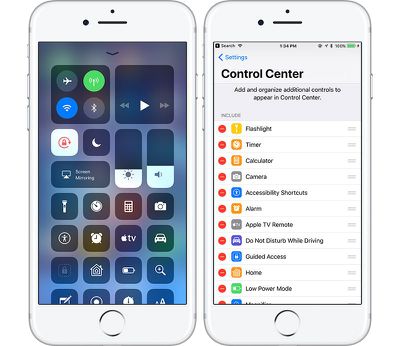
ios11controlcenter
Siri is smarter than ever and has a new, more natural voice, and Siri is now cross-device, letting the personal assistant learn more about you. Siri can also translate English into several different languages like Spanish and Chinese.
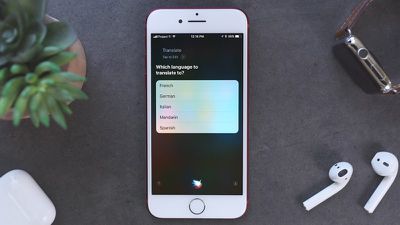
siritranslate
iOS 11 feels a lot different on an iPad. There's now a persistent Dock at the bottom of the display that you can bring up anytime with a swipe, and there's a new App Switcher that's similar to Mission Control on the Mac, letting you see all of your apps -- even those in split-view windows -- at a glance. Apple Pencil does more on iPad Pro, and a new Drag and Drop feature lets you drag links, images, files, and more from one app to another.
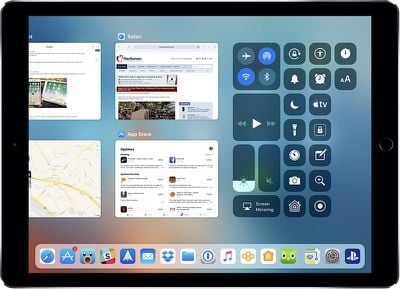
ios11appswitcher
A new Files app introduces improved file management, and many apps have new features. Notes offers searchable handwriting and document scanning, Maps has lane guidance and speed limit info, Apple Music lets you see what your friends are listening to, and there are a new tools for editing Live Photos.
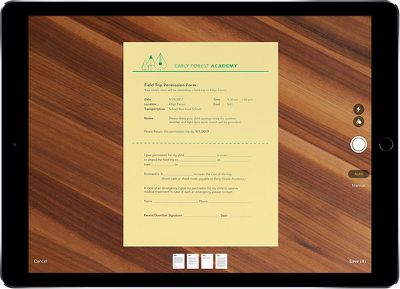
ios11ipaddocumentscanner
HomeKit now supports speakers and AirPlay 2 adds multi-room functionality, while Do Not Disturb has been expanded to encompass driving. In a future update, Apple plans to add iCloud Messages and a person-to-person Apple Pay feature.

On the iPad, there's a handy new "Flick" keyboard, while the iPhone has new one-handed keyboard options. You'll see a completely different App Store after installing iOS 11, and a whole host of apps with new capabilities thanks to ARKit and other under-the-hood improvements.
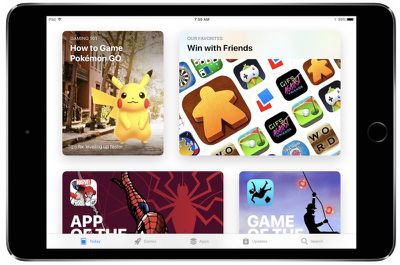
ios 11 app store 5
Note: When iOS 11 is installed, all older 32-bit apps will no longer launch. These are apps that have not been updated for several years, and Apple has discontinued support. Only 64-bit apps are compatible with the new update.

For a full rundown on all of the new features you'll find in iOS 11, make sure to check out our iOS 11 roundup and check out the list below for our extended coverage of tips and how-tos. We'll keep updating the list as we publish these articles throughout the remainder of launch day and beyond.

- How to Find Notifications in iOS 11's New Lock Screen and Cover Sheet
- How to Use and Customize Control Center in iOS 11
- Here's a Look at the First Wave of Augmented Reality ARKit Apps Hitting the iOS App Store Today
- How to Use Drag and Drop on an iPad and iPhone With iOS 11
- How to Use the New iPad Dock in iOS 11
- Drag and Drop Apps for iPad Now Widely Rolling Out on App Store
- How to Use the iPad App Switcher in iOS 11
- What's New in Maps in iOS 11: Indoor Mapping, Lane Guidance and Speed Limits
- How to Use the New Files App in iOS 11
- How to Set Your AirPods to Change Music Tracks in iOS 11
- How to Record Your iPhone or iPad Screen in iOS 11
- PSA: Snapchat Still Notifies You When Someone Screen Records Privately Messaged Snaps on iOS 11
- Bluetooth and Wi-Fi Aren't Fully Disabled When Toggled Off in Control Center on iOS 11
- How to Use the New One-Handed Keyboard in iOS 11
- How to Enable Type to Siri in iOS 11
- How to Use Siri's New Translation Feature in iOS 11
- How to Use the Redesigned Messages App Drawer in iOS 11
- Safari in iOS 11: Enabling Cross-Site Tracking Prevention to Protect Your Privacy
- How to Make an Apple Music Profile to Connect With Friends in iOS 11
- How to Use Emergency SOS on iPhone in iOS 11
- How to Use Do Not Disturb While Driving in iOS 11
- How to Save Space in iOS 11 With New Storage Features
- How to Turn a Photo Into an Apple Watch Face in iOS 11 and watchOS 4
- How to Use Instant Markup to Quickly Edit Screenshots in iOS 11
- How to Sign Up for iCloud Family Storage Plans in iOS 11
- How to Use Automatic Setup in iOS 11 to Transfer Settings to a New Device
- How to Hide Text Previews for Every App Notification on iOS 11's Lock Screen
- How to Use the iPad's New Flick Keyboard in iOS 11
- How to Use the New iOS 11 Document Scanner in Notes on iPad and iPhone
- How to Edit Live Photos in iOS 11
- How to Use Instant Notes on iPad in iOS 11
- How to Prevent Apps From Showing Up in Search and Siri Suggestions in iOS 11


Related Forum: iOS 11

Popular Stories

iOS 26

iOS 26.1 Coming Soon: New Features for Your iPhone and Release Date

Monday October 27, 2025 7:55 am PDT by
The upcoming iOS 26.1 update includes a handful of new features and changes for iPhones, including a toggle for changing the appearance of the Liquid Glass design, "slide to stop" for alarms in the Clock app, and more. Below, we outline key details about iOS 26.1. Release Date Given that Apple has yet to seed an iOS 26.1 Release Candidate, which is typically the final beta version, the...
iOS 26

6 New Things Your iPhone Can Do in iOS 26.1

Wednesday October 29, 2025 4:22 am PDT by
Apple is about to drop iOS 26.1, the first major point release since iOS 26 was rolled out in September, and there are at least six notable changes and improvements to look forward to. We've rounded them up below. Apple has already provided developers and public beta testers with the release candidate version of iOS 26.1, which means Apple will likely roll out the update to all compatible...
maxresdefault

Apple TV 4K Could Still Launch Before 2025 Ends: All the Rumored Features

Monday October 27, 2025 4:51 pm PDT by
Apple is designing an updated version of the Apple TV 4K, and rumors suggest that it could come out sometime in the next couple of months. We're not expecting a major overhaul with design changes, but even a simple chip upgrade will bring major improvements to Apple's set-top box. Subscribe to the MacRumors YouTube channel for more videos. We've rounded up all the latest Apple TV rumors. ...
iOS 26

Apple Seeds iOS 26.1, iPadOS 26.1, and macOS Tahoe 26.1 Release Candidates

Tuesday October 28, 2025 1:07 pm PDT by
Apple today provided developers and public beta testers with the release candidate versions of upcoming iOS 26.1, iPadOS 26.1, macOS Tahoe 26.1, tvOS 26.1, watchOS 26.1, and visionOS 26.1 updates for testing purposes. The RCs betas come a week after Apple released the fourth betas. The new betas can be downloaded from the Settings app on a compatible device by going to General > Software...
M6 MacBook Pro Feature 1

M6 MacBook Pro: Release Date, Pricing, and What to Expect

Monday October 27, 2025 9:15 am PDT by
Apple this month refreshed the 14-inch MacBook Pro base model with its new M5 chip, and higher-end 14-inch and 16-inch MacBook Pro models with M5 Pro and M5 Max chips are expected to follow in early 2026. However, these machines will represent the final update to the current design, with Apple reportedly developing a completely new version of the MacBook Pro packed with next-generation hardware...
iPhone 17 Pro Cosmic Orange

8 Reasons to Wait for Next Year's iPhone 18 Pro

Thursday October 30, 2025 4:42 am PDT by
Apple's iPhone development roadmap runs several years into the future and the company is continually working with suppliers on several successive iPhone models at the same time, which is why we often get rumored features months ahead of launch. The iPhone 18 series is no different, and we already have a good idea of what to expect for the iPhone 18 Pro and iPhone 18 Pro Max. One thing worth...
M5 MacBook Pro

Waiting for New Macs? Apple Just Shared Bad News

Friday October 31, 2025 7:32 am PDT by
Apple has just given a strong indication that it will not be releasing any additional new Macs for the remainder of the year. Apple's CFO Kevan Parekh dropped the hint during the company's earnings call on Thursday:On Mac, keep in mind, we expect to face a very difficult compare against the M4 MacBook Pro, Mac mini, and iMac launches in the year-ago quarter.Parekh essentially gave a heads up ...
macos tahoe

Here Are Apple's Release Notes for macOS Tahoe 26.1

Tuesday October 28, 2025 1:21 pm PDT by
Apple today provided developers and public beta testers with the release candidate version of macOS Tahoe 26.1, which means the update will likely see a public launch next week. The release candidate includes notes on what's in the update, so we have a full picture of the new features that Apple has included. macOS Tahoe 26.1 adds AutoMix support over AirPlay, improved FaceTime audio...
ipad mini 7 feature blue

OLED iPad Mini: Release Date, Pricing, and What to Expect

Wednesday October 29, 2025 7:13 am PDT by
Rumors are stoking excitement for the next-generation iPad mini that Apple is reportedly close to launching. So what should we expect from the successor to the iPad mini 7 that Apple released over a year ago? Read on to find out. Processor and Performance Apple is working on a next-generation version of the iPad mini (codename J510/J511) that features the A19 Pro chip, according to...

Top Rated Comments

darkarn Avatar
106 months ago
Predicted Summary of this Thread:

1. It's still not out here!
2. Meh, won't update until n number of days
3. OMG IT'S THE BEST UPDATE EVAR1111!!!!
4. Great, [insert bug here] happened

And....

5. Why won't [insert 32-bit app here] work?!?!?! >:(

Thank me later
Score: 23 Votes (Like | Disagree)
last_call Avatar
106 months ago
I felt a great disturbance in the Force, as if millions of apps suddenly cried out in terror and were suddenly silenced. I fear something terrible has happened.
Score: 20 Votes (Like | Disagree)
ck2875 Avatar
106 months ago
PSA: Yes. It's normal for your iPhone to get insanely hot after updating. It's doing processor-intense things like re-indexing and re-scanning your Photo library for face data.
Score: 13 Votes (Like | Disagree)
Bryan Bowler Avatar
106 months ago
SO excited! Time to put on my party wig & nipple clamps, and party like it’s 1999!
Score: 11 Votes (Like | Disagree)
jonblatho Avatar
106 months ago
[insert obligatory MacRumors hot take from someone who hasn’t even installed iOS 11 yet here]
Score: 10 Votes (Like | Disagree)
flexiboy1912 Avatar
106 months ago
Shame its the same as GM as still some bugs , was hoping they might send out a polished version.
Score: 9 Votes (Like | Disagree)
















