Drag and Drop Apps for iPad Now Widely Rolling Out on App Store

iOS 11 brings systemwide drag and drop to iPad, providing users with a quick way to move text, images, files, and more from one app to another.
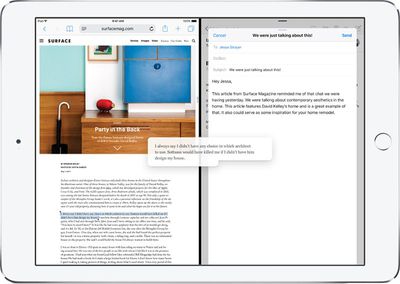
ipad drag drop
Over the past few days, leading up to today's launch of iOS 11, a number of iPad apps have been updated to support the functionality.

Todoist

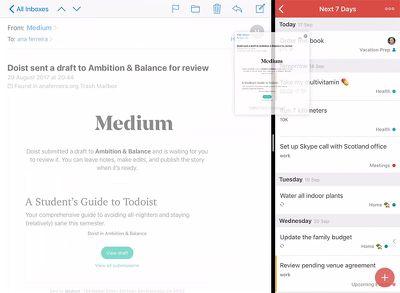
You can now drag text messages, URLs, emails, images, PDFs, files, and more into Todoist, a popular task management app for iOS.
todoist drag and drop

  • Dropping in a project, label, or filter view will create a new task.

  • Dropping in the comment screen will start a new comment pre-populated with the relevant information.

  • Dropping in the Quick Add button will start a new task pre-populated with the relevant information.

    Todoist is free on the App Store [Direct Link] with the option to upgrade to Todoist Premium for $28.99 per year.

    Zipped

    Eytan Schulman, a three-time WWDC Scholarship winner, is releasing a modern archiving utility called Zipped with drag and drop support.

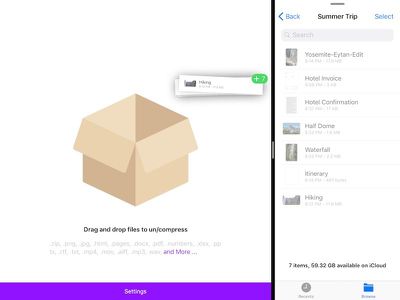
    iPad users can simply drag and drop files onto Zipped's cardboard box icon to zip/compress or unzip/uncompress them.
    zipped drag and drop

  • Quickly open a ZIP file and selectively share or save the contents.

  • Files can be named manually or automatically.

  • Save your compressed or uncompressed files to the Files app on your iOS device, share them to any app, or send them via AirDrop.

    Zipped currently supports the following file types, with more to come: zip, .png, .jpg, .html, .pages, .docx, .pdf, .numbers, .xlsx, .pptx, .rtf, .txt, .mp4, .mov, .aiff, .mp3, .wav, .psd, .caf, .md, .csv, .json, and .js.

    Zipped should be available on the App Store [Direct Link] for 99 cents later today or by tomorrow at the latest.

    1Password

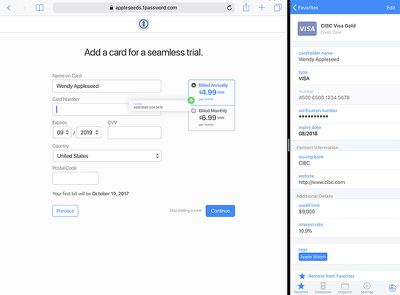
    You can now drag and drop your 1Password-generated username and password right into login fields while in Split View.
    dreag and drop 1password
    You can also drag and drop other items like credit card numbers and contact information from 1Password into web fields.

    1Password is free on the App Store [Direct Link]. A subscription costs $3.99 per month or $35.99 per year.

    Others

  • 1Writer

  • Airmail

  • Astro

  • Castro

  • Things 3

  • Bear

  • Procreate

  • Terminology Dictionary

  • GoodNotes 4

  • join.me

    Related: How to Use Drag and Drop on an iPad and iPhone With iOS 11

    Related Forum: iOS 11
  • Popular Stories

    iOS 26

    iOS 26.3 and iOS 26.4 Will Add These New Features to Your iPhone

    Tuesday February 3, 2026 7:47 am PST by
    We are still waiting for the iOS 26.3 Release Candidate to come out, so the first iOS 26.4 beta is likely still at least a week or two away. Following beta testing, iOS 26.4 will likely be released to the general public in March or April. Below, we have recapped known or rumored iOS 26.3 and iOS 26.4 features so far. iOS 26.3 iPhone to Android Transfer Tool iOS 26.3 makes it easier...
    Aston Martin CarPlay Ultra Screen

    Apple's CarPlay Ultra to Expand to These Vehicle Brands Later This Year

    Sunday February 1, 2026 10:08 am PST by
    Last year, Apple launched CarPlay Ultra, the long-awaited next-generation version of its CarPlay software system for vehicles. Nearly nine months later, CarPlay Ultra is still limited to Aston Martin's latest luxury vehicles, but that should change fairly soon. In May 2025, Apple said many other vehicle brands planned to offer CarPlay Ultra, including Hyundai, Kia, and Genesis. In his Powe...
    Apple Logo Black

    Apple's Next Launch is 'Imminent'

    Sunday February 1, 2026 12:31 pm PST by
    The calendar has turned to February, and a new report indicates that Apple's next product launch is "imminent," in the form of new MacBook Pro models. "All signs point to an imminent launch of next-generation MacBook Pros that retain the current form factor but deliver faster chips," Bloomberg's Mark Gurman said on Sunday. "I'm told the new models — code-named J714 and J716 — are slated...
    Apple MacBook Pro M4 hero

    New MacBook Pros Reportedly Launching Alongside macOS 26.3

    Sunday February 1, 2026 5:42 am PST by
    Apple is planning to launch new MacBook Pro models with M5 Pro and M5 Max chips alongside macOS 26.3, according to Bloomberg's Mark Gurman. "Apple's faster MacBook Pros are planned for the macOS 26.3 release cycle," wrote Gurman, in his Power On newsletter today. "I'm told the new models — code-named J714 and J716 — are slated for the macOS 26.3 software cycle, which runs from...
    iOS 26 Home Feature

    Apple Gives Final Warning to Home App Users

    Tuesday February 3, 2026 8:55 am PST by
    In 2022, Apple introduced a new Apple Home architecture that is "more reliable and efficient," and the deadline to upgrade and avoid issues is fast approaching. In an email this week, Apple gave customers a final reminder to upgrade their Home app by February 10, 2026. Apple says users who do not upgrade may experience issues with accessories and automations, or lose access to their smart...

    Top Rated Comments

    macs4nw Avatar
    109 months ago
    iOS 11 will be a huge improvement, especially for the iPadPro.
    Score: 5 Votes (Like | Disagree)
    Flow39 Avatar
    109 months ago
    This is why I love being in the Apple ecosystem. Developers actually care about the platform and make quality apps that integrate new feature sets quickly. Way to go developers, these are looking awesome!
    Score: 3 Votes (Like | Disagree)
    Woodcrest64 Avatar
    109 months ago
    I really need GMAIL to have drag and drop support so I can attach files more easily.
    Score: 3 Votes (Like | Disagree)
    Aluminum213 Avatar
    109 months ago
    With iPad sales up again developers will actually care about the iPad apps now
    Score: 2 Votes (Like | Disagree)
    Rogifan Avatar
    109 months ago
    There are certain iPad features that Apple should require devs support. Like PIP and split view.
    Score: 2 Votes (Like | Disagree)
    routine_analyst Avatar
    109 months ago
    Dragging and dropping passwords into form fields that auto populate from 1password's deep app integration left me like :\\\\\\
    Score: 2 Votes (Like | Disagree)