Safari in iOS 11: Enabling Cross-Site Tracking Prevention to Protect Your Privacy - MacRumorsOpen MenuShow RoundupsShow Forums menuVisit ForumsOpen Sidebar
Skip to Content

Safari in iOS 11: Enabling Cross-Site Tracking Prevention to Protect Your Privacy

by

Safari in iOS 11 introduces a new tracking prevention feature that's meant to protect your privacy and make it harder for companies to track your browsing habits across multiple websites.

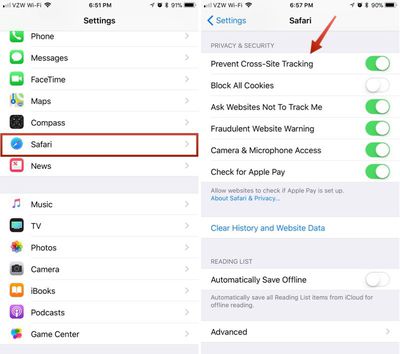
Disabling Cross-Site Tracking isn't going to cut down on the number of ads that you see, but it will make it harder for advertisers to gather data about what you've been browsing to deliver targeted ads. Here's how to enable it:

  1. Open the Settings app.
  2. Scroll down to Safari and tap it.
  3. Scroll down to "Prevent Cross-Site Tracking."safariios11crosssitetracking
  4. Toggle it on so it's green.

This section of the Settings app also includes other Safari settings that are worth turning on if you haven't done so already, including "Ask Websites Not to Track Me," "Block Pop-ups," and "Fraudulent Website Warning." You can also restrict website access to cookies, the camera and microphone, and Apple Pay.

Tag: Safari
Related Forum: iOS 11

Top Rated Comments

dannyyankou Avatar
111 months ago
I appreciate Macrumors for putting this info out. 9to5mac tried defending cross-site tracking, probably because they benefit from it.
Score: 9 Votes (Like | Disagree)
111 months ago
Looks like it was enabled for me by default. You can cry and complain about "Tims" apple, but one things for sure, Apple is clearly a leader in respecting and protecting our privacy. No other giant corporation that I can think has made this more clear.
Score: 5 Votes (Like | Disagree)
111 months ago
I dislike a lot of things about Tim Cook's Apple, but their adherence to privacy is definitely appreciated!

Biggest drawback that is preventing me from switching to Android anytime soon is their lack of privacy and monetizing customer data.
Score: 5 Votes (Like | Disagree)
iapplelove Avatar
111 months ago
Mine was already toggled to on.
Score: 3 Votes (Like | Disagree)
gixxerfool Avatar
111 months ago
I know I’m going against the grain here, but if we’re going to see ads anyway, I’d rather see ads about things that interest me or items that I’ve been shopping for lately. Isn’t that far better than seeing generic “Lose Your Belly Fat Using This 1 Weird Trick” garbage ads?!
I see your point. My problem is when gift shopping it seems to hang on those items and I have my wife or daughter shoulder riding it has almost been an issue.
Score: 2 Votes (Like | Disagree)
gixxerfool Avatar
111 months ago
This is such a welcomed feature. It’s crazy how these ads follow me all over.
Score: 2 Votes (Like | Disagree)

Popular Stories

imac video apple feature

Apple Released Yet Another New Product Today

Friday March 20, 2026 2:39 pm PDT by
Apple has unveiled a whopping nine new products so far this March, including an iPhone 17e, iPad Air models with the M4 chip, MacBook Air models with the M5 chip, MacBook Pro models with M5 Pro and M5 Max chips, the all-new MacBook Neo, an updated Studio Display, a higher-end Studio Display XDR, AirPods Max 2, and now the Nike Powerbeats Pro 2. iPhone 17e features the same overall design as...
iPhone 18 Pro Deep Red Feature

iPhone 18 Pro Launching Later This Year With These 12 New Features

Wednesday March 18, 2026 7:39 am PDT by
While the iPhone 18 Pro and iPhone 18 Pro Max are not expected to launch for another six months or so, there are already plenty of rumors about the devices. It was initially reported that the iPhone 18 Pro models would have fully under-screen Face ID, with only a front camera visible in the top-left corner of the screen. However, the latest rumors indicate that only one Face ID component...
ios 26 4 pastel

iOS 26.4: Top 10 New Features Coming to Your iPhone

Friday March 20, 2026 2:44 pm PDT by
iOS 26.4 isn't the major update with new Siri features that we hoped for, but there are some useful quality of life improvements, and a little bit of fun with an AI playlist generator and new emoji characters. Playlist Playground - Apple Music has a Playlist Playground option that lets you generate playlists from text-based descriptions. You can include moods, feelings, activities, or...
Related Apple News: Local News | Sport | Motoring | World News | Lifestyle