Apple Releases OS X Yosemite 10.10.3 With Photos for OS X App, Emoji Updates - MacRumorsOpen MenuShow RoundupsShow Forums menuVisit ForumsOpen Sidebar
Skip to Content

Apple Releases OS X Yosemite 10.10.3 With Photos for OS X App, Emoji Updates

As expected, Apple today released OS X Yosemite 10.10.3, the first significant feature-rich update the operating system has received. OS X 10.10.3 was first seeded to developers in February, and was provided to public beta testers in March.

The OS X 10.10.3 update can be downloaded through the Software Update mechanism in the Mac App Store. OS X Yosemite Recovery Update 1.0 is also available to improve the reliability of Yosemite Recovery when restoring from a time machine backup.

The OS X Yosemite 10.10.3 update includes the new Photos app and improves the stability, compatibility, and security of your Mac.

The update also includes the following improvements:
- Adds over 300 new Emoji characters
- Adds Spotlight suggestions to Look up
- Prevents Safari from saving website favicon URLs used in Private Browsing
- Improves stability and security in Safari
- Improves WiFi performance and connectivity in various usage scenarios
- Improves compatibility with captive Wi-Fi network environments
- Fixes an issue that may cause Bluetooth devices to disconnect
- Improves screen sharing reliability

Earlier Yosemite releases, including OS X 10.10.1 and 10.10.2, brought mostly under-the-hood bug fixes and reliability improvements to the operating system, but OS X 10.10.3 includes major new features, like the Photos for OS X app.

Designed to be a replacement for Aperture and iPhoto, Photos for OS X was first announced during the 2014 Worldwide Developers Conference, where Apple promised it would see an "early 2015" release. The Photos for OS X app takes on Yosemite-style design elements, with an emphasis on flatness and translucency, and it integrates with both iCloud Photo Library and the Photos for iOS app.


Reviews of the Photos for OS X app have suggested that while it's a suitable replacement for iPhoto, with speed improvements and better tools than were found in iPhoto, it lacks many power features that professional users have become accustomed to in its current incarnation, like plug-ins, a loupe, brushable adjustments, and custom metadata fields.

Along with the new Photos for OS X app, OS X 10.10.3 brings a new emoji picker that consolidates emoji into a single scrollable page with clear labels, new diversified emoji and emoji skin tone modifiers, additional flag emoji and updated emoji for the iPhone, iMac, and Apple Watch.
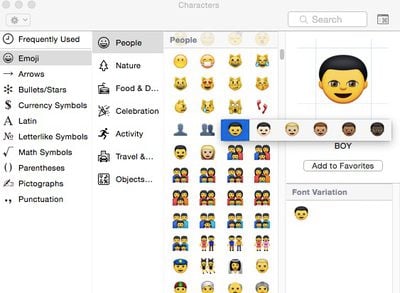
10_10_3_emoji
There's also support for Google 2-step verification when setting up accounts in System Preferences, doing away with the need for app specific passwords, and there are Force Touch APIs for developers, which will let them incorporate Force Touch gestures into their apps.

As noted by MacRumors reader Joe, the Memory section of the Activity Monitor app has been redesigned to make memory usage more clear to users. The App Memory, Wired Memory, and Compressed sections are now listed as part of "Memory Used" rather than listed separately.


unnamed

Related Forum: OS X Yosemite

Popular Stories

imac video apple feature

Apple Released Yet Another New Product Today

Friday March 20, 2026 2:39 pm PDT by
Apple has unveiled a whopping nine new products so far this March, including an iPhone 17e, iPad Air models with the M4 chip, MacBook Air models with the M5 chip, MacBook Pro models with M5 Pro and M5 Max chips, the all-new MacBook Neo, an updated Studio Display, a higher-end Studio Display XDR, AirPods Max 2, and now the Nike Powerbeats Pro 2. iPhone 17e features the same overall design as...
iPhone 18 Pro Deep Red Feature

iPhone 18 Pro Launching Later This Year With These 12 New Features

Wednesday March 18, 2026 7:39 am PDT by
While the iPhone 18 Pro and iPhone 18 Pro Max are not expected to launch for another six months or so, there are already plenty of rumors about the devices. It was initially reported that the iPhone 18 Pro models would have fully under-screen Face ID, with only a front camera visible in the top-left corner of the screen. However, the latest rumors indicate that only one Face ID component...
ios 26 4 pastel

iOS 26.4: Top 10 New Features Coming to Your iPhone

Friday March 20, 2026 2:44 pm PDT by
iOS 26.4 isn't the major update with new Siri features that we hoped for, but there are some useful quality of life improvements, and a little bit of fun with an AI playlist generator and new emoji characters. Playlist Playground - Apple Music has a Playlist Playground option that lets you generate playlists from text-based descriptions. You can include moods, feelings, activities, or...

Top Rated Comments

johncarync Avatar
143 months ago
You kids today!

You kids today! You have it so lucky. All these emojis to choose from.

When I was young, if you wanted to express an emotion in email, all you had was a colon a dash and a parenthesis. And if you wanted to wink, you used a semicolon. Every once in a while you'd stick your tongue out with a capital P. That was the way it was...and we LIKED it!
Score: 36 Votes (Like | Disagree)
143 months ago
Holy crap Photos for OS X suuuuuuucks.
Score: 22 Votes (Like | Disagree)
iSee Avatar
143 months ago
I wonder how many articles about the same emoji update MR can post?
Score: 20 Votes (Like | Disagree)
Attirex Avatar
143 months ago
Just updated my 2014 Mini. Nothing has caught fire. Yet.
Score: 13 Votes (Like | Disagree)
titaniumjones Avatar
143 months ago
Photo's looses folders

The big think I miss in Photos is the lack of folders. If you drop a folder of pictures onto Photos the folder and name vanishes. Say if you had a folder of pics called 'My Wedding' once its imported the folder structure has gone. I loved this in Aperture. Really not impressed.
Score: 12 Votes (Like | Disagree)
attila Avatar
143 months ago
This is an exceptional update. Consumers will love it.

Pros will hate it.
Score: 11 Votes (Like | Disagree)
Related Apple News: Business | Entertainment | Sport | News | Iphone