

OS X 10.10.3 Puts More Focus on Emoji, Lays Groundwork for Skin Tone Modifiers

While the featured addition in yesterday's OS X 10.10.3 developer seed was the new Photos app, Apple is addressing other issues with the forthcoming update, and one of these focus areas is emoji, which is seeing several changes and improvements.

One immediately evident change is the menu option used to bring up the character palette where emoji and other symbols can be browsed and selected. The Character palette a is systemwide option generally accessed through the "Edit" menu in most Mac apps. On OS X 10.10.2 and earlier, the menu item is called "Special Characters," while on OS X 10.10.3, it is labeled "Emoji & Symbols". The change offers a clearer description of what can be accessed through the menu item while specifically giving a strong visibility boost to emoji.

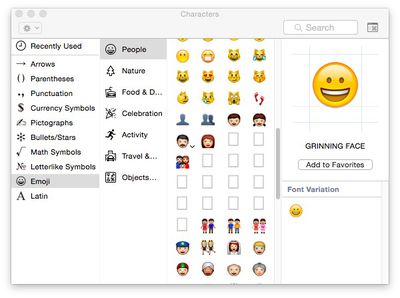
Another significant change for emoji in OS X 10.10.3 is the apparent laying of groundwork to support skin tone modifiers proposed for the Unicode 8.0 standard. Apple noted almost a year ago that it was working with the Unicode Consortium to bring more diversity to emoji, and the proposed skin tone modifiers are a significant step in that direction. OS X 10.10.3 also appears to include a number of placeholders for new emoji in the character palette, but no images or descriptions have yet been added for these entries.
emoji_placeholders

Character palette showing placeholders for new emoji and an arrow on the "Man" emoji to provide access to skin tone options

The skin tone modifier proposal would apply to certain skin-colored emoji, allowing users to select from a range of skin tones to best represent the message they wish to send via emoji. As can be seen in OS X 10.10.3, many of these skin-colored emoji now display an arrow that when clicked brings up a menu of options.
emoji_skin_tone_man

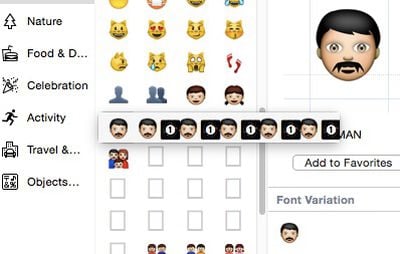
Apparent incomplete implementation of skin tone modifier options for the "Man" emoji

While the menu is currently non-functional, it does show the selected emoji followed by five instances of the emoji paired with a number one inside a black box. These are presumably incomplete implementations of skin tone modifiers, waiting for the Unicode Consortium to finalize its standards for Unicode 8.0. Just yesterday, the Unicode Technical Committee officially moved the technical report covering skin tone modifiers and other emoji changes for Unicode 8.0 to draft status, and Unicode 8.0 itself has been approved for beta release.

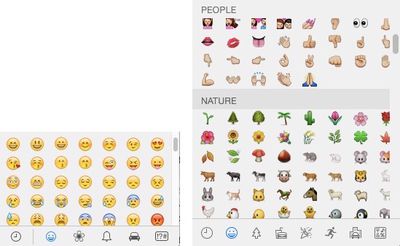
In one other change for emoji in OS X 10.10.3, the pop-up emoji picker available in many apps has been transitioned from a paginated layout to a single larger vertical-scrolling page. Under OS X 10.10.2 and earlier, the various emoji categories are contained on separate pages within the picker, with users needing to click on a toolbar along the bottom to change pages.
emoji_pickers

Emoji picker in OS X 10.10.2 (left) with paginated categories vs. OS X 10.10.3 (right) with single scrollable page and category jumps

In OS X 10.10.3, all emoji are displayed on a single page, and while they are still organized by category and users can still click toolbar buttons to quickly jump between categories, users can now also simply scroll the entire list if they wish.

All of these changes come as emoji have exploded in popularity, spreading beyond their origin in Japan to be embraced worldwide as a quick, fun, and easy way to share a variety of emotions and thoughts, most commonly within messaging apps. As a result, Apple has been working to increase support for emoji across iOS and OS X, and this first OS X 10.10.3 developer build is a clear sign of that continued interest.


(Thanks, Sachin!)

Related Forum: OS X Yosemite

Popular Stories

iOS 26

iOS 26.3 and iOS 26.4 Will Add These New Features to Your iPhone

Tuesday February 3, 2026 7:47 am PST by
We are still waiting for the iOS 26.3 Release Candidate to come out, so the first iOS 26.4 beta is likely still at least a week or two away. Following beta testing, iOS 26.4 will likely be released to the general public in March or April. Below, we have recapped known or rumored iOS 26.3 and iOS 26.4 features so far. iOS 26.3 iPhone to Android Transfer Tool iOS 26.3 makes it easier...
Aston Martin CarPlay Ultra Screen

Apple's CarPlay Ultra to Expand to These Vehicle Brands Later This Year

Sunday February 1, 2026 10:08 am PST by
Last year, Apple launched CarPlay Ultra, the long-awaited next-generation version of its CarPlay software system for vehicles. Nearly nine months later, CarPlay Ultra is still limited to Aston Martin's latest luxury vehicles, but that should change fairly soon. In May 2025, Apple said many other vehicle brands planned to offer CarPlay Ultra, including Hyundai, Kia, and Genesis. In his Powe...
Apple Logo Black

Apple's Next Launch is 'Imminent'

Sunday February 1, 2026 12:31 pm PST by
The calendar has turned to February, and a new report indicates that Apple's next product launch is "imminent," in the form of new MacBook Pro models. "All signs point to an imminent launch of next-generation MacBook Pros that retain the current form factor but deliver faster chips," Bloomberg's Mark Gurman said on Sunday. "I'm told the new models — code-named J714 and J716 — are slated...
Apple MacBook Pro M4 hero

New MacBook Pros Reportedly Launching Alongside macOS 26.3

Sunday February 1, 2026 5:42 am PST by
Apple is planning to launch new MacBook Pro models with M5 Pro and M5 Max chips alongside macOS 26.3, according to Bloomberg's Mark Gurman. "Apple's faster MacBook Pros are planned for the macOS 26.3 release cycle," wrote Gurman, in his Power On newsletter today. "I'm told the new models — code-named J714 and J716 — are slated for the macOS 26.3 software cycle, which runs from...
iOS 26 Home Feature

Apple Gives Final Warning to Home App Users

Tuesday February 3, 2026 8:55 am PST by
In 2022, Apple introduced a new Apple Home architecture that is "more reliable and efficient," and the deadline to upgrade and avoid issues is fast approaching. In an email this week, Apple gave customers a final reminder to upgrade their Home app by February 10, 2026. Apple says users who do not upgrade may experience issues with accessories and automations, or lose access to their smart...

Top Rated Comments

Traverse Avatar
144 months ago
Really? Above all else, this takes precedence? I didn't even think emoji were supposed to look like real people, hints the unrealistic yellow skin and missing nose.
Score: 78 Votes (Like | Disagree)
SmileyBlast! Avatar
144 months ago
Why? :apple: Why?
Score: 62 Votes (Like | Disagree)
weckart Avatar
144 months ago
At last. Something for the professionals. This makes up for Final Cut X.
Score: 47 Votes (Like | Disagree)
ButteryScrollin Avatar
144 months ago
Great to see Apple putting effort into emoji and not fixing the opendirectoryd bug...
Score: 31 Votes (Like | Disagree)
cunninglinguist Avatar
144 months ago
Glad to see Apple putting time and effort into the truly important features of an operating system. :rolleyes:

Seriously folks, if you were on the fence about switching to a different OS because of Apple's long string of debacles over the past few years, this should be your "table flip, exit stage left" moment.
Score: 26 Votes (Like | Disagree)
rkilcoyne Avatar
144 months ago
REALLY‽ How about Vid Driver issues‽

How about video driver issues on retina macbook pros? I've had more lockups since Fall than I've had in the previous 10 years! And while they're at it, instead of screwing around with goofy emojis, how about fixing the absolutely horrendous calculator app‽ It's really an embarrassment -- the window controls don't even line up and C/AC don't work right!
Score: 24 Votes (Like | Disagree)















