Enable Smoother 120Hz Browsing in Safari - MacRumorsOpen MenuShow RoundupsShow Forums menuVisit ForumsOpen Sidebar
Skip to Content

Enable Smoother 120Hz Browsing in Safari

by

Any iPhone, iPad, or Mac with a ProMotion display is capable of rendering buttery smooth 120Hz animations. However, Apple's Safari browser is locked to 60fps page rendering by default, making scrolling feel noticeably choppier for some users than in Chrome or Firefox. Thankfully, recent versions of Safari include a hidden setting that lets you unlock 120Hz rendering.
iphone 14 pro 120hz promotion blue
At 60Hz, your screen refreshes every 16.7 milliseconds, meaning each frame of a scrolling page stays on screen for that duration. At 120Hz, the refresh interval drops to 8.3 milliseconds, so the image updates twice as often. This reduces the perceived blur and judder as content moves across the screen, making motion look more fluid and responsive. For a better idea of the difference, visit Blur Buster's Motion Tests webpage and watch the refresh rate test in Safari.

The difference is most noticeable when scrolling text-heavy pages or panning across detailed content. That said, the improvement is more dramatic for some people than others. If you've never noticed Safari feeling "off" compared to other apps, you may not register much difference. But if you've used Chrome or Firefox on the same device and wondered why Safari felt slightly sluggish, this is the reason.

The 120Hz option is buried in Safari's Feature Flags, a developer-focused menu that doesn't require any special mode to access on iPhone or iPad. On Mac, you'll need to enable developer features first, but it's a straightforward process. Keep in mind that turning on 120Hz may impact your device's battery life if you tend to browse a lot.

Here's how to enable 120Hz scrolling on all your Apple devices.

Enable 120Hz Safari Browsing iPhone and iPad

  1. Open the Settings app.
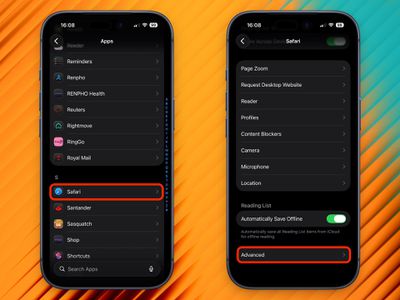
  2. Scroll down and tap Apps.
  3. Tap Safari.
  4. Scroll to the bottom and tap Advanced.
    2120hz safari scrolling promotion

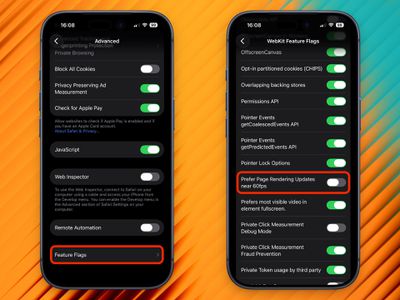
  5. Tap Feature Flags at the bottom of the list.
  6. Scroll to Prefer Page Rendering Updates near 60fps and toggle it off.
  7. Force quit Safari and reopen it.
    1120hz safari scrolling promotion

With this setting disabled, Safari will now render pages at up to 120Hz on ProMotion-equipped devices, including iPhone 13 Pro and later, and iPad Pro models with ProMotion.

Enable 120Hz Safari Browsing on Mac

Enabling 120Hz on Mac requires a few extra steps to reveal the Feature Flags menu.

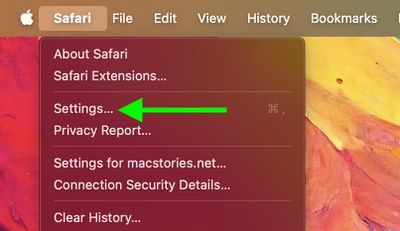
  1. Open Safari, then click Safari in the menu bar and choose Settings....
    safari

  2. Click the Advanced tab.
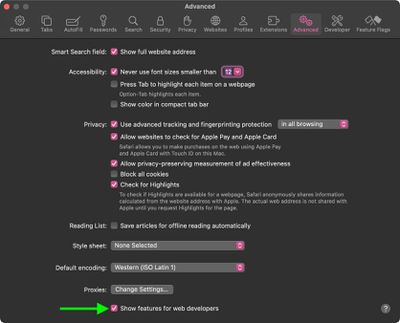
  3. At the bottom of the pane, check the box next to Show features for web developers.
    safari

  4. A new Feature Flags tab will appear in the toolbar – click it.
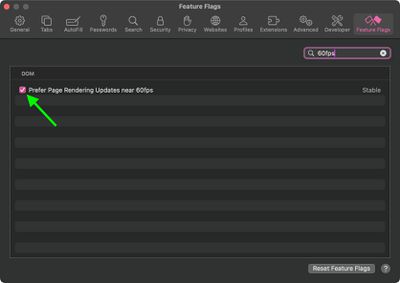
  5. In the search field at the top right, type 60fps.
  6. Uncheck Prefer Page Rendering Updates near 60fps.
  7. Quit Safari completely and reopen it.
    safari

This works on any Mac with a ProMotion display, which includes the 14-inch and 16-inch MacBook Pro models introduced in 2021 and later. If you have external displays connected to your Mac that are capable of refreshing at 120Hz, they should also benefit from the change.

Kudos goes to MacStories for unearthing the 120Hz scrolling tip recently shared by developer Matt Birchler.


Tag: Safari

Top Rated Comments

johannnn Avatar
8 weeks ago
Why is this disabled by default?
Score: 56 Votes (Like | Disagree)
HouseLannister Avatar
8 weeks ago

Why is this disabled by default?
Battery life. Most people don't need 120hz to read static webpages.
Score: 35 Votes (Like | Disagree)
8 weeks ago
I can usually tell a difference between 60 and 120, it’s easy to compare on the Home Screen or other apps by toggling low power mode. But in safari I’m not seeing a difference regardless of how I have this setting set; are we’re sure we know how this “feature” works? The toggle says “prefer,” not force. I wonder if someone at macrumors was just poking around in settings and saw this, and wrote an article assuming they knew what it meant. I’d like to see some documentation from Apple explaining it because my eyes aren’t seeing the difference
Score: 30 Votes (Like | Disagree)
cbcasas Avatar
8 weeks ago
If this is hidden by default I wonder if it murders your battery
Score: 28 Votes (Like | Disagree)
MikeZTM Avatar
8 weeks ago

I can usually tell a difference between 60 and 120, it’s easy to compare on the Home Screen or other apps by toggling low power mode. But in safari I’m not seeing a difference regardless of how I have this setting set; are we’re sure we know how this “feature” works? The toggle says “prefer,” not force. I wonder if someone at macrumors was just poking around in settings and saw this, and wrote an article assuming they knew what it meant. I’d like to see some documentation from Apple explaining it because my eyes aren’t seeing the difference
This is only for JavaScript animations on the webpages, not for scrolling.

Scrolling always use 120fps regardless of this flag.
Score: 23 Votes (Like | Disagree)
8 weeks ago
Just to be clear - scrolling in safari is 120hz by default. This just lets animations in CSS etc run above 60hz, which is rare
Score: 13 Votes (Like | Disagree)

Popular Stories

iPhone 18 Pro Deep Red Feature

iPhone 18 Pro Launching Later This Year With These 12 New Features

Wednesday March 18, 2026 7:39 am PDT by
While the iPhone 18 Pro and iPhone 18 Pro Max are not expected to launch for another six months or so, there are already plenty of rumors about the devices. It was initially reported that the iPhone 18 Pro models would have fully under-screen Face ID, with only a front camera visible in the top-left corner of the screen. However, the latest rumors indicate that only one Face ID component...
imac video apple feature

Apple Released Yet Another New Product Today

Friday March 20, 2026 2:39 pm PDT by
Apple has unveiled a whopping nine new products so far this March, including an iPhone 17e, iPad Air models with the M4 chip, MacBook Air models with the M5 chip, MacBook Pro models with M5 Pro and M5 Max chips, the all-new MacBook Neo, an updated Studio Display, a higher-end Studio Display XDR, AirPods Max 2, and now the Nike Powerbeats Pro 2. iPhone 17e features the same overall design as...
ios 26 4 yellow

Here Are Apple's Release Notes for iOS 26.4

Wednesday March 18, 2026 11:56 am PDT by
Apple provided developers and public beta testers with the release candidate versions of iOS 26.4 and iPadOS 26.4, which means we're going to see a public launch as soon as next week. The RC versions of the software include Apple's official release notes, giving us final details on what's included in the update. Apple Music - Playlist Playground (beta) generates a playlist from your...
Related Apple News: Entertainment | Travel | World News | Lifestyle | Sport