Apple Seeds First OS X 10.10.3 Yosemite Beta to Developers With Mac Photos App

Apple today seeded the first beta of OS X 10.10.3 Yosemite to developers, just over a week after releasing OS X 10.10.2 to the public. OS X 10.10.3 includes the much anticipated Photos app for Mac.

The new beta is available through the Software Update mechanism in the Mac App Store and through the Mac Dev Center.
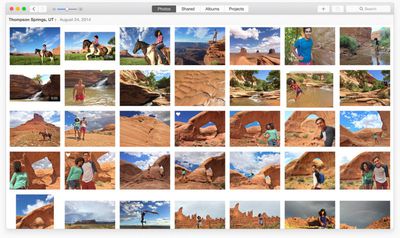
Photos for OS X
Recent rumors questioned the removal of mentions of the Photos app for Mac from Apple's website, suggesting it might be delayed, but today's beta release indicates that it is still on track for an early 2015 launch. 10.10.3's release notes offer details on the app:

All new for OS X, Photos automatically organizes your photo library and helps you perfect your photos with comprehensive editing tools. You can also store your photos and videos in the cloud using iCloud Photo Library, and access them on all your devices.

Photos lets you:
- Browse your photos by time and location in Moments, Collections, and Years views.
- Navigate your library using convenient Photos, Shared, Albums, and Projects tabs
- Store all of your photos and videos in iCloud Photo Library in their original format and full resolution
- Access your photos and videos stored in iCloud Photo Library from your Mac, iPhone, iPad, or iCloud.com with any web browser
- Perfect your photos with powerful and easy-to-use editing tools that optimize with a single click or slider, or allow precise adjustments with detailed controls
- Create professional-quality photo books with simplified bookmaking tools, new Apple-designed themes, and new square book formats
- Purchase prints in new square and panoramic sizes

Quite a few sites have been given preview access to Photos for Mac, giving us our first look at the app that is designed to replace both iPhoto and Aperture. Re/code, for example, has shared several screenshots of the app, and calls it "both refreshingly new and comfortably familiar."

Apple has also created a Photos preview page that walks users through the Photos experience. The Photos for Mac app takes on a Yosemite-style design, with an emphasis on translucency and flatness. Like Photos for iOS, the Mac app organizes images into Moments, Collections, and Years, in a format that's immediately recognizable to anyone who has used the iOS app.

Photos for Mac integrates with iCloud Photo Library (though iCloud Photo Library is not required), letting a user access all of their photos regardless of the device they were captured with, for a seamless photo editing and management experience. Beta Photos users will find that their existing iPhoto libraries will be updated for compatibility with the Photos app, and there's also an option to import Aperture libraries.

Edits made to a photo on iOS or on Mac through the now-universal Photos app are automatically synced to all devices if iCloud Photo Library is enabled, and the Mac app includes a range of editing tools. Enhance can be used to improve images with a single click, but there are also Smart Sliders for more customized adjustments.
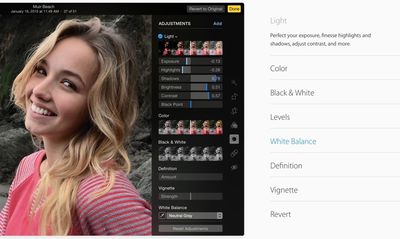
photosapptools
The app has somewhat more in-depth tools than were available in iPhoto, giving access to a histogram along with Light, Color, Black & White, Levels, White Balance, and Definition. Eight pre-defined filters are also included for adding quick effects, and there are options for printing Photo books and sharing images on sites like Facebook, Twitter, Flickr, and more.

Update: OS X 10.10.3 includes a new emoji picker that consolidates emoji into a single page with clear labels. In OS X, the emoji menu is brought up by pressing Control + Command + Space.
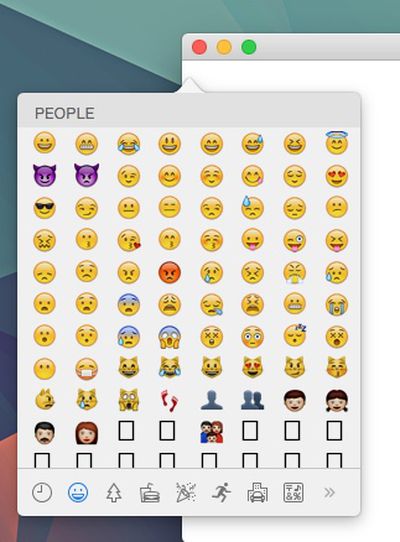
10103emoji
The update also includes new support for Google 2-step verification when setting up accounts in System Preferences.


Related Forum: OS X Yosemite

Popular Stories

Aston Martin CarPlay Ultra Screen

Apple's CarPlay Ultra to Expand to These Vehicle Brands Later This Year

Sunday February 1, 2026 10:08 am PST by
Last year, Apple launched CarPlay Ultra, the long-awaited next-generation version of its CarPlay software system for vehicles. Nearly nine months later, CarPlay Ultra is still limited to Aston Martin's latest luxury vehicles, but that should change fairly soon. In May 2025, Apple said many other vehicle brands planned to offer CarPlay Ultra, including Hyundai, Kia, and Genesis. In his Powe...
Apple Logo Black

Apple's Next Launch is 'Imminent'

Sunday February 1, 2026 12:31 pm PST by
The calendar has turned to February, and a new report indicates that Apple's next product launch is "imminent," in the form of new MacBook Pro models. "All signs point to an imminent launch of next-generation MacBook Pros that retain the current form factor but deliver faster chips," Bloomberg's Mark Gurman said on Sunday. "I'm told the new models — code-named J714 and J716 — are slated...
iOS 26

iOS 26.3 and iOS 26.4 Will Add These New Features to Your iPhone

Tuesday February 3, 2026 7:47 am PST by
We are still waiting for the iOS 26.3 Release Candidate to come out, so the first iOS 26.4 beta is likely still at least a week or two away. Following beta testing, iOS 26.4 will likely be released to the general public in March or April. Below, we have recapped known or rumored iOS 26.3 and iOS 26.4 features so far. iOS 26.3 iPhone to Android Transfer Tool iOS 26.3 makes it easier...
Apple MacBook Pro M4 hero

New MacBook Pros Reportedly Launching Alongside macOS 26.3

Sunday February 1, 2026 5:42 am PST by
Apple is planning to launch new MacBook Pro models with M5 Pro and M5 Max chips alongside macOS 26.3, according to Bloomberg's Mark Gurman. "Apple's faster MacBook Pros are planned for the macOS 26.3 release cycle," wrote Gurman, in his Power On newsletter today. "I'm told the new models — code-named J714 and J716 — are slated for the macOS 26.3 software cycle, which runs from...
iOS 26 Home Feature

Apple Gives Final Warning to Home App Users

Tuesday February 3, 2026 8:55 am PST by
In 2022, Apple introduced a new Apple Home architecture that is "more reliable and efficient," and the deadline to upgrade and avoid issues is fast approaching. In an email this week, Apple gave customers a final reminder to upgrade their Home app by February 10, 2026. Apple says users who do not upgrade may experience issues with accessories and automations, or lose access to their smart...

Top Rated Comments

ButteryScrollin Avatar
144 months ago
"You cannot geotag photos, though you can see, sort, and search by where photos were taken."


whhhhyyyyyyyyyyyyyyyyyy
Score: 26 Votes (Like | Disagree)
cmChimera Avatar
144 months ago
Finally!
Score: 18 Votes (Like | Disagree)
ipedro Avatar
144 months ago
Professional Photographers: Photos is a platform for OSX, not just an app. The app is only the front end UI that Apple provides. Extensions are what will make this infinitely powerful for professionals. Imagine Pixelmator being able to natively tap into your Photos library and execute non destructive edits that will then become available to your library through Photos.app on your Mac, iPad and iPhone.

Other extensions will add power to those who need it. Need more fine tune control for your EXIF data? More automated importing? There'll be an extension for that. A whole ecosystem is going to pop up and it'll be a serious threat to Adobe's Photoshop/Lightroom monopoly.

Photo libraries are now supported at the operating system level. This is huge.
Score: 15 Votes (Like | Disagree)
kettle Avatar
144 months ago
I'm still smarting about Aperture and its non-future as a 'professional' app running on 'professional' hardware.

I don't think I want to even bother trying this - it'll end in disappointment in a couple of years.
Score: 15 Votes (Like | Disagree)
Advil Avatar
144 months ago
I'm inexplicably excited for the new Photos app. I hope it lives up to expectations.
Score: 14 Votes (Like | Disagree)
thewebb Avatar
144 months ago
Finally! The Photos app is coming
Score: 14 Votes (Like | Disagree)