

After years of there being few alternatives to the Apple-approved LG UltraFine 5K and later the Apple Studio Display in the 27-inch 5K display market, a number of new entrants have recently appeared to offer more options for consumers.
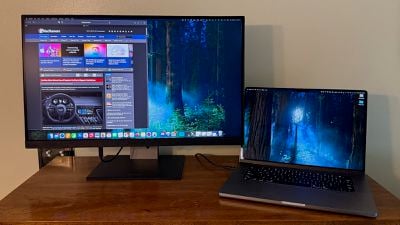 ViewSonic 2788-5K
In just the past few months, we've taken a look at the ASUS ProArt Display 5K, the BenQ PD2730S, and the Alogic Clarity 5K Touch with its unique touchscreen capabilities, and most recently I've been testing out another new option, the $950 ViewSonic VP2788-5K, to see how it stacks up.
As background, I have been driving a pair of LG UltraFine 5K displays in my desk setup since 2016, and aside from some image retention issues that I've learned to live with, they work fantastically for my needs, so much so that I haven't seen the need to upgrade to the Apple Studio Display. Content looks great on the UltraFines, they work reliably, and they integrate with macOS to support convenient features such as volume and brightness keyboard shortcuts.
With those as my benchmark, I've been testing the ViewSonic VP2788-5K in daily use alongside one of my LG UltraFines, and I've found both positives and negatives with ViewSonic's offering.
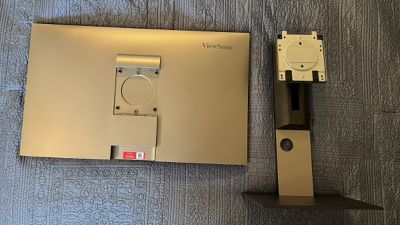
The VP2788-5K arrives in a fairly compact box, and as with most displays it requires a little bit of simple assembly. The hefty metal foot attaches to the display neck with a secure thumbscrew that is recessed slightly into the bottom of the foot to protect against scratching surfaces, and there is a click-in cover attachment for the rear of the display that simply slides into the top of the stand neck. If you prefer a VESA mounting solution, just leave that cover off and you can secure the display to any 100x100 VESA mount.
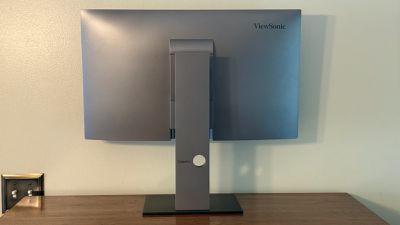
My first impressions of the general design of the VP2788-5K were relatively favorable, though aside from the sturdy metal stand base the construction is almost entirely black and dark gray plastic. Still, I find the design unobtrusive overall, which is mainly what I'm looking for as the content on the screen is what I'm most interested in. Bezels on the top and sides are fairly slim, with a bit thicker bezel on the bottom including some subtle ViewSonic branding. There's a bit of additional gray ViewSonic branding on the stand base.
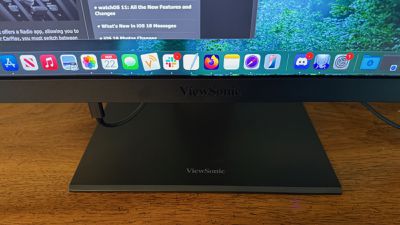
The VP2788-5K excels in positional flexibility, supporting not just height (120 mm range) and tilt (5º forward to 22º back) adjustments but also up to 30º of swivel right or left and 90º of pivot right or left if you prefer to use the display in portrait mode. While the Apple Studio Display supports tilt adjustment on the base model, height adjustment is a $400 stand upgrade, and swivel and pivot are not supported at all.
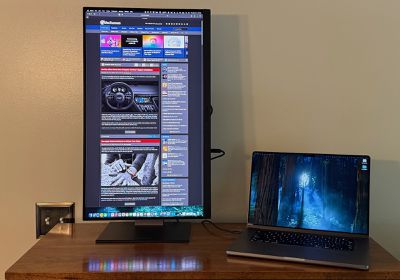
For cable management, the VP2788-5K includes a hole in the stand neck, and it's high enough that it's well hidden behind the display to keep those cables out of sight as much as possible. Only if you push the display toward its highest position will the cables and hole become visible.
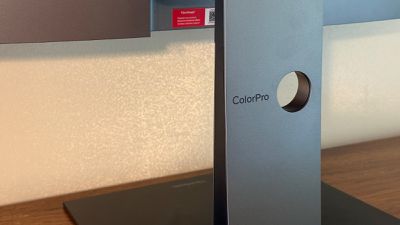
Whereas Apple and LG kept connectivity simple on their displays with only a single Thunderbolt 3 input, ViewSonic has included several options to support not just Macs but Windows PCs and other devices. There's an upstream Thunderbolt 4 port for easy Mac connectivity, plus an HDMI 2.1 port, a DisplayPort 1.4 port, and an upstream USB-C port. On the downstream side, there's a second Thunderbolt 4 port, a 15-watt USB-C port, and a pair of 10-watt USB-A ports, with the extra Thunderbolt port allowing for daisy-chained displays via a single connection on supported computers. Cables for the various connector types are included in the box.

All of the ports are located on the rear of the display in a downward-facing orientation, with some located near the bottom of the display and others sitting up a bit higher on the back. While the downward-facing ports can allow the display to be placed flatter against walls or other surfaces when on a VESA mount and perhaps result in less stress on cables with gravity pulling in line with the cable rather than perpendicularly, they do make cables attached to some of the ports visible from in front of the display.
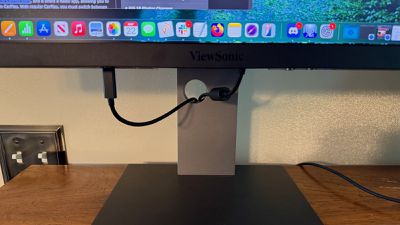
For example, the main Thunderbolt port used for connecting to my MacBook Pro is flush with the bottom of the display, so the cable connector sticks straight down out of the display. That results in some visual clutter, and the connector can be easily bumped if you're trying to move items around under the display. Most of the ports are a bit higher on the back of the display, keeping any connectors hidden away from view, and I'm not entirely sure why all of the ports weren't designed in this way for a cleaner look.
That upstream Thunderbolt 4 port can supply up to 100 watts of charging power to a connected computer, so you won't need an additional power source to keep your MacBook charged up. That's a competitive amount of power output, as many other options offer more like 90 watts or even less. The display does use an external power brick of its own, so keep in mind you will need to hide that away somewhere on the floor or your desk.
Turning to the actual display, the VP2788-5K offers up to 500 nits of brightness, which has proven to be plenty bright in my work environment and easily matched to my UltraFine 5K and my MacBook Pro's internal display. Apple's Studio Display does go up to 600 nits, however, so it offers a bit more in this department. The IPS panel supports refresh rates up to 75Hz, but this is achieved via scalar processing that ViewSonic says may not perform consistently, so it's probably best to use the native 60Hz refresh rate. That's not going to offer top-of-the-line performance for gaming and other demanding environments, but for general computing I've found it to be just fine.
As for color, the VP2788-5K supports 100% of the sRGB spectrum, 99% of DCI-P3 colors, and HDR400, and I found colors to look natural and well-matched to my other displays, with calibration options available if you need to tweak things. Content looks sharp on the 5K screen, delivering solid Retina quality running in 2560×1440 HiDPI mode.
The VP2788-5K includes an "Anti-Glare Low Reflection (AGLR) coating" that looks great in my opinion. Display quality and colors don't seem to be hampered much at all by the coating (though I don't do intense color work like grading) and I don't notice any glare from the display in my daily use, with only a tiny bit of diffuse light showing up when a bright source is reflected in the display. That's a definite improvement over the glossy finish of my LG UltraFine displays. Apple offers a low-reflectivity standard glass on the Studio Display, with a nano-texture glass option to further minimize glare available as a $300 upgrade.
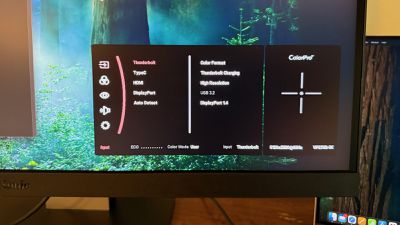
One area where the ViewSonic VP2788-5K seems to be lacking compared to the Apple Studio Display and LG UltraFine is integration with macOS, as it does not appear to support features like brightness or volume adjustments from the keyboard, requiring adjustment via a somewhat finicky joystick button underneath the bottom edge of the display that controls all of the on-screen display menu options. It's not a dealbreaker for me because I don't frequently adjust display brightness at my desk, but it may be an issue for some. ViewSonic tells me it is aware of the missing feature and is working to add it to the Display Portal software that can be used to update the display's firmware, but they do not have firm timeline for it yet.
The VP2788-5K includes a pair of 5-watt speakers, but as with most built-in display speakers, they leave something to be desired and deliver a very hollow sound. The speakers in my LG UltraFine displays are considerably better, and you're better off using the speakers in your Mac or a separate speaker solution if you want to listen to much more than system sounds with this display.
It's important to note that the VP2788-5K does not include a webcam or microphone, so you will need another solution for video calls, whether it be the built-in camera and mics on a connected Mac, a separate webcam, or an iPhone via Continuity Camera.
The ViewSonic VP2788-5K is priced at $949.99, so considerably cheaper than the Apple Studio Display and most other 27-inch 5K options on the market. It's also available from third-party retailers like Best Buy and B&H.
Its lower price compared to Apple's Studio Display certainly makes it worthy of consideration, with its multiple input options and flexible positioning offering some nice advantages for certain users. It does fall a bit short on the seamless Mac integration and webcam you get from Apple and the Studio Display offers more in the design and build quality departments, but the ViewSonic VP2788-5K is a solid value if those aspects are lower on your priority list.
Note: ViewSonic provided MacRumors with the VP2788-5K display for the purposes of this review. No other compensation was received. MacRumors is an affiliate partner with some of vendors mentioned in this article. When you click a link and make a purchase, we may receive a small payment, which helps us keep the site running.





















Top Rated Comments
Why is this such a difficult marketing concept
It is an easy marketing concept. But not an easy engineering one. No-one has released a 5k panel with higher refresh than 60hz, and Apple relies on third parties for their display panels.
Remember 5k has 30%+ more pixels to drive than 4k, and then you'd need double the bandwidth and processing power for 120hz.
Thunderbolt 5 has made this only theoretically possible.
Interestingly, Apple's old non-retina flagship 30" 2560x1600 Cinema HD Display was 101 ppi. A Retina version of that would be 5120x3200 at 201 ppi. That would be my holy grail for default text sizing and text quality. At 201 ppi, it would be considered Retina at distances of 17" or greater, but the text would be bigger than it is now on the Apple Studio Display.