

Apple may have a fight on its hands in the 27-inch 5K display space. Recently we've seen a solid budget competitor to the $1,600+ Apple Studio Display arrive on the market with the $799 ASUS ProArt 5K Display, and now here we have the BenQ PD2730S, part of the company's Designer Series that promises "always accurate and consistent colors."
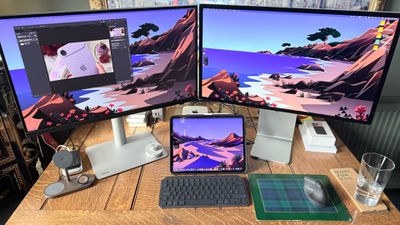
Price-wise, this monitor sits $400 either side of the Apple and ASUS offerings at $1,200. As you'd expect, it packs more features than the cheaper ASUS display. For a start, it's Thunderbolt 4. But the extra capabilities don't end there. I've spent several weeks with it, putting it through its paces alongside an Apple Studio Display. So how did it fare?
Key Display Specifications
- Panel Type: 27-inch IPS with Nano Matte coating
- Resolution: 5120 x 2880 (5K)
- Brightness: 400 nits peak
- Contrast Ratio: 2000:1 (IPS Black technology)
- Color Gamut: 98% P3, 100% sRGB
- Refresh Rate: 60Hz
- Response Time: 5ms (GtG)
- HDR Support: VESA DisplayHDR 400
- VESA Mount: 100 x 100mm
- Built-in Speakers: 2x 3W stereo
- Included Accessories: HotKey Puck G3 wireless controller
Design and Build Quality
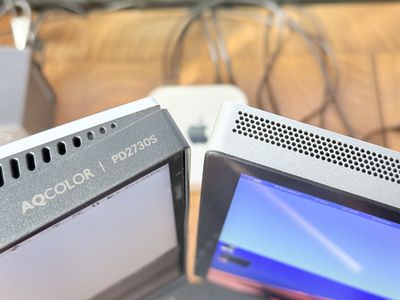
First off, the PD2730S doesn't match Apple's all-aluminum aesthetic. Let's be honest, nothing on the market quite does. But BenQ has remained faithful to the same design ethos that was evident in our MA270U 4K monitor review. While it may not be to everyone's taste, it's tried and tested.
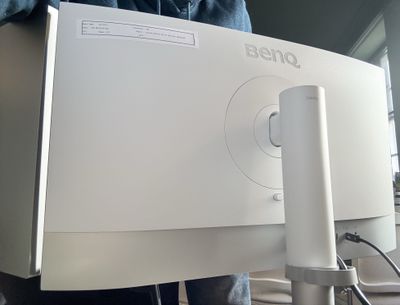
The monitor combines black, white, and silver elements into a cohesive whole. The black bezels remain pleasantly slim, the rear of the display is a white plastic that curves outwards slightly, and the silver stand is a brushed metal pipe about 2.5 inches in diameter. Assembly is extremely simple and requires no tools. You just click the neck of the stand to the back and then use the key-screw to fasten on the rectangular base.
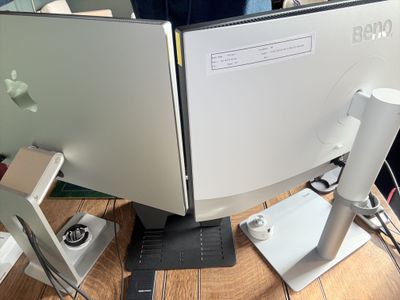
Once set up, the monitor feels remarkably solid, and the stand deserves special mention - it's a robust piece of engineering that provides great stability. I particularly like how the display panel remains steady even when adjusting its position, something that's surprisingly rare in this price range.
Speaking of adjustments, BenQ hasn't skimped here. The stand offers a comprehensive range of movement: height adjustment up to 150mm, -5° to 20° tilt, and smooth 60° swivel capabilities. This versatility comes as standard - no $400 upgrade required, Apple. For those preferring alternative mounting solutions, there's a standard VESA mount option.
Connectivity and Features
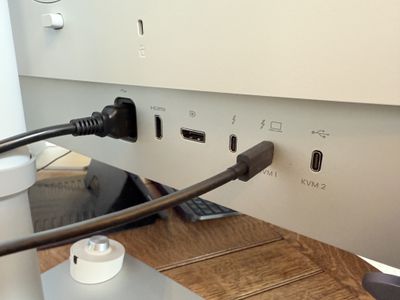
Connectivity is where the PD2730S really shines. The monitor boasts a genuinely useful selection of ports. The Thunderbolt 4 input delivers 90W of power delivery, which is enough for my 14-inch MacBook Pro. You'll also find HDMI 2.1, DisplayPort 1.4, and a downstream Thunderbolt 4 port supporting display daisy-chaining. These ports face outward rather than downward - a small detail that makes a big difference in daily use.
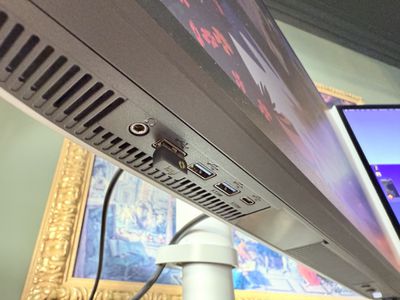
A thoughtful array of USB ports rounds out the package. There's both USB-C (2x) and USB-A (3x) connectivity, making this an effective hub for any desk setup. That said, most of these are located directly under the panel next to a headphone jack and they face downwards, so the dangling cables can look a bit messy if you use them all. On the other hand, BenQ includes a hook that attaches to the stand behind the monitor for funnelling cables through, which is a much more aesthetically pleasing cable management system than the one found on the ASUS ProArt 5K Display.
Another point worth noting is that the hub can provide power even when the display is off, so you can keep your MacBook and whatever else plugged in and charging regardless.
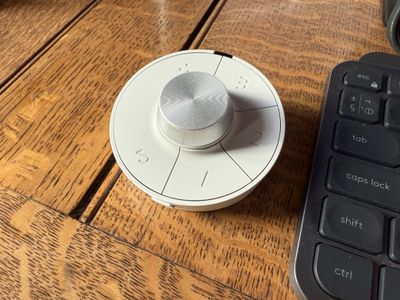
BenQ also includes its unique HotKey Puck G3 controller. This wireless dial provides quick access to display settings and input switching. It's customizable and works well, and creative professionals might appreciate it, but it's not something I've found myself using regularly.
Display Performance
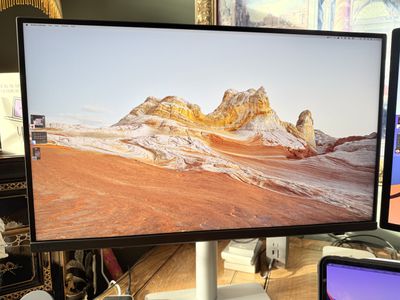
Let's get down to brass tacks: image quality. The IPS panel delivers outstanding clarity. Text on the panel appears razor-sharp, and images pop with vivid detail. With 5120x2880 resolution, you're getting the same pixel density as Apple's Studio Display. And just like the Apple Studio Display, you get 218 pixels per inch, ensuring that sweet spot for 5K Retina.
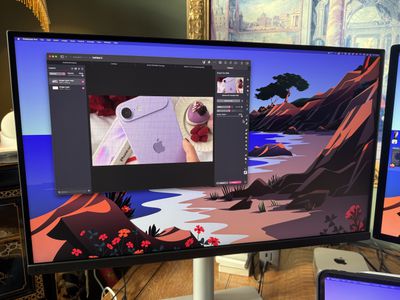
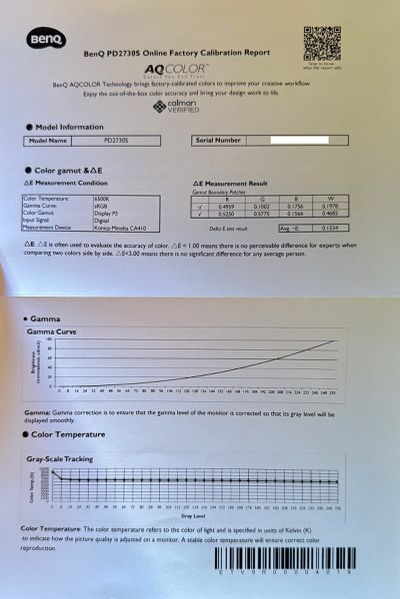
Likewise, color accuracy impresses right out of the box. The monitor covers 98% of the P3 color gamut, which is crucial for creative work. BenQ's factory calibration proved spot-on as far as I'm concerned, although you can fine-tune things further using the included software tools. Display ColorTalk lets you easily match colors between a MacBook and the monitor or between two monitors – no calibrator needed – while Palette Master Ultimate lets you achieve more precise color matching using a calibrator.
The panel employs BenQ's Nano Matte coating, which effectively manages reflections without compromising image clarity. The panel's maximum brightness reaches 400 nits, which is less than the Studio Display's 600 nits. This is the one visually noticeable difference between the two panels, but I've found 400 nits to be perfectly adequate for my environment. It's worth noting that the panel is "only" 60Hz. That may irk hard-core gamers, but I had no problems playing Resident Evil 2, and it's totally adequate for everyday tasks and image editing work. Lastly, the PD2730S has 2000:1 contrast ratio, providing a solid dynamic range.
Software Integration
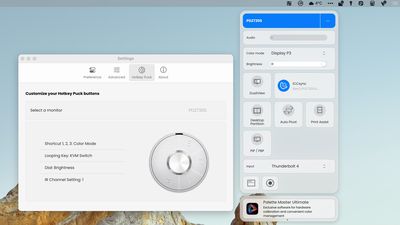
We covered BenQ's Display Pilot 2 software in the MA270U review, but it deserves special mention. It enables seamless brightness and volume control using your Mac's keyboard - a feature that's surprisingly rare in third-party monitors. The software also provides straightforward access to color profiles and monitor settings. ICCsync ensures consistent color matching between your MacBook and external display, and while HDR support is limited to HDR400, it's there if you need it. The KVM switch functionality should also prove handy when working with multiple computers.
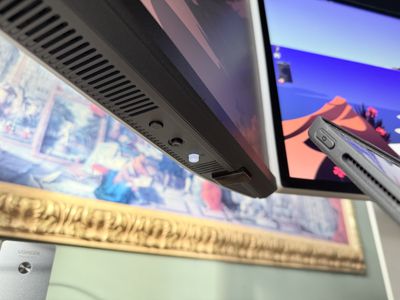
All that being said, you don't have to use the software to control the monitor, since you can access all of the settings in the OSD menu via the physical controls along the bottom of the display.
Summing Up
The BenQ PD2730S makes a compelling case for itself. At $1,199, it delivers 5K resolution, excellent color accuracy, Thunderbolt 4 connectivity, and other thoughtful features at a significantly lower price point than Apple's Studio Display. Yes, the speakers are terrible, but that seems par for the course in third-party monitors. And no, it doesn't have a webcam like the Studio Display, but that just means you can invest in a better one than the latter offers. While the PD2730S can't match Apple's premium build quality or 600-nit brightness, it compensates with superior ergonomics and connectivity options.
This monitor deserves serious consideration by creative professionals seeking a high-resolution display without breaking the bank. It strikes an impressive balance between performance and value, offering most of what makes the Studio Display great at a more accessible price point.
Where to Buy
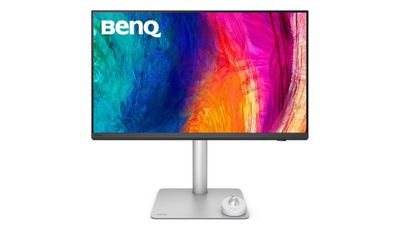
The BenQ PD2730S is available directly from BenQ's website and through authorized retailers for $1,199.
Note: BenQ provided MacRumors with a BenQ PD2730S monitor for the purpose of the review. No other compensation was received.






















Top Rated Comments
The joy of the Apple Studio Display is I don’t have to worry about dust getting into cracks and it is so easy to wipe across the whole front display.
I'm glad to see more 5K displays coming out to compete with the ASD, but I wish they were bringing a bit more to the table.
That's one of the #1 ergonomic adjustments folks can and should make
Not being able to adjust the monitor height leads to adjustments happening elsewhere in the chain (chair & desk) which can screw up other ergonomic angles
I have 20:20 vision and while it is technically not 5K like ASD or this BenQ in that is has 720 less pixels in the vertical, to me it looks like I grabbed hold of the edges of that iMac and stretched it out wider. Text is nice & crisp, and colors are nice.
Tangible shortcomings:
* no camera, but Continuity Camera delivers the best camera available for FaceTime, Zoom, etc., far superior to the one in ASD, MBs and similar.
* speakers are not as good but no speakers- including the ASD ones- compare to third party speakers with perhaps a wireless sub that cost as little as $100-$150 (plenty of high-rated ones on Amazon). Spend the money and own some exceptional speakers vs. trying to be satisfied with space-constrained ones built in: audio physics can't be overcome. Connect the speakers to this monitor and they can then be shared with multiple devices you might connect to it.
After those, you have to start reaching and/or making a big deal out of fine detail differences. The Apple-and-only-Apple crowd loves to spin "plasticy" and "wobbly" against EVERYTHING not Apple, but this one never wobbles and the part that I look at 99.9% of the time is NOT the case. That part looks great. My friends often gush at the expansive size and then want the details to look into getting one for their own Macs. Bonus: those "stand options" that cost extra for ASD are included with this one. Bonus #2: 120Hz.
Doubts? Dell has broad distribution of demo models. Odds are good with only a little looking around, you can find a demo model of this one. If so, take a Mac in, hook it up and have a look with your own eyes. Seeing is wayyyyyyyy better than trusting biased stranger judgements, many of which argue Apple and only Apple.