

Sphero's been making iPhone-connected ball-shaped robotic toys since 2011, and while the company has been successful with the original Sphero and the Ollie, it stumbled on a major hit this year with the launch of the BB-8, a Star Wars branded iPhone-controlled droid.
BB-8 is based on the droid from the upcoming movie Star Wars: The Force Awakens. It combines Sphero's existing robotic ball technology with the Star Wars universe, a marriage that's resulted in the most appealing, advanced Sphero toy to date.
Sphero's BB-8 has a fun backstory and was designed with help from Lucasfilm. Throughout the development process, Lucasfilm provided Sphero with details on BB-8, feedback on the design, and the iconic sounds that bring the toy's personality to life.
Hardware and Design
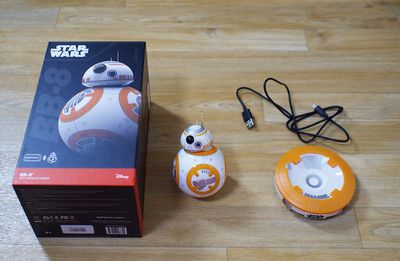
Design wise, the BB-8 consists of a robotic ball, similar to the original Sphero, and a droid head that fits onto the ball using magnets. Under the head, there are a set of wheels that allow it to move around and stay in place on top of the body of the BB-8 while it is in motion.
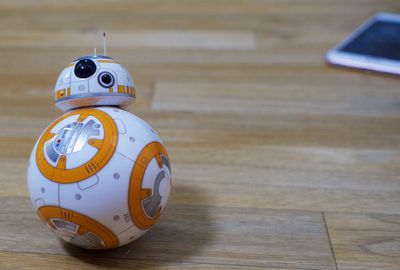
BB-8 is about the size of a baseball and fits in the palm of a hand. If you have a Sphero already, the body of the BB-8 is the same size as the Sphero ball. The head is about the size of half a ping pong ball and is adorned with two ornamental antennae. The body and the head are both made of a smooth plastic and there are LEDs inside that allow BB-8 to light up. This is a pretty durable plastic - even when BB-8 slammed into walls, it remained undamaged. Plastic is breakable though, and it's still worth being gentle with BB-8.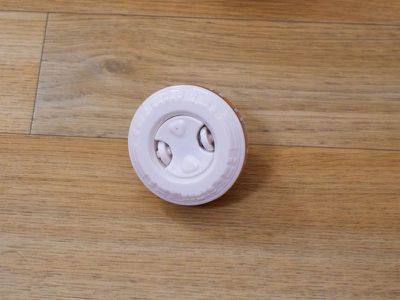
The body of the BB-8 is basically a Sphero ball that's been painted with Star Wars markings to match the BB-8 of the movie, with a matching head stuck on top. If you've used a Sphero, you can get an idea of how the BB-8 looks and feels in action.
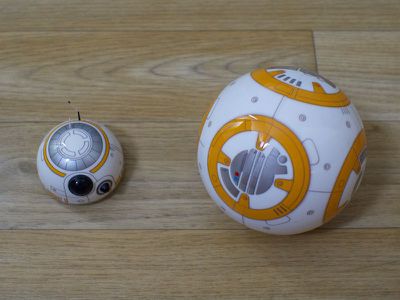
Inside the BB-8 is a gyroscope used to determine orientation, electronics and a motor to power it, a set of wheels that make the ball roll, magnets that hold onto the head, and counterweights to keep it all upright. That's a bit of a simplification of what's inside, but it basically works by propelling itself with those internal wheels.
BB-8 connects to and is controlled by an iPhone that uses Bluetooth to send commands to the ball. It has a 30 meter range and it lasts for approximately 60 minutes on one charge. That may sound short, but I doubt most play sessions are going to last longer than that simply because you'll run out of things to do with the BB-8.
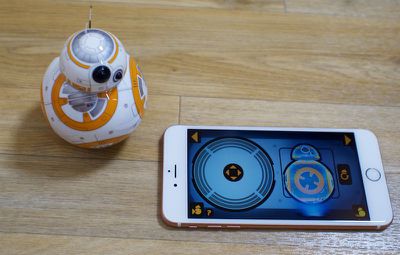
Without an iPhone or an Android smartphone, you won't be able to do much with the BB-8. Even the BB-8's sounds come from the iPhone, which is a little disappointing. It would be a better experience if the ball itself was able to make the requisite noises.
When not in use or when charging, the BB-8 sits on a matching inductive charging base that plugs into the wall.
Controls, Performance, and App Features
The BB-8 app is what adds a lot of the magic to the BB-8 droid. As mentioned above, it's used as a way to control the BB-8 and it supplies sound. There are also several built-in extras that offer up a few more things to do with the toy.
There are three interactive modes in the app: Drive, Message, and Patrol, along with a Settings app. The Drive interface is the main mode that's used, and it consists of a virtual directional pad that can be moved to control where the BB-8 goes. There's also a virtual BB-8 on the screen, which is an orientation-based control method used to line up the blue light in the actual BB-8 with the user's direction. BB-8 moves in the direction where the blue light is pointing, which keeps him on track even at high speeds.
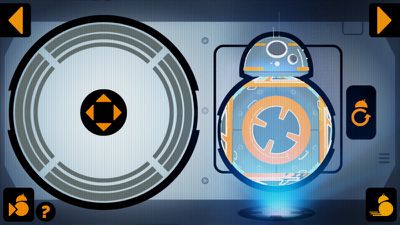
The dual control stick method works very well. BB-8 is responsive and the controls are accurate - it was easy to get BB-8 to go where I wanted him to go. These controls are simple enough that even younger children should be able to use BB-8 without much trouble so long as the blue light is lined up.
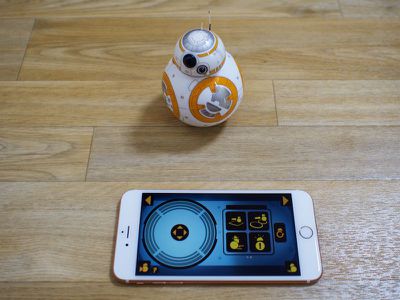
On the Drive screen of the app, there are also controls for driving in reverse and temporarily boosting BB-8's speed, and if the BB-8 portrait is tapped, there are several actions available. BB-8 can be made to nod yes or no, spin in circles joyfully, or do a perimeter check where he investigates the room. A second screen of actions includes two mini patrols, square and figure 8 shaped, along with a high alert response and a self-diagnostic mode, both of which cause BB-8 to spin around in place.
BB-8 worked well on even flooring, but it had difficulty going from a hard floor to a slightly elevated rug. I don't have carpet in my house, but BB-8 worked well on the rug - it was just the act of getting on the rug that was a problem if there wasn't enough speed. BB-8 is not going to work as well in situations where the flooring is uneven. Also, if you have a pet, expect BB-8 to pick up any scrap of fur that's on the ground.
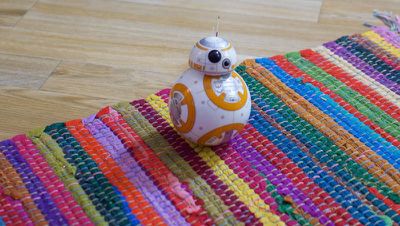
Whenever I ran into an obstacle in the house, BB-8's head had a tendency to pop off from the impact. This was frustrating because it happened frequently and required me to walk over and fix the head. I ended up making a game out of it - I used the iPhone to make BB-8 push his own head over towards me whenever it came off.
The Messages screen of the app lets you record a video message with the front-facing camera, which BB-8 "plays" holographically. This is done by holding up the iPhone to BB-8, with the message being played on the iPhone using augmented reality. It's a gimmick that's fun the first time, but I'm not sure I see the point of recording my own messages and then watching them play back in a "holograph."
Recording messages is also awkward because the BB-8 app can only be used in landscape mode and recording video in landscape mode with the selfie camera is just plain unwieldy. The front-facing camera is the only camera that can be used to record these messages.
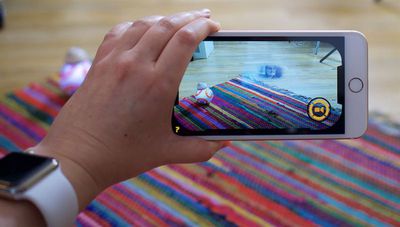
A patrol feature makes up the third and final section of the app. In this mode, BB-8 will "explore" on his own, moving around the room and navigating obstacles without user input. In this mode, there are metrics that tell you how far BB-8 has patrolled, his speed, balance, acceleration (vector and mapping), internal temperature, and more.
I wasn't impressed with the Messages aspect of the BB-8, but patrol more than made up for the poor messaging feature. It was fun watching BB-8 stumble around my office, but you might not want to engage this mode in a room with a lot of nooks and crannies where he can get stuck.
When patrolling, the app will keep a map of where BB-8 has been and an event log, which includes proximity data, self diagnostics, and collision information, recorded whenever BB-8 bumps into anything. BB-8 saves some of this mapping information and he'll get a bit smarter, running into fewer obstacles in the room as time goes on.
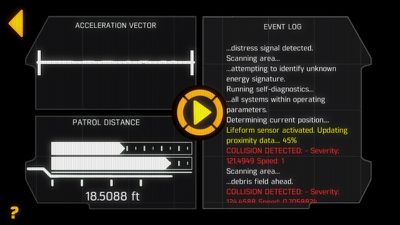
For example, if BB-8 runs into a table leg, he'll mark the spot on the map as an obstacle and in the future, he won't run into the same barriers. This is a process that involves a lot of movement around the room and plenty of vocalization, with BB-8 making angry noises whenever he runs into anything.
BB-8 includes voice recognition features, which can be turned on in the Settings section of the app. I had trouble getting through the voice recognition tutorial to get the function working because the app would refuse to recognize my voice. After restarting the app several times, I got the full tutorial finished, and once that was done, BB-8 was responsive to voice commands.
Saying "Okay, BB-8" activates voice mode, and from there, he'll follow several other commands like "Run away!" or "Go explore," both of which are movement commands. He'll answer questions like "What do you think?" or "How do you feel?" with nods or head shaking, or react to statements like "Run away!" or "It's a trap!"
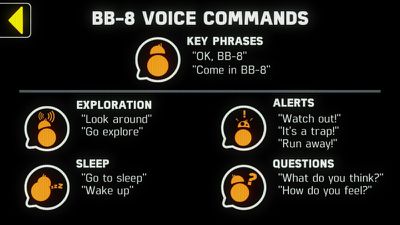
Voice commands worked most of the time and were another way to interact with BB-8, but what he does via voice is basically the same as what can be done in the Drive section of the app, and voice commands can't be used while BB-8 is being manually controlled. It's also easy to accidentally activate voice mode when it isn't wanted, and voice commands weren't always recognized.
Each time the BB-8 is used, the app needs to be re-paired with the droid. For pairing to take place, an iPhone needs to be held near the BB-8, and this constant need to re-pair is a hassle. You need to go through this pairing process even when exiting the app for just a moment to check a message or snap a picture.
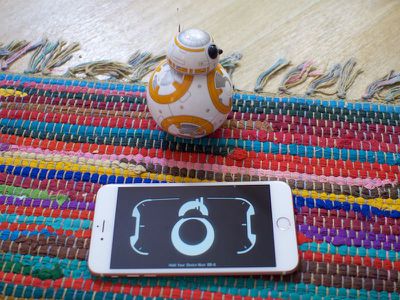
I found that my BB-8 did not always pair when my iPhone was held near and I often needed to restart the app a time or two to get the pairing process started. It's also necessary to hold the iPhone quite close to the BB-8 for the pairing process to initiate and complete, but when the right conditions are met, it only takes about 10 seconds to sync up.
Bottom Line
It's impressive how far a bit of paint, a head, and some droid-like sounds go towards turning the Sphero from a simple robotic ball to a toy with a lot of personality. BB-8 is an undeniably cute toy, but as with some other Sphero products, I question how long it's able to entertain.
As an adult, once I went through all of the app features and played with BB-8 for a couple of hours, I lost interest. It wasn't something that I felt like picking up and playing since I'm more or less just driving a ball around with my iPhone, and though I tried, I failed to get my cats interested in BB-8. For the most part, they ignored its existence or tried to get away from it.
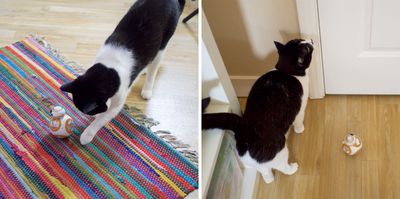
A dog might find BB-8 more interesting, but because of the small head, I'd be wary of letting a pet roughhouse with BB-8. A larger dog could swallow the head or damage it because its moving parts are not completely enclosed. I don't have children, but I suspect kids might get a bit more out of the BB-8. It's at least as fun as a remote control car or helicopter and it has a lot more personality.
BB-8's controls are simple enough for kids to use and it's fun to drive around the house. The main point of frustration may be the one thing that gives the BB-8 its charm - the head. The head comes off almost every time the BB-8 runs into an obstacle, requiring it to be picked up and put back. Of course, you can use BB-8 without his head, but that just feels wrong.
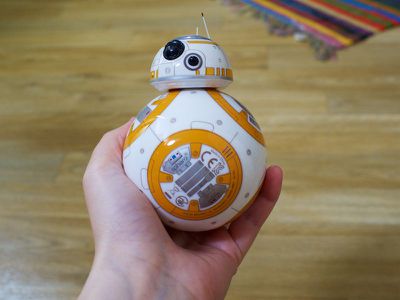
As a Star Wars collectible, the BB-8 really shines. Were I a Star Wars collector, the BB-8 is definitely something I'd love to keep on the shelf and take out every once in awhile to play with or show off to visitors. At $149, I'm not sure I'd want to buy the BB-8 as a toy for a child, but as a toy that also has a place on the shelf of a huge Star Wars fan later? Much more worthwhile.
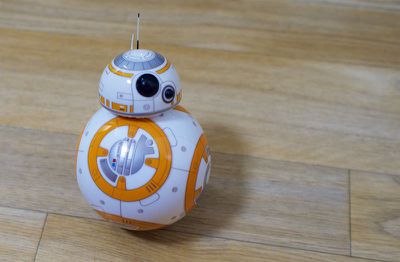
Sphero's been making robotic toys for a long time, but the company really found its niche with the BB-8. I've used Sphero balls several times in the past and have been underwhelmed, but the BB-8, with its Star Wars branding, personality, app features, and adorable droid sounds, really outshines past products. The BB-8 is without a doubt Sphero's best toy yet, and if you don't mind shelling out $149 on a robotic iPhone-controlled ball that might not have a lot of lasting potential beyond being a collector's item, BB-8 is worth the cash.
Pros:
- Star Wars branding
- Simple controls
- Accurate controls
- Durable
- Design/personality is appealing
- Learns room layouts through Patrol mode
Cons:
- Head falls off often
- Head's wheels attract dust, lint, and pet fur
- Have to re-pair with app every time BB-8 is used
- Lasting appeal is questionable
- Messages feature is unimpressive
- Voice control was unreliable at times
- Droid sounds go through the iPhone speaker
How to Buy
The BB-8 can be purchased from the Sphero website for $149.99 or from the Apple Store for $149.95.
Note: MacRumors received no compensation for this review.






















Top Rated Comments
http://www.polygon.com/2015/9/4/9261655/star-wars-bb8-updates-firmware-app-spoilers