

Bluetti's Elite 30 V2 that came out earlier this year is a portable power station that's ideal for short trips, plus it works well as a temporary backup for powering small electronics in a power outage.
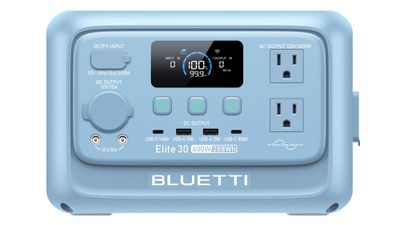
The Elite 30 V2 is one of many power stations that Bluetti offers, and it is on the smaller, more compact side with a 288-watt-hour capacity. This is the first Bluetti power station that I've reviewed, but I have experience with larger power banks from Jackery, DJI, Anker, and other companies. The Elite 30 V2 has a LiFePO4 battery, which Bluetti says will last for over 3,000 charging cycles and 10 years. There's a five-year warranty, which is solid.
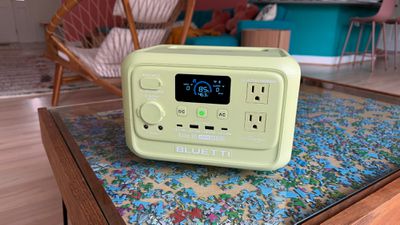
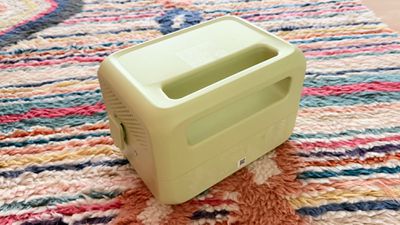
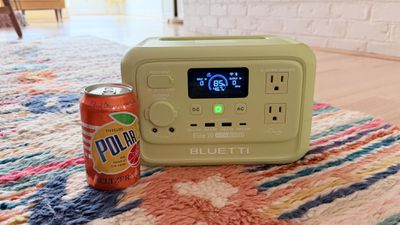
Most power stations are utilitarian, with a black or gray plastic design, but the Elite 30 V2 comes in several fun colors. There's nothing wrong with a simple design for battery equipment, but colors make Bluetti's little power station stand out. The model I tested is green, but it also comes in blue, purple, pink, light gray, and dark gray.
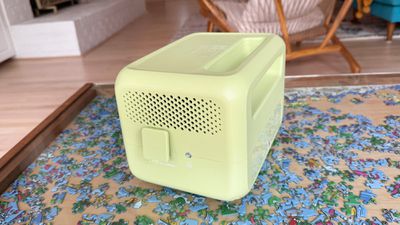
Appearance isn't going to matter to most, but if you're going to have a battery out for people to use at the beach, on a camping trip, at the park, or during some other activity, it might as well have some pizazz. The power station is just about 9.5 pounds, and it measures 9.8 inches long, 7 inches wide and 6.6 inches tall. There's a handle for carrying it, and an LCD display shows you input, output, charge level, and an estimate of how long the power will last based on what's plugged in.
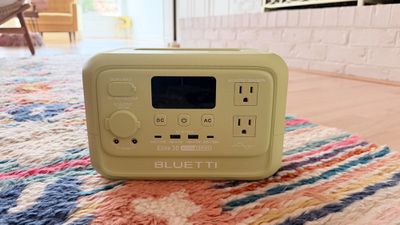
The Elite 30 V2 supports 600W charging, though it can handle up to 1500W temporarily as part of a Power Lifting mode. The Elite 30 V2 has more ports than you might even need on a power station this size, and it can charge up multiple devices at a time. There's a 140W USB-C port, a 100W USB-C port, two 15W USB-A ports, and two AC outlets. There are also AC and DC inputs for charging, a cigarette lighter port, a grounding terminal, and a pair of 12V/8A barrel ports. Both USB-C ports can be used at full power at the same time.
There's a power button, a button to turn on DC power to the USB-C/USB-A ports, and an AC button to turn on power to the AC outlets. When you plug something in, you have to turn on power to the appropriate port before charging will begin. It's also a good idea to turn it off when you're done to ensure there's no power drain when you're not charging anything. The power stations that I've tested in the past haven't had separate buttons for DC power (just AC power), but that's the way Bluetti's power stations are designed.
I've been using the Elite 30 V2 to charge my Apple devices for the last several weeks to get an idea of what it's useful for. Charging my iPhone 17 Pro Max from 0 to 80 percent drains the power station from 100 percent to 90 percent, and it's about the same for an iPhone 16 Pro Max and an iPhone 15 Pro Max.
I can charge my iPhone's battery between 9 and 10 times, though I do limit my charging to 80 percent. The variation is because the power station's battery level can drop slightly with nothing plugged in unless it's turned off. Over a four-hour period, the battery dropped around 10 percent with DC power on.
It charges my MacBook Air three and a half times. It was able to run my MacBook Pro, Studio Display, and two lights (my desk setup) for half of my work day (12:51 p.m. to right around 5:00 p.m.). It ranged from 60W to 110W depending on workload. Charging takes around an hour and 20 minutes to get to full, though it can get to an 85 percent charge in around 50 minutes. It can charge through a cigarette lighter port in a car, or with solar panels for off-grid connectivity.
The Elite 30 V2 isn't the power station you want to get to run something that's power hungry like an electric heater, but it's good for smaller things like computers, lights, speakers, and consoles. You could run a mini refrigerator for a few hours, a hair dryer or flat iron long enough to do your hair, or a lower power electric kettle or coffee maker. It is able to run my entire computer setup, plus it can power my Wi-Fi for a full work day. Some people use power stations as backups for medical devices. The Elite 30 V2 may be able to run a CPAP machine for a night's sleep, but that will depend on the individual machine. I wouldn't recommend this one for other devices like an oxygen concentrator, which would draw too much power and require a much larger battery for an extended power outage.
You can use the Elite 30 V2 as a backup in case of a power outage, plugging a device into it and then plugging the power station into an outlet. In that situation, the power station will kick on automatically in a power outage with no interruption in function (Bluetti says there's a super fast 10ms response time). It actually supports up to 980W of passthrough power.
Since the Elite 30 V2 is a smaller power station, it runs and charges quietly. It is nearly silent when charging and when powering things like iPhones and Macs. The fan inside will kick on under higher loads, but it's still not unreasonably loud. I can hear it, but it's a noise I could sleep through.
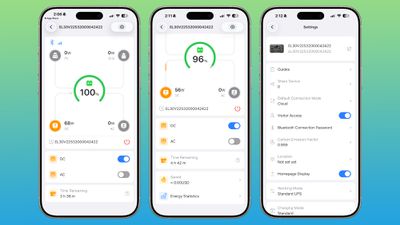
There is a Bluetti app, and you can connect to the power station via Bluetooth or Wi-Fi to monitor it remotely. The app tells you what's drawing power and how much, how long the battery will last under the current load, and your energy usage statistics. You can also remotely turn the AC/DC power on or off, choose power modes, and enable the 1500W Power Lifting feature. You should also be able to upgrade the firmware, but it wasn't working properly for me in the app (the button to actually install firmware was blank).
Bottom Line
I'm a fan of the Elite 30 V2. It provides enough power to charge multiple phones, tablets, portable gaming systems, or computers, but it's not too heavy to carry around. For an active use power station that you're using for day or weekend trips where portability is an issue, this is one of the better power stations that you can get.
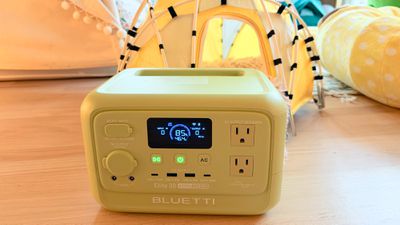
I am petite and can struggle to haul around some of the bigger power 20lb+ stations that I've tested, but this one is the perfect size. I'm more likely to use a power station that is convenient for me to carry and take places.
This would be ideal as a backup battery if you just wanted to power smaller devices like smartphones and your router in a power outage. For medical devices or appliances that draw a lot of power, a bigger battery would be better.
Some power stations can cost over $1,000, but the Elite 30 V2 is much more affordable. The MSRP is $304, but it's often on sale.
How to Buy
The Bluetti Elite 30 V2 Portable Power Station can be purchased from the Bluetti website for $209 at the current time.
Note: Bluetti provided MacRumors with an Elite 30 V2 for the purpose of this review. No other compensation was received.





















Top Rated Comments
Instant UPS, Switchover in a Blink.
With a lightning-fast 10ms response, the UPS kicks in before you even notice. It supports up to 980W of bypass power—allowing you to run your devices and recharge the unit at the same time. Whether you're working on critical data or deep in a gaming session, enjoy smooth, uninterrupted power that protects every second.
------
Thats the only reason I bought it plus the 5 year warranty is pretty good and 10 year battery life vs replacing the UPS Nickle batteries every few years. Like I said I'll give it a whirl and see if its any good otherwise I have 30 days to return it. Another reason I liked this one is it has a DC in option so I can even use solar as a backup if my power goes out and our generator goes out/doesn't work for some reason.