How to Use 'Hey Siri' Hands-Free on a Mac - MacRumorsOpen MenuShow RoundupsShow Forums menuVisit ForumsOpen Sidebar
Skip to Content

How to Use 'Hey Siri' Hands-Free on a Mac

by

The latest version of Apple's "Hey Siri" feature works hands-free without being plugged into power, and it can be found in several recently announced Apple mobile products, including the fifth-generation iPad mini, third-generation iPad Air, and second-generation AirPods.
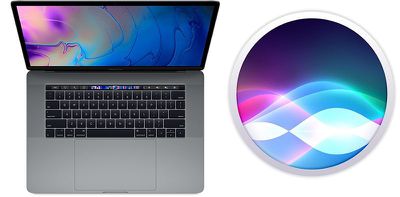
macbook pro hey siri
What's perhaps less well-known is that many of Apple's new Macs also support "Hey ‌Siri‌" hands-free, meaning that users no longer have to click the menu bar icon or press a keyboard shortcut before they can start talking to the digital assistant.

What follows is a list of Macs that support "Hey ‌Siri‌" hands-free, and below that you can find instructions on how to enable it on your machine. Note that future Mac models that include Apple's T2 security chip are likely to support the feature, too.

  • MacBook Pro (15-inch, 2018)
  • ‌MacBook Pro‌ (13-inch, 2018, Four Thunderbolt 3 ports)
  • MacBook Air (Retina, 13-inch, 2018)
  • iMac Pro

How to Enable "Hey Siri" hands-free on a Mac

  1. Click the Apple () symbol in the top left corner of your Mac's screen and select System Preferences....
  2. Click the Siri icon in the preference pane.

  3. Tick the checkbox next to Listen for "Hey Siri". macheysiri
  4. Click Continue to follow the ‌Siri‌ setup process, repeating verbally the commands shown on the screen.
  5. Click Done and then close the preference pane.
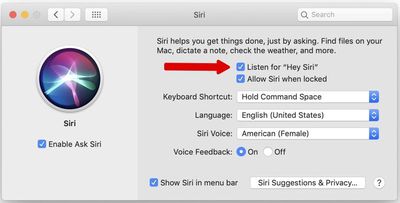
Now that you've enabled the feature, simply say "Hey ‌Siri‌" to invoke the digital assistant and ask a question or give a command. If you're familiar with the ‌Siri‌ function on iPhone or iPad, you should find most of the same general commands work on Mac, too. For more information on how the feature can be useful on the desktop, check out our dedicated guide to using Siri commands in macOS.


Top Rated Comments

4jasontv Avatar
90 months ago
Oh please no. I don’t need Cortana waking up, activating Siri and than having a conversation until I throw one at the other.
Score: 4 Votes (Like | Disagree)
NBAasDOGG Avatar
90 months ago
I usually use the Command + Space to activate Siri, but since our courageous keyboards doesn’t work anymore, Apple decided to release hands-free Siri on the Mac!
Score: 3 Votes (Like | Disagree)
Icaras Avatar
90 months ago
Still can’t believe the new iMac doesn’t have the T2 chip :mad:
Score: 3 Votes (Like | Disagree)
90 months ago
What about the Mac mini?
Doesn't show on my Mac mini with a microphone attached which is annoying as it has the T2 chip.
Score: 2 Votes (Like | Disagree)
Plutonius Avatar
90 months ago
No of course not. But I also want Face ID and “Hey Siri” so I’ll take the trade off.
You don't need the T2 to have "hey Siri" on your Mac ('https://forums.macrumors.com/threads/how-to-use-hey-siri-hands-free-on-a-mac.2178813/#post-27306909') and I'm not sure that it's worth having Face ID if your Mac is going to suffer T2 crashes.

I can also see why Face ID would be on demand in an iPhone / iPad but I'm not sure why on a computer ?
Score: 1 Votes (Like | Disagree)
Plutonius Avatar
90 months ago
Does Hey Siri only work with the internal microphone input?
It is not mentioned but people can set up their older Macs or Macs with an external microphone (Sierra or newer) to take Siri voice activation.

It is a little bit more complicated and the directions are here ('https://www.macworld.com/article/3096187/how-to-make-siri-activate-when-you-say-hey-siri-to-your-mac-running-macos-sierra.html') (no T2 chip needed :) ).

Still can’t believe the new iMac doesn’t have the T2 chip :mad:
The new iMac lucked out not getting the T2 chip.

Do new iMac owners want T2 bridgeOS errors ?
Score: 1 Votes (Like | Disagree)

Popular Stories

iPhone 18 Pro Deep Red Feature

iPhone 18 Pro Launching Later This Year With These 12 New Features

Wednesday March 18, 2026 7:39 am PDT by
While the iPhone 18 Pro and iPhone 18 Pro Max are not expected to launch for another six months or so, there are already plenty of rumors about the devices. It was initially reported that the iPhone 18 Pro models would have fully under-screen Face ID, with only a front camera visible in the top-left corner of the screen. However, the latest rumors indicate that only one Face ID component...
Apple Logo Sketch Feature

Apple Has Now Unveiled Eight New Products This Month

Tuesday March 17, 2026 9:25 am PDT by
Apple has unveiled a whopping eight new products so far this March, including an iPhone 17e, iPad Air models with the M4 chip, MacBook Air models with the M5 chip, MacBook Pro models with M5 Pro and M5 Max chips, an updated Studio Display, a higher-end Studio Display XDR, and now the AirPods Max 2 this week. iPhone 17e features the same overall design as the iPhone 16e, but it gains Apple's...
ios 26 4 yellow

Here Are Apple's Release Notes for iOS 26.4

Wednesday March 18, 2026 11:56 am PDT by
Apple provided developers and public beta testers with the release candidate versions of iOS 26.4 and iPadOS 26.4, which means we're going to see a public launch as soon as next week. The RC versions of the software include Apple's official release notes, giving us final details on what's included in the update. Apple Music - Playlist Playground (beta) generates a playlist from your...
Related Apple News: Travel | Sport | Health | Opinion | Iphone