

In iOS 17 and later, Apple includes an accessibility setting that makes the haptic feedback feature activate faster than in previous versions of its mobile operating system. If you fondly hearken back for the days of 3D Touch, you might just prefer it.
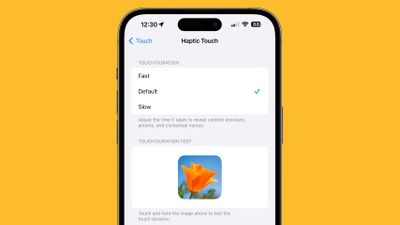
haptic touch ios 17 fast
As many iPhone users might remember, ‌3D Touch‌ was an interactive haptic feature that Apple introduced in 2015 with the ‌iPhone‌ 6s. When the iPhone XR was released in 2018, Apple kiboshed 3D Touch‌ to the dismay of some users, and instead implemented the simplified ‌Haptic Touch, which offers less functionality‌.

‌3D Touch‌ supported multiple levels of pressure for different interactions depending on how hard you pressed, with Apple implementing "Peek and Pop" gestures. In contrast, ‌Haptic Touch‌ supports just a single level of pressure for the long press gesture.

‌Haptic Touch‌ has always worked slower than ‌3D Touch‌ because of the two levels of pressure that ‌3D Touch‌ allowed for. The first ‌3D Touch‌ pressure level activated quickly when pressing on the display, so those who became used to ‌3D Touch‌ may have found the ‌Haptic Touch‌ replacement to be too sluggish.

The good news is that setting ‌Haptic Touch‌ to the Fast option makes a noticeable difference in how quick haptic menus pop up under the finger when an icon or on-screen element is long pressed. The speed brings ‌Haptic Touch‌ interactions closer to 3D Touch interactions. Here's how to enable it on iPhones running iOS 17 and newer.

  1. Open the Settings app and tap Accessibility.
  2. Under "Physical and Motor," tap Touch.
  3. Tap Haptic Touch.
  4. Select from Fast, Default, and Slow. Note that when you select a speed, you can test it using the flower image on the same screen.
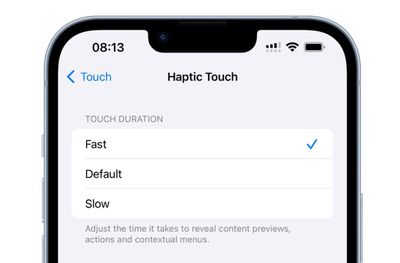
haptic touch faster ios 17

It's still not entirely clear why Apple got rid of ‌3D Touch. Some have argued that it suffered from a lack of discoverability, similar to the Apple Watch's Force Touch functionality, which suffered the same fate. Others have speculated that Apple eliminated it in order to bring gesture parity to the ‌iPhone‌ and the iPad. Either way, the change allowed Apple to remove the capacitive layer that used to be integrated into every ‌‌iPhone‌‌ display.

Top Rated Comments

foobarbaz Avatar
8 months ago
This is my favorite tip. It may only save milliseconds, but it makes it feel so much more responsive.
Score: 5 Votes (Like | Disagree)
UltimaKilo Avatar
8 months ago
Great tip! However, I really don’t use it much. Getting rid of 3D Touch was such a bummer, I still miss it today.
Score: 4 Votes (Like | Disagree)
hokuspokus Avatar
8 months ago
Didn't know of this. Thank you.

I feel like when iOS 26 comes out, there will be a lot of users changing things in the Accessibility settings to make their iPhone/iPad less hard to actually use.
Score: 3 Votes (Like | Disagree)
TechWhisperer Avatar
8 months ago
Still ain’t fast enough.
Score: 2 Votes (Like | Disagree)
svish Avatar
8 months ago
Have set it to 'Fast' for my iPhones ever since 3D touch was removed years ago.
Score: 2 Votes (Like | Disagree)
OlliFlamme Avatar
8 months ago
[LIST=1]
* Open the Settings app, pull down and search "Haptic Touch"
* Tap the top result
* Select from Fast, Default, and Slow.
Score: 2 Votes (Like | Disagree)

Popular Stories

iOS 26

iOS 26.3 and iOS 26.4 Will Add These New Features to Your iPhone

Tuesday February 3, 2026 7:47 am PST by
We are still waiting for the iOS 26.3 Release Candidate to come out, so the first iOS 26.4 beta is likely still at least a week or two away. Following beta testing, iOS 26.4 will likely be released to the general public in March or April. Below, we have recapped known or rumored iOS 26.3 and iOS 26.4 features so far. iOS 26.3 iPhone to Android Transfer Tool iOS 26.3 makes it easier...
Apple Logo Black

Apple's Next Launch is 'Imminent'

Sunday February 1, 2026 12:31 pm PST by
The calendar has turned to February, and a new report indicates that Apple's next product launch is "imminent," in the form of new MacBook Pro models. "All signs point to an imminent launch of next-generation MacBook Pros that retain the current form factor but deliver faster chips," Bloomberg's Mark Gurman said on Sunday. "I'm told the new models — code-named J714 and J716 — are slated...
iOS 26 Home Feature

Apple Gives Final Warning to Home App Users

Tuesday February 3, 2026 8:55 am PST by
In 2022, Apple introduced a new Apple Home architecture that is "more reliable and efficient," and the deadline to upgrade and avoid issues is fast approaching. In an email this week, Apple gave customers a final reminder to upgrade their Home app by February 10, 2026. Apple says users who do not upgrade may experience issues with accessories and automations, or lose access to their smart...
Aston Martin CarPlay Ultra Screen

Apple's CarPlay Ultra to Expand to These Vehicle Brands Later This Year

Sunday February 1, 2026 10:08 am PST by
Last year, Apple launched CarPlay Ultra, the long-awaited next-generation version of its CarPlay software system for vehicles. Nearly nine months later, CarPlay Ultra is still limited to Aston Martin's latest luxury vehicles, but that should change fairly soon. In May 2025, Apple said many other vehicle brands planned to offer CarPlay Ultra, including Hyundai, Kia, and Genesis. In his Powe...
Apple Foldable Thumb

First Foldable iPhone Design Details Revealed

Monday February 2, 2026 7:19 am PST by
Apple's first foldable iPhone will feature relocated volume buttons, an all-black camera plateau, a smaller Dynamic Island, and more, according to design leaks from a known Weibo leaker. The user known as "Instant Digital" today claimed to share several key details about the design of the foldable iPhone: The volume buttons will be located on the top edge of the device, aligned to the...


















