How to Set Up Your New AirPods - MacRumorsOpen MenuShow RoundupsShow Forums menuVisit ForumsOpen Sidebar
Skip to Content

How to Set Up Your New AirPods

by

AirPods, introduced last December, are Apple's completely wire-free earphones that have a W1 chip inside for simple pairing between devices.

AirPods work like magic, and while they're easy to set up, the process may not be intuitive to all users who received AirPods this Christmas, so we thought we'd share some quick, easy to digest instructions.
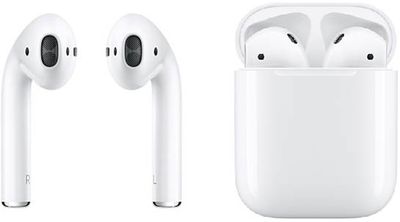
AirPods duo

  1. Remove the AirPods from the packaging.
  2. Leave the AirPods in AirPods case.
  3. Power on your iPhone or iPad, unlock it, and go to the Home screen (aka the main app screen).
  4. Open up the lid to your AirPods case.
  5. Hold the AirPods case with open lid next to your iPhone or ‌iPad‌.
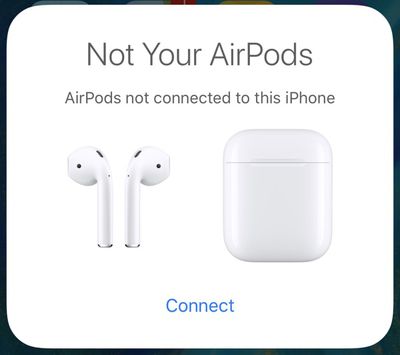
  6. Your iOS device will recognize the AirPods and you'll see a popup to connect your AirPods.airpodsnotconnected
  7. Tap "Connect."
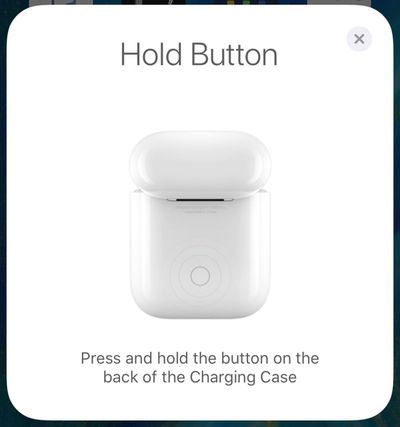
  8. You'll be instructed to press and hold on the back button of the AirPods case.airpodsholdbutton
  9. Press it for a few seconds, and the popup on your iPhone will change to "Connecting."
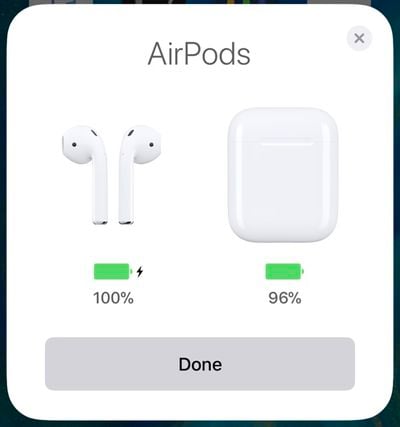
  10. When the connection is complete, the popup will display the battery life for both the AirPods and the case.airpodsconnected

That's all there is to it. Once this setup process has been completed, your AirPods will re-pair to your iOS device whenever you open up the case lid. This re-pairing process takes just a few seconds, so your AirPods are essentially ready to go whenever you pull them out.

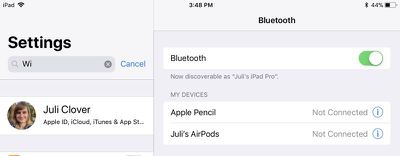
Your AirPods are linked to your iCloud account, so once you pair them with one device, your other devices know they exist. You can switch connections between your devices through the standard Bluetooth settings options, where AirPods will be listed on any device that you're signed into with your ‌iCloud‌ account.

airpodsbluetoothmenu
On iOS devices, go to Settings --> Bluetooth and tap "AirPods." On a Mac, click on the Bluetooth icon in the status bar, choose AirPods, and then select "Connect." On Apple TV, open up the Settings app, choose "Video and Audio," scroll down to "Audio," select "Audio Output" and choose AirPods.

On iOS devices, you can also use the Now Playing widget in Control Center to select AirPods, and on ‌Apple TV‌, you can hold down the Home button on the main ‌Apple TV‌ screen to bring up a shortcut to audio options.

Update: As some MacRumors forum members have pointed out, when pairing with an iOS device signed into your ‌iCloud‌ account, the step involving a button press may not be necessary. In this situation, the AirPods should be ready to pair after opening the case near an iPhone or ‌iPad‌.

Top Rated Comments

109 months ago
Do you actually need to hold the button on the AirPods case to connect them initially? I can’t remember I had to press it the first time I connected them with my iPhone. Ever since I performed a reset, I had to press it.
No, it is not needed. The button is there for connecting to non-Apple devices.
The author should read the manual for AirPods first, then write a guide.
Score: 17 Votes (Like | Disagree)
Pezboy Avatar
109 months ago
Why the hell do we need a set up guide?? This whole article should be, open airpods. Aaaaaannnnd done
Score: 12 Votes (Like | Disagree)
firewire9000 Avatar
109 months ago
I appreciate the article but the information shown here is incorrect. You don’t need to press the button. In fact, these steps are for when the AirPods are previously connected to other devices.
Score: 8 Votes (Like | Disagree)
109 months ago
.
Score: 7 Votes (Like | Disagree)
TMRJIJ Avatar
109 months ago
Eek... will not buy
Never make a purchase decision based on some random guy on a tech forum.
Score: 6 Votes (Like | Disagree)
lazyrighteye Avatar
109 months ago
Tough crowd.

Or... Thanks for spending your xmas morn posting these articles, MR. :D
Score: 5 Votes (Like | Disagree)

Popular Stories

iOS 27 on iPhone 17 1

iOS 27 Will Add These New Features to Your iPhone

Saturday May 2, 2026 8:43 am PDT by
Apple is expected to unveil iOS 27 during its WWDC 2026 keynote on June 8, and there are already many rumored features and changes for iPhones. The first developer beta of iOS 27 will likely be available immediately following the keynote, and a public beta typically follows in July. Following beta testing, the software update should be released to all users with a compatible iPhone in...
Apple MacBook Pro M4 hero

Why You Might Want to Wait to Buy a MacBook Pro

Friday May 1, 2026 3:43 pm PDT by
Apple refreshed the 14-inch and 16-inch MacBook Pro with M5 Pro and M5 Max models in March 2026, but depending on your needs and interests, you might want to skip this generation because there's something better in the works. The M5 Pro and M5 Max MacBook Pro models have faster chips, but the same design that Apple has used since 2021. An updated design with new display technology and faster ...
Apple Event Logo

Apple Just Released a New Accessory

Monday May 4, 2026 8:13 am PDT by
Apple today released a new Pride Edition Sport Loop for the Apple Watch. The band features a rainbow design with 11 colors of woven nylon yarns. The new Pride Edition Sport Loop is available to order now on Apple.com and in the Apple Store app in 40mm, 42mm, and 46mm sizes, and it will be available at Apple Store locations starting later this week. In the U.S., the band costs $49. There...
Related Apple News: Local News | Never Miss Doorbell Wearing Iphone | Nuki Keypad 2 Nfc | Apple Maps Visited Places Disable | Ipad