iOS 14.5: How to Set a Preferred Music Streaming Service With Siri - MacRumorsOpen MenuShow RoundupsShow Forums menuVisit ForumsOpen Sidebar
Skip to Content

iOS 14.5: How to Set a Preferred Music Streaming Service With Siri

by

With the release of iOS 14.5, Apple introduced a feature that lets users select a specific music service to use with Siri, with the options including third-party services like Spotify in addition to Apple Music.
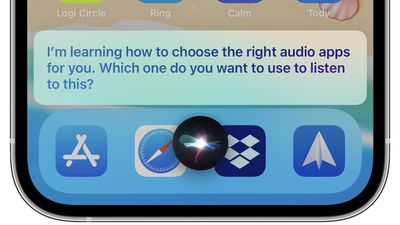
siri choose audio apps
When this feature first came to light in beta versions of iOS 14.5, many early reports interpreted it as Apple allowing users to select a default streaming service, similar to the way it allows email apps other than Apple's native Mail client to be selected as the system default.

However, Apple has since clarified that there isn't actually any option to choose a music service that will be selected on every occasion. More accurately, the feature in question uses ‌Siri‌ intelligence to learn from your listening habits and improve the music selection process over time.

In fact, by occasionally asking which service to use, ‌Siri‌ learns your preferences for all types of audio content rather than just music. For example, it will let you open podcasts in Apple Podcasts or a third-party podcasts app, and let you choose a specific audiobook app if you listen to audiobooks. Here's how it works.

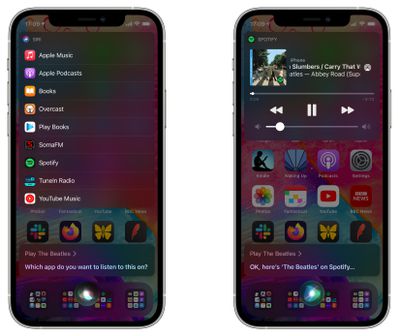
  1. Ask ‌Siri‌ to play an artist, song, or album with a request like "Hey ‌Siri‌, play The Beatles."
  2. ‌Siri‌ will display a list of all music apps you have installed and will ask "Which app would you like to use?"
  3. Choose your preferred music app from the list.
    siri

  4. If asked, confirm that ‌Siri‌ can access data from your music app.
  5. From there, ‌Siri‌ will play the music in your app of choice. If you chose Spotify, for example, the music content will play in Spotify.
In past versions of iOS, it's been possible to play music from other services by clarifying which service you want ‌‌Siri‌‌ to use, such as "Hey ‌‌Siri‌‌, play music on Spotify," but the change implemented in iOS 14.5 makes it more likely that ‌‌Siri‌‌ will remember your music app of choice, so a simple command like "Hey ‌‌Siri‌‌ play music" will use your favorite app rather than defaulting to ‌‌Apple Music‌‌.

Top Rated Comments

Einkoro Avatar
64 months ago
“Sorry, something’s gone wrong. Please try again.”

Seems to work about as well as the rest of Siri.
Score: 12 Votes (Like | Disagree)
64 months ago
We still need a 'I own my music, stop looking at services' option....
Score: 6 Votes (Like | Disagree)
64 months ago

Why not just do this by default, but add a submenu for which one to play which type of content by default?

I don’t really understand the point either. If I want to listen to music I’ll say play music and the chosen default app would ideally be used. If I want to listen to a podcast I’d say play podcasts and again the default podcast app would be used. Or the only thing I use a lot of is audiobooks and I’d obviously ask Siri to play my audiobook.

They’re overthinking this one.
They clearly don’t want to you to set a default player for all your music. So they came up with this. We all know it will never work because Siri and learning are not two words that should ever be used in the same sentence.
Score: 4 Votes (Like | Disagree)
64 months ago
I feel like being able to manually choose default apps would be way more helpful
Score: 4 Votes (Like | Disagree)
chriscl Avatar
64 months ago
It just feels like Apple has begrudgingly added this option.

Why can there not be a simple option to select the default Music service to be used every single time ?

I use Spotify, I don't use any other service. I just want Spotify as the default for all music playback. How Hard can it be?

(and don’t get me started on the lack of native Spotify support on HomePod - but that’s down to Spotify, not Apple).
Score: 3 Votes (Like | Disagree)
Cory S Avatar
64 months ago
Why not just do this by default, but add a submenu for which one to play which type of content by default?

I don’t really understand the point either. If I want to listen to music I’ll say play music and the chosen default app would ideally be used. If I want to listen to a podcast I’d say play podcasts and again the default podcast app would be used. Or the only thing I use a lot of is audiobooks and I’d obviously ask Siri to play my audiobook.

They’re overthinking this one.
Score: 3 Votes (Like | Disagree)

Popular Stories

imac video apple feature

Apple Released Yet Another New Product Today

Friday March 20, 2026 2:39 pm PDT by
Apple has unveiled a whopping nine new products so far this March, including an iPhone 17e, iPad Air models with the M4 chip, MacBook Air models with the M5 chip, MacBook Pro models with M5 Pro and M5 Max chips, the all-new MacBook Neo, an updated Studio Display, a higher-end Studio Display XDR, AirPods Max 2, and now the Nike Powerbeats Pro 2. iPhone 17e features the same overall design as...
iPhone 18 Pro Deep Red Feature

iPhone 18 Pro Launching Later This Year With These 12 New Features

Wednesday March 18, 2026 7:39 am PDT by
While the iPhone 18 Pro and iPhone 18 Pro Max are not expected to launch for another six months or so, there are already plenty of rumors about the devices. It was initially reported that the iPhone 18 Pro models would have fully under-screen Face ID, with only a front camera visible in the top-left corner of the screen. However, the latest rumors indicate that only one Face ID component...
ios 26 4 pastel

iOS 26.4: Top 10 New Features Coming to Your iPhone

Friday March 20, 2026 2:44 pm PDT by
iOS 26.4 isn't the major update with new Siri features that we hoped for, but there are some useful quality of life improvements, and a little bit of fun with an AI playlist generator and new emoji characters. Playlist Playground - Apple Music has a Playlist Playground option that lets you generate playlists from text-based descriptions. You can include moods, feelings, activities, or...
Related Apple News: Travel | World News | Local News | Opinion | Ipad