

Apple has introduced significant updates to its Messages app in iOS 18, with a particular focus on enhancing the popular Tapback feature. Tapbacks, the quick reactions users can add to messages by long-pressing on them, have received a colorful makeover and expanded functionality.
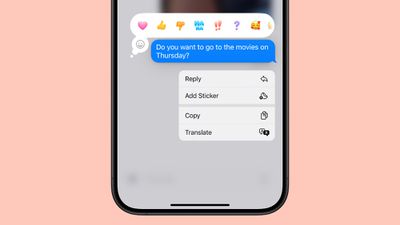
ios 18 messages tapback colors
In iOS 18, the six standard Tapback icons now feature more vibrant colors and intricate details. This visual refresh makes reactions more expressive and engaging, since the new design is visible both when selecting a Tapback and when receiving one from other users.

Perhaps the most notable change however is the addition of emoji support for Tapbacks. While the classic six reactions remain, you now have the option to choose from a wide array of emoji characters, adding a new layer of personalization to your message responses and making them more nuanced and expressive.

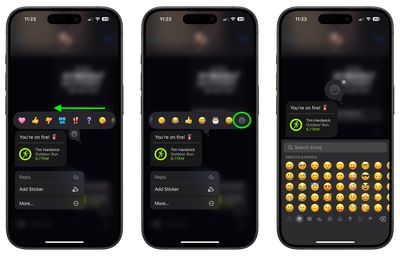
Here's how to use emoji as a Tapback reaction to a message you received in iOS 18:

  1. Long press on a message in the conversation thread.
  2. Swipe left across the standard Tapback reactions.
  3. Either select one of the suggested emoji to use, or tap the greyed out emoji at the end of the row to access the emoji keyboard and choose one that better suits your reaction.
messages

That's all there is to it. In iOS 18, Apple has also added new text effects and formatting options to the Messages app. Follow the links to learn how to use them.


Top Rated Comments

xxray Avatar
18 months ago
How do they appear on devices pre-iOS 18?
Score: 5 Votes (Like | Disagree)
MrTemple Avatar
18 months ago

Must both iPhone owners have iOS18 for this to work or only one side will do?

TIA
To anybody on an older version of iMessage (or no iMessage), it shows:

Craig Federighi reacted ?‍♂️ to "How come you're always late?"
To other interfaces and non iMessages (car etc) if you use one of the standard reacts it changes it to loved/emphasized/questioned/etc:


Attachment Image
Score: 2 Votes (Like | Disagree)
CharlesShaw Avatar
18 months ago
I use Tapback on a friend's daily gifs, and now that I have so many choices, I might suffer from writer's block. ?
Score: 2 Votes (Like | Disagree)
GruberHans Avatar
18 months ago
Top tip: Stop holding down a message to react and quickly double tap that same message instead.
Score: 2 Votes (Like | Disagree)
CharlesShaw Avatar
18 months ago

How do they appear on devices pre-iOS 18?
The recipient receives a text that says: Reacted [whatever emoji you used] to "[content of message]"
Score: 1 Votes (Like | Disagree)
svish Avatar
18 months ago
Good to see this change on this year's iOS
Score: 1 Votes (Like | Disagree)

Popular Stories

Aston Martin CarPlay Ultra Screen

Apple's CarPlay Ultra to Expand to These Vehicle Brands Later This Year

Sunday February 1, 2026 10:08 am PST by
Last year, Apple launched CarPlay Ultra, the long-awaited next-generation version of its CarPlay software system for vehicles. Nearly nine months later, CarPlay Ultra is still limited to Aston Martin's latest luxury vehicles, but that should change fairly soon. In May 2025, Apple said many other vehicle brands planned to offer CarPlay Ultra, including Hyundai, Kia, and Genesis. In his Powe...
Apple Logo Black

Apple's Next Launch is 'Imminent'

Sunday February 1, 2026 12:31 pm PST by
The calendar has turned to February, and a new report indicates that Apple's next product launch is "imminent," in the form of new MacBook Pro models. "All signs point to an imminent launch of next-generation MacBook Pros that retain the current form factor but deliver faster chips," Bloomberg's Mark Gurman said on Sunday. "I'm told the new models — code-named J714 and J716 — are slated...
Apple MacBook Pro M4 hero

New MacBook Pros Reportedly Launching Alongside macOS 26.3

Sunday February 1, 2026 5:42 am PST by
Apple is planning to launch new MacBook Pro models with M5 Pro and M5 Max chips alongside macOS 26.3, according to Bloomberg's Mark Gurman. "Apple's faster MacBook Pros are planned for the macOS 26.3 release cycle," wrote Gurman, in his Power On newsletter today. "I'm told the new models — code-named J714 and J716 — are slated for the macOS 26.3 software cycle, which runs from...
iOS 26

iOS 26.3 and iOS 26.4 Will Add These New Features to Your iPhone

Tuesday February 3, 2026 7:47 am PST by
We are still waiting for the iOS 26.3 Release Candidate to come out, so the first iOS 26.4 beta is likely still at least a week or two away. Following beta testing, iOS 26.4 will likely be released to the general public in March or April. Below, we have recapped known or rumored iOS 26.3 and iOS 26.4 features so far. iOS 26.3 iPhone to Android Transfer Tool iOS 26.3 makes it easier...
14 inch MacBook Pro Keyboard

Apple Changes How You Order a Mac

Saturday January 31, 2026 10:51 am PST by
Apple recently updated its online store with a new ordering process for Macs, including the MacBook Air, MacBook Pro, iMac, Mac mini, Mac Studio, and Mac Pro. There used to be a handful of standard configurations available for each Mac, but now you must configure a Mac entirely from scratch on a feature-by-feature basis. In other words, ordering a new Mac now works much like ordering an...
















