iOS 18: How to Use New Text Effects in Messages - MacRumorsOpen MenuShow RoundupsShow Forums menuVisit ForumsOpen Sidebar
Skip to Content

iOS 18: How to Use New Text Effects in Messages

by

In iOS 18, Apple has added several new features to its Messages app, one being the ability to add neat text effects to your messages to make them more expressive.
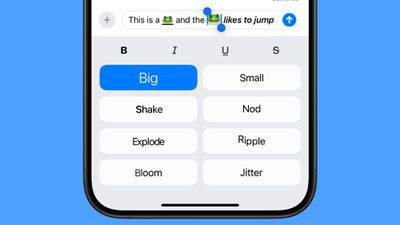
ios 18 text effects messages
The new animated text effects can be applied to your entire message, a single word, a phrase, or even an emoji or sticker. The options include Big, Small, Shake, Nod, Explode, Ripple, Bloom, and Jitter.

Here's how to add a text effect in the Messages app in iOS 18:

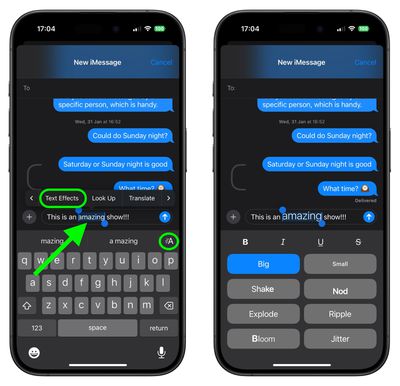
  1. Select the text, emoji, or sticker that you want to add an effect to with a double tap. (You can use the anchors to shorten and widen your selection.)
  2. Tap the "A" icon in the suggestions bar above the keyboard, or select the Text Effects option in the popup menu (tap the right chevron button to reveal it).
  3. Choose the text effect that you'd like to use.
messages

In a conversation with someone running ‌iOS 18‌ or a later update, the text or emoji that has an effect applied to it will continually animate when viewed. Note that these effects do not work on earlier versions of Apple's operating systems and won't show up at all.

Top Rated Comments

alexandr Avatar
20 months ago

Would be great if iMessage could somehow let us know if the recipient is using an older OS and won't be able to see what we send them. I hardly ever use these new effects or emojis because chances are they haven't upgraded yet. Whenever I have sent a new emoji in the past, I often got asked "What's that square?"
So you tell them — that square is you.
Score: 3 Votes (Like | Disagree)
robgreene Avatar
20 months ago
Bold/Italic/Underline should not be buried under text effects. As structured, they’ll rarely be used.
Score: 3 Votes (Like | Disagree)
20 months ago
Would be great if iMessage could somehow let us know if the recipient is using an older OS and won't be able to see what we send them. I hardly ever use these new effects or emojis because chances are they haven't upgraded yet. Whenever I have sent a new emoji in the past, I often got asked "What's that square?"
Score: 2 Votes (Like | Disagree)
20 months ago
The basic formatting might occasionally be useful. The dynamic text feels like a 2005 Internet forum feature.

The UI for this Apple went with looks horrible. It’s giant, boring buttons, with minimal spacing. It feels heavy. And the animations just keep going. It’s too busy and crazy.
Score: 2 Votes (Like | Disagree)
20 months ago
The keyboard/typing issues I’ve encountered in iOS 18 is out of this world. I thought it was just me getting old. Nope, tons of issues. Even while I’m typing this. Lag, odd key presses, weird auto correct anomalies, what appears to be stuck letters at times. UGH
Score: 2 Votes (Like | Disagree)
20 months ago
I was considering going to a 16PM from my 14PM - but I believe 17 will be a drastic change - plus, Apple Intelligence might actually work by then.
Score: 2 Votes (Like | Disagree)

Popular Stories

iPhone 18 Pro Deep Red Feature

iPhone 18 Pro Launching Later This Year With These 12 New Features

Wednesday March 18, 2026 7:39 am PDT by
While the iPhone 18 Pro and iPhone 18 Pro Max are not expected to launch for another six months or so, there are already plenty of rumors about the devices. It was initially reported that the iPhone 18 Pro models would have fully under-screen Face ID, with only a front camera visible in the top-left corner of the screen. However, the latest rumors indicate that only one Face ID component...
imac video apple feature

Apple Released Yet Another New Product Today

Friday March 20, 2026 2:39 pm PDT by
Apple has unveiled a whopping nine new products so far this March, including an iPhone 17e, iPad Air models with the M4 chip, MacBook Air models with the M5 chip, MacBook Pro models with M5 Pro and M5 Max chips, the all-new MacBook Neo, an updated Studio Display, a higher-end Studio Display XDR, AirPods Max 2, and now the Nike Powerbeats Pro 2. iPhone 17e features the same overall design as...
ios 26 4 pastel

iOS 26.4: Top 10 New Features Coming to Your iPhone

Friday March 20, 2026 2:44 pm PDT by
iOS 26.4 isn't the major update with new Siri features that we hoped for, but there are some useful quality of life improvements, and a little bit of fun with an AI playlist generator and new emoji characters. Playlist Playground - Apple Music has a Playlist Playground option that lets you generate playlists from text-based descriptions. You can include moods, feelings, activities, or...
Related Apple News: Sport | Health | Buyers Guide | Education | Iphone