

How to Hide Home Screen App Pages on iPhone in iOS 14 - MacRumorsOpen MenuShow RoundupsShow Forums menuVisit ForumsOpen Sidebar
Skip to Content

How to Hide Home Screen App Pages on iPhone in iOS 14

by

With so many apps available for iPhone on the App Store, it doesn't take long before you download so many that managing them can start to get a bit tiresome and unwieldy. Having multiple pages of apps extending off the initial Home Screen can be a burden, especially if you like to organize what you can see on the screen into any sort of meaningful order.
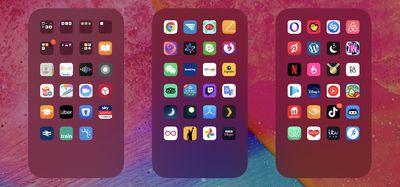
apps
Fortunately, in iOS 14 and later, Apple allows you to hide individual pages of apps from sight. This not only gives your iPhone a tidier look and feel, but it also serves to bring the App Library closer to your initial ‌Home Screen‌, making it that much easier to access using fewer swipes.

How to Hide iPhone App Pages on the Home Screen

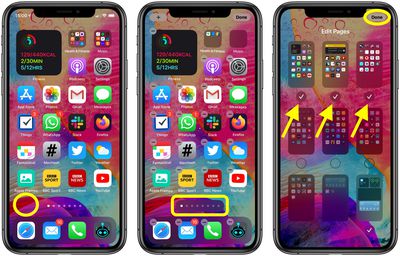
  1. Long press on a blank area of the ‌Home Screen‌ or any additional page of apps.
  2. Once in jiggle mode, tap the app page dot icons just above the Dock at the bottom of the screen.
  3. Tap to uncheck any app pages that you want to hide.
  4. Tap Done in the top-right corner of the screen to finish.
  5. Tap Done in the top-right corner to exit out of jiggle mode.
home screen apps

To reinstate any app pages you hid using this method, simply follow the steps again, but in step 3, check the app pages you want to unhide instead.


Related Forum: iOS 14

Top Rated Comments

H3boy Avatar
75 months ago
Am I the only person that has everything not on the home page in a folder?
Score: 10 Votes (Like | Disagree)
itsmilo Avatar
75 months ago

Am I the only person that has everything not on the home page in a folder?
yeah. Home Page has my most frequently used apps and the 2nd page is just apps put into categorized folders. Same reason I have no use for the new App Library screen
Score: 8 Votes (Like | Disagree)
jclo Avatar
75 months ago

Is 'jiggle mode' official terminology? :D
Sure is. https://support.apple.com/guide/iphone/move-and-organize-apps-iph822ece7dd/ios

Bonus:
Score: 6 Votes (Like | Disagree)
75 months ago
My wife needs this article. She has like 12 pages of apps, which drives me crazy when I have to use her phone.
Score: 6 Votes (Like | Disagree)
adrianlondon Avatar
75 months ago
Answers to some questions asked:

Can you remove/disable the App Library? No, just don't keep swiping right.

Can you hide every homescreen? No, you have to have one selected.

Can the homescreens be re-arranged? No. Shame.

Why is this thing a thing? Dunno; maybe for people who have a page full of work apps they want to hide at home, or a page full of dating apps and porn links they want to hide at work.
Score: 4 Votes (Like | Disagree)
alexandr Avatar
75 months ago

My wife needs this article. She has like 12 pages of apps, which drives me crazy when I have to use her phone.
so really it's you who needs this article ;)
Score: 4 Votes (Like | Disagree)

Popular Stories

iPhone 18 Pro Deep Red Feature

iPhone 18 Pro Launching Later This Year With These 12 New Features

Wednesday March 18, 2026 7:39 am PDT by
While the iPhone 18 Pro and iPhone 18 Pro Max are not expected to launch for another six months or so, there are already plenty of rumors about the devices. It was initially reported that the iPhone 18 Pro models would have fully under-screen Face ID, with only a front camera visible in the top-left corner of the screen. However, the latest rumors indicate that only one Face ID component...
ios 26 4 yellow

Here Are Apple's Release Notes for iOS 26.4

Wednesday March 18, 2026 11:56 am PDT by
Apple provided developers and public beta testers with the release candidate versions of iOS 26.4 and iPadOS 26.4, which means we're going to see a public launch as soon as next week. The RC versions of the software include Apple's official release notes, giving us final details on what's included in the update. Apple Music - Playlist Playground (beta) generates a playlist from your...
Apple Logo Sketch Feature

Apple Has Now Unveiled Eight New Products This Month

Tuesday March 17, 2026 9:25 am PDT by
Apple has unveiled a whopping eight new products so far this March, including an iPhone 17e, iPad Air models with the M4 chip, MacBook Air models with the M5 chip, MacBook Pro models with M5 Pro and M5 Max chips, the all-new MacBook Neo, an updated Studio Display, a higher-end Studio Display XDR, and now the AirPods Max 2 this week. iPhone 17e features the same overall design as the iPhone...
Related Apple News: Lifestyle | Politics | Education | Reviews | Opinion
















