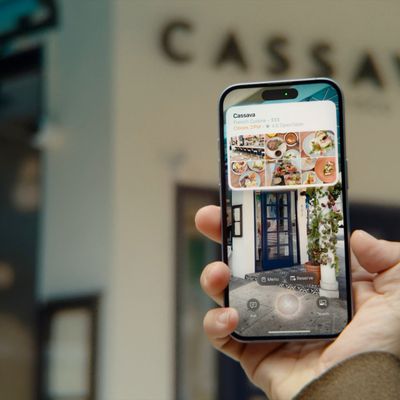
With iOS 18.1, Apple has introduced AI-powered notification summarization across all apps, which means your iPhone will automatically condense your alerts to show just the key details. The feature aims to reduce notification overload, but it doesn't always work as advertised. Keep reading to learn how to manage the feature.
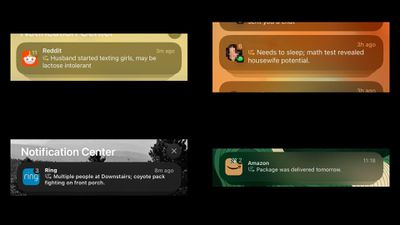
apple intelligence fails

Image credits: r/AppleIntelligenceFail

Powered by Apple Intelligence, the new summarization feature works by analyzing notification content and creating more concise versions that highlight the most important information. By default, it's enabled for compatible apps after you complete the initial setup process in iOS 18.1.

While Apple's AI summaries offer convenience, they've also produced some unexpectedly funny results. The system's struggle with emotional context and tone detection has led to some particularly amusing recap fails. As recorded in places like the subreddit r/AppleIntelligenceFail, when the algorithm misinterprets sarcasm, combines unrelated notifications, or fails to grasp logic, the results can be surprisingly entertaining (or not, depending on your sense of humor).

Customize or Disable Notification Summaries

Whether you've been tickled or confused by summaries, or they just don't appeal to your workflow, fortunately you can disable the feature entirely or customize which apps use the feature. This gives you complete control over how your notifications appear on the Lock Screen and in Notification Center on your iPhone.

  1. Open Settings on your iPhone.
  2. Scroll down and tap Notifications.
  3. Tap Summarize Previews.
  4. Toggle off the switch at the top to completely disable Summarize Previews. Alternatively, toggle off the switches for individual apps only.
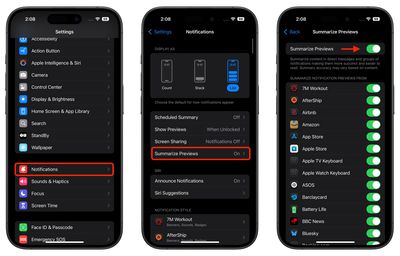
settings

Things to Know About Notification Summaries

  • Turning off summarization doesn't affect other notification settings like grouping or Focus modes.
  • The feature only works on devices that support Apple Intelligence (iPhone 15 Pro and iPhone 16 models, M-series iPads, iPad mini 7, and Macs with Apple silicon).
  • Disabling summaries returns notifications to their standard format immediately.
  • You can re-enable summarization at any time through Settings.

Keep in mind that notification summaries are separate from the Notification Summary feature that delivers scheduled batches of notifications at specific times. While they may seem similar, they serve different purposes in helping you manage your notifications more effectively.


Top Rated Comments

frost_horizon Avatar
15 months ago
I am totally agree with arguments in this video:

Score: 15 Votes (Like | Disagree)
contacos Avatar
15 months ago
I still don't get the point of this like Notifications are super short as it is, what's there to summarize.

I guess it makes sense for people like the Kardashians with Notifications coming in every second of the day.
Score: 13 Votes (Like | Disagree)
Rkuda Avatar
15 months ago
Tech companies are willing to burn down the world for this ****...
Score: 12 Votes (Like | Disagree)
Mr_Ed Avatar
15 months ago
Apple: “Here’s an awesome new feature you didn’t ask for.”
MR: “Here’s how you turn that awesome new feature off.”
Most of the rest of us: “Thanks! I needed that!”

I’ve been holding out on moving to iOS 18 until some of the AI nonsense works itself out. I don’t want any of it, and there is nothing compelling to me about other stuff in 18, so I guess I’ll continue to wait.
Score: 12 Votes (Like | Disagree)
Godspeed8230 Avatar
15 months ago
That has Siri Intelligence written all over it. Oh dear..
Score: 9 Votes (Like | Disagree)
CharlesShaw Avatar
15 months ago
This explains what happens to the feedback I send to Apple.
Score: 7 Votes (Like | Disagree)

Popular Stories

Aston Martin CarPlay Ultra Screen

Apple's CarPlay Ultra to Expand to These Vehicle Brands Later This Year

Sunday February 1, 2026 10:08 am PST by
Last year, Apple launched CarPlay Ultra, the long-awaited next-generation version of its CarPlay software system for vehicles. Nearly nine months later, CarPlay Ultra is still limited to Aston Martin's latest luxury vehicles, but that should change fairly soon. In May 2025, Apple said many other vehicle brands planned to offer CarPlay Ultra, including Hyundai, Kia, and Genesis. In his Powe...
Apple Logo Black

Apple Just Made Its Second-Biggest Acquisition Ever After Beats

Thursday January 29, 2026 10:07 am PST by
Apple today confirmed to Reuters that it has acquired Q.ai, an Israeli startup that is working on artificial intelligence technology for audio. Apple paid close to $2 billion for Q.ai, according to sources cited by the Financial Times. That would make this Apple's second-biggest acquisition ever, after it paid $3 billion for the popular headphone and audio brand Beats in 2014. Q.ai has...
Apple Logo Black

Apple's Next Launch is 'Imminent'

Sunday February 1, 2026 12:31 pm PST by
The calendar has turned to February, and a new report indicates that Apple's next product launch is "imminent," in the form of new MacBook Pro models. "All signs point to an imminent launch of next-generation MacBook Pros that retain the current form factor but deliver faster chips," Bloomberg's Mark Gurman said on Sunday. "I'm told the new models — code-named J714 and J716 — are slated...
14 inch MacBook Pro Keyboard

Apple Changes How You Order a Mac

Saturday January 31, 2026 10:51 am PST by
Apple recently updated its online store with a new ordering process for Macs, including the MacBook Air, MacBook Pro, iMac, Mac mini, Mac Studio, and Mac Pro. There used to be a handful of standard configurations available for each Mac, but now you must configure a Mac entirely from scratch on a feature-by-feature basis. In other words, ordering a new Mac now works much like ordering an...
Apple MacBook Pro M4 hero

New MacBook Pros Reportedly Launching Alongside macOS 26.3

Sunday February 1, 2026 5:42 am PST by
Apple is planning to launch new MacBook Pro models with M5 Pro and M5 Max chips alongside macOS 26.3, according to Bloomberg's Mark Gurman. "Apple's faster MacBook Pros are planned for the macOS 26.3 release cycle," wrote Gurman, in his Power On newsletter today. "I'm told the new models — code-named J714 and J716 — are slated for the macOS 26.3 software cycle, which runs from...