How to Enhance Siri Requests in iOS By Adding Your Personal Contact Details - MacRumorsOpen MenuShow RoundupsShow Forums menuVisit ForumsOpen Sidebar
Skip to Content

How to Enhance Siri Requests in iOS By Adding Your Personal Contact Details

by

If you add your personal contact information to your iPhone or iPad, it allows Siri to carry out more complex queries and offer better suggestions, such as giving you directions home or reminding you about your scheduled meeting when you arrive at the office.
siri iphone x
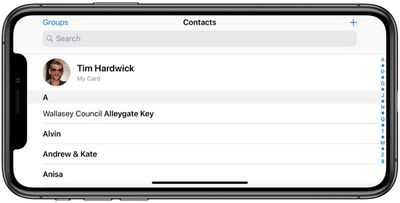
For best results, you need to make sure your self-identifying contact card – called My Card in the Contacts app – includes sufficient information about you. Your iPhone or ‌iPad‌ should use your Apple ID to create your contact card, but you may need to provide additional details like your name and address to complete it.
editing my card in contacts for better siri suggestions
To do so, open the Contacts app on your device and tap My Card at the top of your contacts list, then tap Edit and enter your information – you can insert additional fields as desired using the plus buttons. If you don't see My Card, tap the Add button and enter your info, then return to your device's Home screen and follow the steps below.

  1. Launch the Settings app on your iPhone or ‌iPad‌.
  2. Scroll down and tap Contacts.
  3. Tap My Info.
    editing my card in contacts for better siri suggestions 1

  4. Select your name in the contacts list that appears.
  5. Next, tap Siri & Search.
  6. Make sure the toggle next to Siri & Suggestions is in the green ON position.
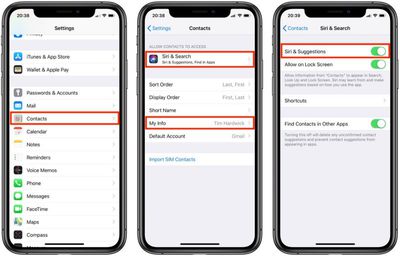
If you like, you can enable these personalized ‌Siri‌ Suggestions on your iPhone's lock screen – just make sure the toggle next to Allow on Lock Screen is also in the green ON position.

You can also enhance ‌Siri‌'s responses by establishing relationships between your familial contacts. Click here to learn how.


Popular Stories

iOS 27 on iPhone 17 1

Apple to Unveil iOS 27 in June With These New Features Beyond Siri

Friday April 17, 2026 8:40 am PDT by
Apple is expected to unveil iOS 27 during its WWDC 2026 keynote on June 8, and the update should be released in September. Below, we outline some of the new features that are rumored to be coming with iOS 27, beyond the long-awaited more personalized version of Siri. iOS 27 will reportedly support 5G satellite internet connectivity, although this functionality might be limited to the...
Sad Siri Feature

Siri Engineers Sent to AI Coding Bootcamp as Apple Prepares to Deliver Siri Overhaul

Wednesday April 15, 2026 1:19 pm PDT by
Apple is sending a large portion of its Siri engineers to a multi-week bootcamp to learn to code using AI, reports The Information. Apple's decision to teach its programmers to better use AI for coding comes just two months before Apple is expected to unveil a smarter, more capable version of Siri at WWDC. While employees attend the coding bootcamp, around 60 members of the Siri development...
wwdc 2026 horizontal

WWDC 2026 Graphic Teases Major iOS 27 Feature

Sunday April 19, 2026 3:02 pm PDT by
Apple's WWDC 2026 graphic provides "a glimpse of the revamped Siri interface coming in iOS 27," according to Bloomberg's Mark Gurman. In his Power On newsletter today, Gurman said iOS 27 will include a new Siri interface in the Dynamic Island. When you trigger Siri, he said the Dynamic Island will show a "Search or Ask" prompt, and this will apparently be accompanied by a "glowing cursor"...
Related Apple News: Culture | Motoring | Ipad | Buyers Guide | Reviews