

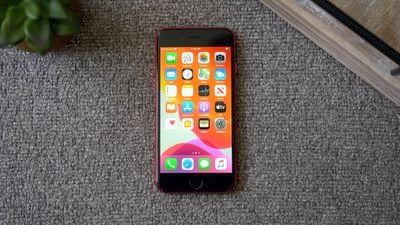
This tutorial explains how to force restart or hard reset Apple's second-generation iPhone SE (2020) and third-generation ‌iPhone‌ SE (2022), and how to activate Device Firmware Upgrade (DFU) mode to troubleshoot your device if needed.
iphone se
A hard reset basically force-reboots your ‌‌iPhone‌‌, which is useful if the device is freezing, throwing up errors, or has stopped responding completely. DFU mode, on the other hand, restores an ‌‌iPhone‌‌ if a reset or standard Recovery Mode doesn't solve the problem you're experiencing.

DFU mode lets the device interface with iTunes, update the firmware and restore the OS without automatically installing the last downloaded version. It's useful for installing older versions of iOS if a beta malfunctions, or if a jailbreak goes bad.

How to Hard Reset iPhone SE (2020 & 2022 Models)

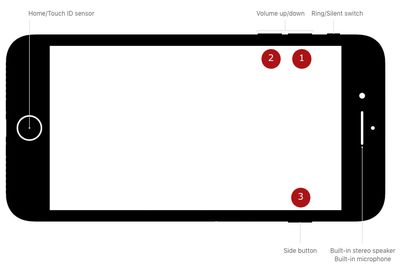
The following button presses should be done in quick succession, one after the other.
hard reset buttons iphone se

  1. Press and quickly release the Volume Up button.
  2. Press and quickly release the Volume Down button.
  3. Finally, press and hold the Side button (aka power) until you see a black screen, then release.

After about 10 seconds of holding the Side button, your ‌iPhone‌ SE will force restart.

How to Activate DFU Mode on iPhone SE (2020 & 2022 Models)

  1. Turn on your ‌iPhone‌ if it isn't already.
  2. Connect it to your computer using a Lightning to USB cable.
  3. On your ‌iPhone‌, press the Volume Up button immediately followed by the Volume Down button.
  4. Next, press and hold the Side button (or power button) until your ‌iPhone‌'s screen turns black.
  5. Release the Side button and then hold down both the Side button and Volume Down button together for approximately five seconds.
  6. Now release the Side button, but continue to press the Volume Down button. The screen should remain black.
  7. Wait for Finder to automatically launch. You'll see a message prompt saying Your Mac has detected an ‌iPhone‌ in recovery mode. You must restore this ‌iPhone‌ before it can be used." If you don't see the message, repeat the steps above.

Once you've closed the Finder recovery prompt you can go ahead and restore your ‌iPhone‌ back to factory settings by selecting Restore iPhone on the ‌iPhone‌ Recovery Mode screen. Once restored, your ‌iPhone‌ will automatically exit out of DFU mode and boot up to its activation screen.

How to Exit DFU Mode on iPhone SE (2020 & 2022 Models)

If you enabled DFU mode and want to manually exit out of it, here's how it's done.

  1. Press the Volume Up button on your ‌iPhone‌ and quickly release it.
  2. Press the Volume Down button and release it.
  3. Press and hold the Side button until the Apple logo appears on your ‌iPhone‌'s screen.

Your ‌iPhone‌ should now have exited DFU recovery mode.

Tag: DFU
Related Forum: iPhone

Popular Stories

iOS 26

iOS 26.4 and iOS 27 Features Revealed in New Leak

Friday December 12, 2025 10:56 am PST by
Macworld's Filipe Espósito today revealed a handful of features that Apple is allegedly planning for iOS 26.4, iOS 27, and even iOS 28. The report said the features are referenced within the code for a leaked internal build of iOS 26 that is not meant to be seen by the public. However, it appears that Espósito and/or his sources managed to gain access to it, providing us with a sneak peek...
iOS 26

Apple Releases iOS 26.2 With Alarms for Reminders, Lock Screen Changes, Enhanced Safety Alerts and More

Friday December 12, 2025 10:10 am PST by
Apple today released iOS 26.2, the second major update to the iOS 26 operating system that came out in September, iOS 26.2 comes a little over a month after iOS 26.1 launched. ‌iOS 26‌.2 is compatible with the ‌iPhone‌ 11 series and later, as well as the second-generation ‌iPhone‌ SE. The new software can be downloaded on eligible iPhones over-the-air by going to Settings >...
Apple Foldable Thumb

Leak Reveals Foldable iPhone Details

Monday December 15, 2025 9:09 am PST by
The first foldable iPhone will feature a series of design and hardware firsts for Apple, according to details shared by the Weibo leaker known as Digital Chat Station. According to a new post, via machine translation, Apple is developing what the leaker describes as a "wide foldable" device, a term used to refer to a horizontally oriented, book-style foldable with a large internal display....
iOS 26

iOS 26.2 Coming Soon With These 8 New Features on Your iPhone

Thursday December 11, 2025 8:49 am PST by
Apple seeded the second iOS 26.2 Release Candidate to developers earlier this week, meaning the update will be released to the general public very soon. Apple confirmed iOS 26.2 would be released in December, but it did not provide a specific date. We expect the update to be released by early next week. iOS 26.2 includes a handful of new features and changes on the iPhone, such as a new...
macOS Tahoe 26 Thumb

Apple Releases macOS Tahoe 26.2 With Edge Light

Friday December 12, 2025 10:08 am PST by
Apple today released macOS Tahoe 26.2, the second major update to the macOS Tahoe operating system that came out in September. macOS Tahoe 26.2 comes five weeks after Apple released macOS Tahoe 26.1. Mac users can download the macOS Tahoe update by using the Software Update section of System Settings. macOS Tahoe 26.2 includes Edge Light, a feature that illuminates your face with soft...
AirPods Pro Firmware Feature

Apple Releases New Firmware for AirPods Pro 2 and AirPods Pro 3

Thursday December 11, 2025 11:28 am PST by
Apple today released new firmware designed for the AirPods Pro 3 and the prior-generation AirPods Pro 2. The AirPods Pro 3 firmware is 8B30, up from 8B25, while the AirPods Pro 2 firmware is 8B28, up from 8B21. There's no word on what's include in the updated firmware, but the AirPods Pro 2 and AirPods Pro 3 are getting expanded support for Live Translation in the European Union in iOS...
ipados 26 1 slide over

Apple Releases iPadOS 26.2 With Multitasking Improvements

Friday December 12, 2025 10:09 am PST by
Apple today released iPadOS 26.2, the second major update to the iPadOS 26 operating system released in September. iPadOS 26.2 comes a month after iPadOS 26.1. The new software can be downloaded on eligible iPads over-the-air by going to Settings > General > Software Update. iPadOS 26.2 continues with the multitasking improvements that were added with iPadOS 26.1. You can now drag and...
airpods max 2024 colors

AirPods Max 2 Likely to Offer These 10 New Features

Monday December 15, 2025 7:41 am PST by
Apple released the AirPods Max on December 15, 2020, meaning the over-ear headphones launched five years ago today. While the AirPods Max were updated with a USB-C port and new color options last year, followed by support for lossless audio and ultra-low latency audio this year, the headphones lack some of the features that have been introduced for newer generations of the regular AirPods and the ...

















