

Apple made some major improvements to the Photos app in iOS 15, adding some long-awaited and requested features along with unique capabilities that enable you to do more with your images than ever.

There's a new Memories feature that lets you relive your favorite moments, metadata info can be viewed and edited, Visual Lookup lets you identify plants, landmarks, and more, and with Live Text, you can copy and paste the text from any image on your iPhone. This guide highlights all of the new features that are available in the Photos app.
Memories
The Memories section of the Photos app has been overhauled in iOS 15, making it easier than ever to resurface your favorite memories.
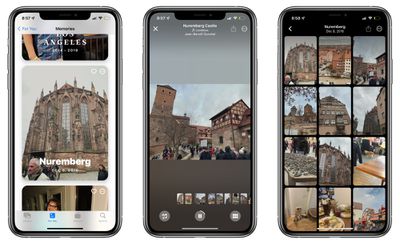
The Memories feature has a new look that includes animated cards with adaptive titles, new animation and transition styles, and multiple image collages for a more cinematic feel. There are new memory looks that are added to Memories based on each photo and video, with Apple using machine learning to apply the right contrast and color adjustment for a consistent look. Apple says that this feature is designed to mimic what colorists at film studios do.
When playing a Memory, there's an interactive interface that lets you tap to pause, replay the last photo, skip to the next photo, or jump ahead, with the music designed to keep playing. Changing a song, removing or adding photos, or adjusting a Memory look is done in realtime with no need to recompile. To make it easier to make adjustments to Memories, there's a new Browse view so you can see all of the photos and videos in a bird's eye view.
- iOS 15: How to Enhance Photos App Memories With 'Memory Looks'
- iOS 15: How to Select the Images That Appear in a Photos Memory
Apple Music Integration
When creating and viewing Memories, the Photos app has always supported integrated music, but now Apple Music subscribers can choose to add any Apple Music song to a Memory.
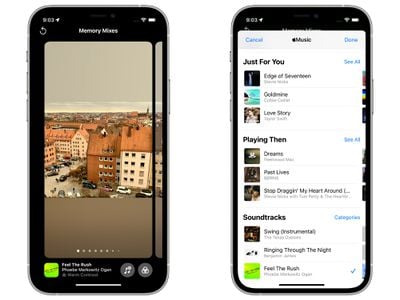
The Memories feature makes personalized Apple Music song suggestions based on your music tastes and the content of your photos and videos. Song suggestions can include songs that were popular at the time and location of the memory, songs that you listened to while you were traveling, or a song from an artist if the memory includes a concert.
You can customize a Memory by swiping through various Memory mixes, which lets you experiment with different songs, pacing, and Memory looks.
New Memory Types
There are new kinds of Memories that are built from your Photos library, with Apple adding new international holidays, child-focused memories, and trends over time. Pet Memories have been improved and iOS devices can recognize individual dogs and cats.
Watch Next
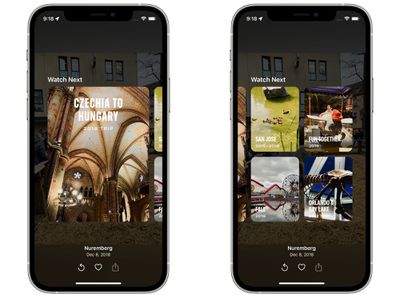
After you've finished a Memory, Memories will suggest related content so that you can keep going through your photo content.
Suggest Less Often
If there's someone popping up in your Memories or in Featured Photos, you can use a new quick access "Feature Less" button to see less of that specific person.

This "Feature Less" option also works for dates, places, and holidays.
Live Text
Any text that's in a photograph or an image on your iPhone is now recognized by the iPhone through the new Live Text feature.
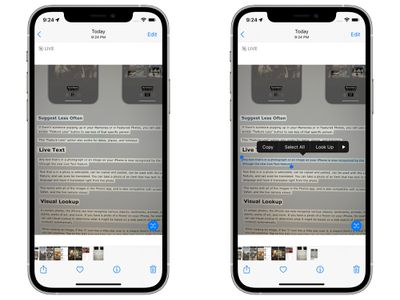
Text that is in a photo is selectable, can be copied and pasted, can be used with the Lookup feature, and can even be translated. You can take a photo of an item that has text in a foreign language and have it translated right from the photo.
This works with all of the images in the Photos app, and is also compatible with screenshots, Safari, and the live camera viewer.
Visual Lookup
In certain photos, the iPhone can now recognize various objects, landmarks, animals, books, plants, works of art, and more. If you have a photo of a flower on your iPhone, for example, you can use Visual Lookup to determine what it might be based on a web search of images that Apple conducts automatically.
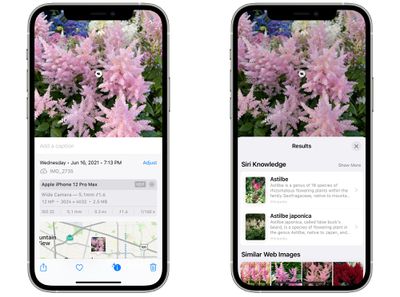
When viewing an image, if the "I" icon has a little star over it, it means there's a Visual Lookup you can examine. Tap on the Info icon and then tap on the little leaf icon to open up a search.
Metadata Viewing and Editing
In iOS 15, if you tap on the new "Info" icon below a photo, you can view the camera that was used to take it, the lens, shutter speed, megapixels, size, aperture, and more, which is all of the EXIF info you can get from the desktop Photos app.
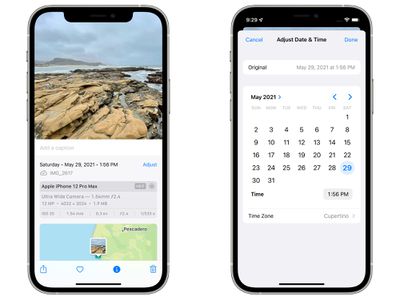
In this interface, you can add captions and adjust the date and time of a photo through an added "Adjust" button. Prior to iOS 15, none of this information was available on iOS devices.
- iOS 15: How to View EXIF Metadata in the Photos App
- iOS 15: How to Adjust the Date and Time of Photos
Faster iCloud Photos Library Syncing
Apple says that when you upgrade to a new device, iCloud Photos syncs more quickly than before, making it faster than ever for you to get access to your photo library.
People Identification and Naming Improvements
The "People" album on the iPhone has improved recognition for the various individuals that are in your pictures, and the iOS 15 Photos app is able to detect people in extreme poses, people wearing accessories, and people with occluded faces.

Apple has also added a full workflow for correcting naming mistakes. When selecting a person, if you tap on the "..." icon and then choose "Manage Tagged Photos," you can untag any photos that might not be that person. This is also the interface used to tag additional photos if iOS finds untagged images.
Selection Order for Photos Picker
The Photos image picker that's available across iOS lets you select photos in a certain order for sharing purposes, so if you have a photo sequence, you can be sure they're shared in the order that you intend.
Shared With You
If someone shares a photo or video with you in the Messages app, it will show up in a new "Shared With You" section in the Photos app.
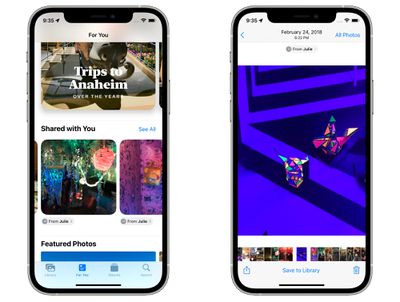
If it's a photo that was taken when you were present, it will appear in the All Photos view and in the Days, Months, and Years view, as well as in Featured Photos and Memories.
Photos in the Shared With You section can easily be saved to the Photos Library, and you can respond to a message with a tap right from the Photos app.
Spotlight Photos Search
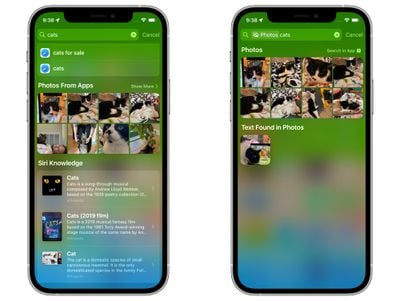
In iOS 15, you can search through your entire Photos library using Spotlight. You can search by locations, people, scenes, or things in the photos like plants or pets thanks to Visual Lookup.
Guide Feedback
Have questions about Photos in iOS 15, know of a feature we left out, or want to offer feedback on this guide? Send us an email here.



















