iOS 15: How to Add Apple Music Songs to Your Memories in Photos - MacRumorsOpen MenuShow RoundupsShow Forums menuVisit ForumsOpen Sidebar
Skip to Content

iOS 15: How to Add Apple Music Songs to Your Memories in Photos

by

In iOS 15, Apple's native Photos app features a significant update to Memories, including a new design, a more interactive interface, new visual effects, and richer integration with Apple Music.
iOs 15 Photos Feature
When creating and viewing Memories, the ‌Photos‌ app has always supported basic music integration, but now ‌Apple Music‌ subscribers can choose to add any ‌Apple Music‌ song to a memory.

When a memory is selected in ‌Photos‌, new "Memory Mixes" can suggest songs based on your ‌Apple Music‌ listening history that may go with the photos and videos, or you can choose a song yourself for a more personalized experience.

In addition to auditioning songs, Memory mixes can also suggest Memory Looks – essentially color filters – that may go with your chosen memory and accompanying music in order to evoke a particular atmosphere.

Here's how you can select songs from ‌Apple Music‌ to add to your Memories in iOS 15 (a public beta is coming in July, with an official release due in the fall).

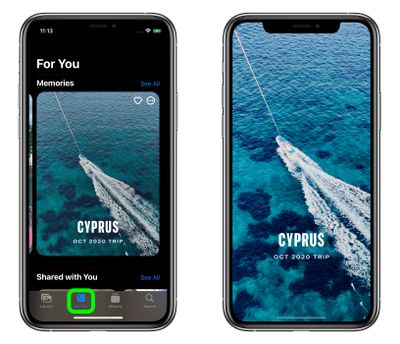
  1. Launch the Photos app on your iPhone or iPad, then select the For You tab.
  2. Under the Memories section, select a memory you want to edit.
    ios 15 memories music

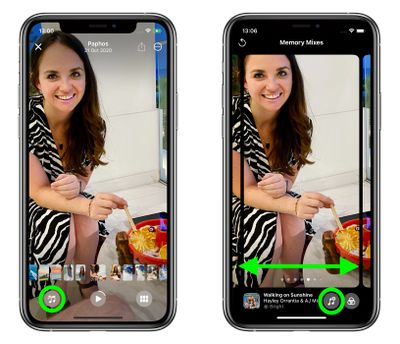
  3. Tap the playing memory to bring up the controls overlay, then tap the Memory Mixes icon in the lower left corner (it looks like a musical note with stars).
  4. Swipe left or right, and the ‌Photos‌ app will use machine learning to marry suggested music tracks from ‌Apple Music‌ with different Memory Looks that may go together. (Use the Restart icon in the upper left corner to rewind the memory.)
  5. If you come across a song you like, simply tap the screen, and the music and look will be applied to your memory. Alternately, tap the Music icon (the musical note with the + sign) to select another track.
    photos

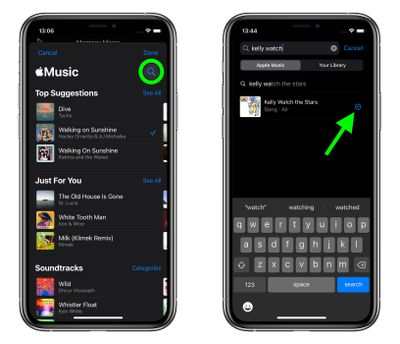
  6. You can browse ‌Apple Music‌'s Top Suggested songs and other categories, or tap the Search icon at the top to find a specific song in your music library.
  7. Tap Done when you've chosen a song to preview it in your memory, then tap the screen and the music will be applied to your memory.
    photos

In addition to ‌Apple Music‌ integration, ‌Photos‌ also features new Memory types, including new international holidays, child-focused memories, trends over time, and improved pet memories, including the ability to recognize individual dogs and cats.

Related Forum: iOS 15

Top Rated Comments

Canyda Avatar
63 months ago

Great move - but then when people try to share it on social media platforms or YouTube, the song will get flagged for copyright infringement.
I cannot tell you how many of my vacation videos have had the sound muted by YouTube because of the song playing in the background somewhere. All my Caesar's Palace fountain show videos are basically silent films, despite those songs being licensed by the casino for the fountain shows.
Score: 3 Votes (Like | Disagree)
63 months ago
Please just let me turn memories off. I don't want them, don't need them. Whenever I accidentally hit the "For You" button (because I never intentionally hit it) I get annoyed as **** and spend five minutes hitting "suggest fewer memories like this" on every single automatically generated memory. Doesn't seem to work.
Score: 3 Votes (Like | Disagree)
lazyrighteye Avatar
63 months ago

I wish they cared about users who have their won music libraries and fix the issues with the Music app.
I had a massive library of meticulously curated songs - many that were live recordings, some of which I recorded, that only existed in my Library - and when Match first landed, it totally jacked up my collection. It hasn't been the same since. Has definitely adversely effected the amount of live recordings I listen to. Been a sad nightmare. Sux.

That out of the way, ANY attention paid Music is welcome. While it has played a role in music discovery, there remains a loooong way to go. Amongst many other things, I'd like to see more robust data - inline with liner notes from the vinyl days. Who engineered the album, who are the musicians, where was it recorded, etc. Why that data still hasn't been included with digital audio files is baffling. It definitely helps listeners better connect with the music in deeper, more meaningful ways.
Score: 3 Votes (Like | Disagree)
cmichaelb Avatar
63 months ago
I wish they cared about users who have their won music libraries and fix the issues with the Music app.
Score: 3 Votes (Like | Disagree)
TheYayAreaLiving 🎗️ Avatar
63 months ago
I didn’t know you could do that. Thank you MR.
Score: 2 Votes (Like | Disagree)
Rswifty Avatar
60 months ago

It truly is a mess. I have live albums that I can't even play anymore because there are multiple versions of each song showing up. Like, "Song A," "Song A (live)," "Song A (feat. person X)"... So instead of medleys where songs flow together, I get the same song 3 times in a row. And I can't even use a playlist to recreate the album because then there are gaps in songs where there should be none.

That's even more irritating to me than albums that have random foreign versions of songs mixed in.
Has anyone been able to figure how to just turn the music off?
Score: 1 Votes (Like | Disagree)

Popular Stories

iphone 17 pro orange

Apple Highlights Photos Shot on iPhone During NASA's Mission to Moon

Saturday April 11, 2026 8:17 am PDT by
As we previously reported, astronauts aboard NASA's Orion spacecraft used the iPhone 17 Pro Max to take selfies of themselves with the Earth in the background during the Artemis II mission around the far side of the Moon last week. Now that the crew members have safely returned to Earth, Apple's CEO Tim Cook and marketing chief Greg Joswiak have both turned to social media to congratulate...
google photos wardrobe

Google Photos to Get AI 'Wardrobe' Feature

Wednesday April 29, 2026 3:50 pm PDT by
Google Photos is getting a new wardrobe planning feature that will help you decide what to wear. AI will pull in images of clothing from the Google Photos library, organizing clothing items into a digital closet. You will be able to put items together to create outfits, and even virtually try them with a digital avatar on to see how they'll look. The Google Photos app will show all items of...
Apple Event Logo

Apple Just Released a New Accessory

Monday May 4, 2026 8:13 am PDT by
Apple today released a new Pride Edition Sport Loop for the Apple Watch. The band features a rainbow design with 11 colors of woven nylon yarns. The new Pride Edition Sport Loop is available to order now on Apple.com and in the Apple Store app in 40mm, 42mm, and 46mm sizes, and it will be available at Apple Store locations starting later this week. In the U.S., the band costs $49. There...
Related Apple News: Business | Politics | Buyers Guide | Motoring | Travel