iOS 15: How to Use Spotlight to Search for Photos - MacRumorsOpen MenuShow RoundupsShow Forums menuVisit ForumsOpen Sidebar
Skip to Content

iOS 15: How to Use Spotlight to Search for Photos

by

In iOS 15, Apple has made Spotlight Search on iPhone and iPad more powerful than ever by integrating it with more apps, including the Photos app.
iOs 15 Photos Feature
Simply swipe down on the Lock Screen or the Home Screen to bring up Spotlight Search, type "‌Photos‌," then start searching your pictures by specifying locations, people, scenes, or even things in your photos like plants or pets, thanks to Visual Lookup.

‌Photos‌ can appear in search results as Suggestions, too. So if you type in "cats," for example, you'll see your photos appear alongside results from the Files app, the web, Siri Knowledge, and other sources.
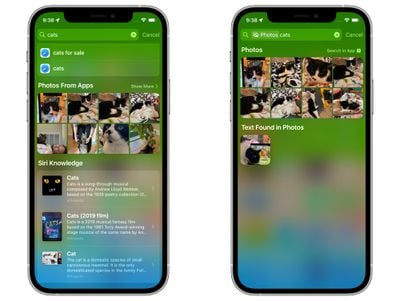
spotlight search photos app
That's all well and good, you might be thinking, but what if you don't want your photos appearing in Spotlight because of privacy concerns? Fear not, because you can control what shows up in search by going to Settings -> Siri & Search -> Photos.
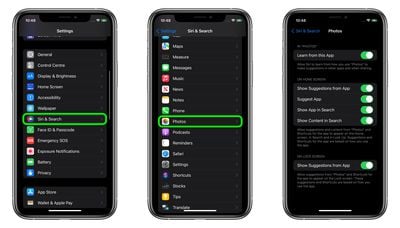
settings
There, you'll find options to control what gets shown in terms of ‌Photos‌ content and suggestions, with separate toggles to manage both Lock Screen and ‌Home Screen‌ searches individually.

Related Forum: iOS 15

Popular Stories

iphone 17 pro orange

Apple Highlights Photos Shot on iPhone During NASA's Mission to Moon

Saturday April 11, 2026 8:17 am PDT by
As we previously reported, astronauts aboard NASA's Orion spacecraft used the iPhone 17 Pro Max to take selfies of themselves with the Earth in the background during the Artemis II mission around the far side of the Moon last week. Now that the crew members have safely returned to Earth, Apple's CEO Tim Cook and marketing chief Greg Joswiak have both turned to social media to congratulate...
google photos wardrobe

Google Photos to Get AI 'Wardrobe' Feature

Wednesday April 29, 2026 3:50 pm PDT by
Google Photos is getting a new wardrobe planning feature that will help you decide what to wear. AI will pull in images of clothing from the Google Photos library, organizing clothing items into a digital closet. You will be able to put items together to create outfits, and even virtually try them with a digital avatar on to see how they'll look. The Google Photos app will show all items of...
Apple Event Logo

Apple Just Released a New Accessory

Monday May 4, 2026 8:13 am PDT by
Apple today released a new Pride Edition Sport Loop for the Apple Watch. The band features a rainbow design with 11 colors of woven nylon yarns. The new Pride Edition Sport Loop is available to order now on Apple.com and in the Apple Store app in 40mm, 42mm, and 46mm sizes, and it will be available at Apple Store locations starting later this week. In the U.S., the band costs $49. There...
Related Apple News: Education | Business | Buyers Guide | Mac | Sport