iOS 26 Streamlines Apple Music Replay
iOS 26 improves the Apple Music Replay viewing experience.
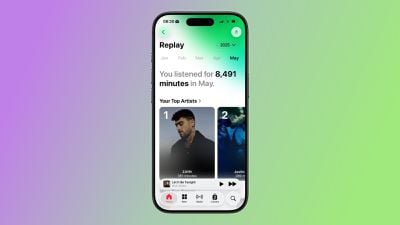
As spotted by Hidde Collee and others, Apple Music Replay is now a completely native feature on iOS 26. This means that you can see your monthly and yearly listening statistics directly in the Apple Music app, rather than in a popover web view.
This change is minor in the grand scheme of things, but for many Apple Music enthusiasts, it is a long-awaited improvement.
Apple Music Replay is similar to Spotify Wrapped, showcasing the top songs and artists that you listen to each year, complete with a year-end highlight reel.
Apple Music Replay is available for most of the year, though.
A corresponding Apple Music Replay playlist is available in the Apple Music app, at the bottom of the Home tab. The playlist lists the 100 songs that you have listened to the most as the year progresses, and it is updated on a weekly basis until the end of the year. At that point, the playlist for that particular year becomes final.
iOS 26 is currently in beta, and the update should be released in September.
Popular Stories
If Apple Music isn't working for you, you're not alone. According to Apple's System Status page, there's currently an Apple Music outage.
Apple says that users may be experiencing intermittent issues with the service. The outage started at 2:38 p.m. Eastern Time, and it is ongoing. We'll update this article when the outage has been...
iOS 26.5 has been in beta since late March, with a third beta released this week. The update is relatively minor so far, which is not too surprising given that Apple is starting to shift its focus towards iOS 27. Apple will unveil iOS 27 during its WWDC 2026 keynote on June 8, and the update should be released in September.
iOS 26.5 lays the groundwork for two changes, including end-to-end...
Apple today seeded the second betas of upcoming iOS 26.5 and iPadOS 26.5 updates to developers for testing purposes, with the software coming two weeks after Apple released updated first betas.
Registered developers can download the betas from the Settings app on the iPhone or iPad by going to the General section and selecting Software Update.
iOS 26.5 and iPadOS 26.5 do not include new...