

iPhone 14 Pro: Using Custom App Icons Now Less Annoying Thanks to Dynamic Island - MacRumorsOpen MenuShow RoundupsShow Forums menuVisit ForumsOpen Sidebar
Skip to Content

iPhone 14 Pro: Using Custom App Icons Now Less Annoying Thanks to Dynamic Island

As a means to customize their iPhones, many users want to use custom app icons on their Home Screen. iOS itself doesn't offer a native option to easily change and use custom app icons, but thankfully, the new iPhone 14 Pro and Dynamic Island make it easier to use a workaround to do just that.
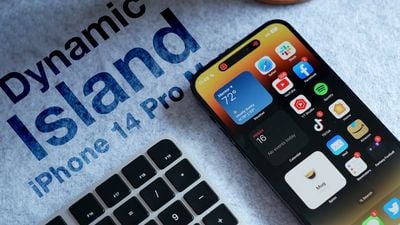
Dynamic Island Thumb Alt
One of the most popular ways users have used custom app icons on iOS is with Shortcuts. Using the Shortcuts app on iOS, users can create a custom shortcut on their Home Screen with any image or custom app icon they wish that opens a specific app. The workaround has not been perfect since there are practical limitations that can be annoying.
custom app icon shortcut banner 2

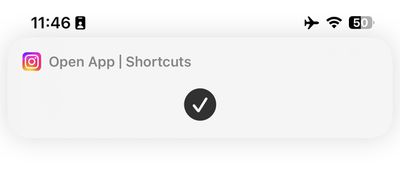
Intrusive banner when using custom app icons on the iPhone 13 and older

Every time you tap on a custom app icon shortcut on your Home Screen, a large banner appears at the top of your display to confirm the shortcut is running. Many users find the banner distracting and intrusive, which makes the workaround less than ideal.

Thankfully, the new iPhone 14 Pro and the introduction of Dynamic Island make using custom app icons with Shortcuts more seamless and effortless. Dynamic Island on the latest high-end iPhones introduces an entirely new area at the top of the display where system-wide alerts and contextual information now appear at the top rather than obscuring other parts of iOS.

One alert that Apple has moved to Dynamic Island is Shortcuts. When running Shortcuts on the iPhone 14 Pro, there is no longer a banner that appears at the top of the display. Now, the shortcut runs seamlessly in Dynamic Island.

custom app icon shortcut dynamic island

Custom app icon Shortcut running on the ‌iPhone 14 Pro‌'s Dynamic Island

While Dynamic Island makes it easier to run custom app icon shortcuts, other limitations still exist. The most notable is that custom app icons still cannot show notification badges like normal apps. This can be annoying for users who want to use a custom app icon for social media or messaging apps, where notification badges are particularly useful.

Users creating custom app icons was a trend in 2020 following iOS 14, which introduced redesigned widgets to the Home Screen on the iPhone. Since then, Apple has more openly adopted the idea of users customizing iOS to their specific likings, making it easier to use custom app icons and, of course, the entirely personalized Lock Screen in iOS 16.

Related Forum: iPhone

Popular Stories

iPhone 18 Pro Deep Red Feature

iPhone 18 Pro Launching Later This Year With These 12 New Features

Wednesday March 18, 2026 7:39 am PDT by
While the iPhone 18 Pro and iPhone 18 Pro Max are not expected to launch for another six months or so, there are already plenty of rumors about the devices. It was initially reported that the iPhone 18 Pro models would have fully under-screen Face ID, with only a front camera visible in the top-left corner of the screen. However, the latest rumors indicate that only one Face ID component...
ios 26 4 yellow

Here Are Apple's Release Notes for iOS 26.4

Wednesday March 18, 2026 11:56 am PDT by
Apple provided developers and public beta testers with the release candidate versions of iOS 26.4 and iPadOS 26.4, which means we're going to see a public launch as soon as next week. The RC versions of the software include Apple's official release notes, giving us final details on what's included in the update. Apple Music - Playlist Playground (beta) generates a playlist from your...
Apple Logo Sketch Feature

Apple Has Now Unveiled Eight New Products This Month

Tuesday March 17, 2026 9:25 am PDT by
Apple has unveiled a whopping eight new products so far this March, including an iPhone 17e, iPad Air models with the M4 chip, MacBook Air models with the M5 chip, MacBook Pro models with M5 Pro and M5 Max chips, the all-new MacBook Neo, an updated Studio Display, a higher-end Studio Display XDR, and now the AirPods Max 2 this week. iPhone 17e features the same overall design as the iPhone...

Top Rated Comments

jacjustjac Avatar
46 months ago
It still irks me a little that Apple needs us to buy a phone with a Dynamic Island just to make these constantly regular, pop-up system UI banner notifications less annoying and cumbersome. They could have improved notifications on phones without a Dynamic Island too, just saying.
Score: 18 Votes (Like | Disagree)
DailySlow Avatar
46 months ago

that’s a reason to upgrade alone
I think it’s more fun to upgrade in a group.
Score: 11 Votes (Like | Disagree)
orbital~debris Avatar
46 months ago

Intrusive banner when using custom app icons on the iPhone 13 and older
Photo caption should read "Intrusive banner when using custom app icons on the iPhone 14 and older".
Score: 6 Votes (Like | Disagree)
46 months ago

I think it’s more fun to upgrade in a group.
Reasons to Upgrade over the 13 Pro models:1) New design on the front, (2) New 48MP wide camera, (3) Satellite connectivity, (4) Better ultra wide camera, telephoto camera and the front camera, (5) New 5G chip (X65, (6) Crash detection, (7) better thermals, (8) Bluetooth 5.3, (9) Action mode, (10) Always on display.
Score: 3 Votes (Like | Disagree)
JonathanParker Avatar
46 months ago
that’s a reason to upgrade alone
Score: 3 Votes (Like | Disagree)
46 months ago
If Apple simply demanded a 'color' and 'monochrome' icon for each app - that'd be great.

The ability to recolour icons to fit your scheme should be standard already.

Android's a step ahead in this regard.
Score: 2 Votes (Like | Disagree)
Related Apple News: Education | Mac | Travel | News | Culture
















