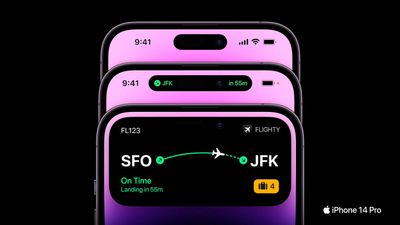
How the iPhone 14 Pro's New 'Dynamic Island' Works

With the launch of the iPhone 14 Pro and ‌iPhone‌ 14 Pro Max, Apple introduced an updated design that does away with the notch at the front for the TrueDepth camera. Instead, Apple has slimmed down the hardware and put the proximity sensor under the display, allowing for a smaller pill-shaped cutout.


As we learned during the rumor cycle, the new cutout consists of a circle for the camera and a second pill-shaped cutout for the TrueDepth hardware, but Apple has combined these into a single cutout that it is calling the Dynamic Island. We thought we'd take a closer look at the ‌Dynamic Island‌, which is one of the most clever user interface changes Apple has implemented in recent years.

Dynamic Island Shape

The ‌Dynamic Island‌ is not a static cutout, and can shift in size and shape to blend itself into the UI and provide new visual tools front and center on the ‌iPhone‌'s display. In standard usage, it is a small pill-shaped cutout, but Apple uses pixels to expand it to match different tasks.
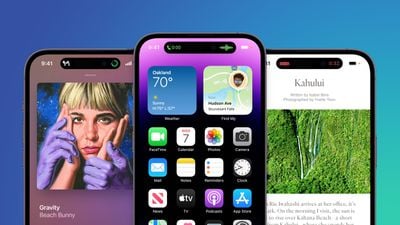
iphone 14 pro blue image
When making an Apple Pay payment, for example, the ‌Dynamic Island‌ expands into a square shape to match the Face ID confirmation interface, and while on a phone call, it expands to be larger so you can have the phone controls front and center.

Basically, the ‌Dynamic Island‌ is able to house ongoing background tasks that you might need to come back to while doing other things on your phone

Ways the Dynamic Island Can Be Used

So far, we only have Apple's demonstrations to go on, but it looks like the ‌Dynamic Island‌ can show all kinds of different information. We're rounded up the ways it's been used so far.
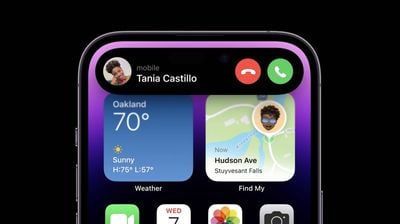
iPhone 14 Pro Dynamic Island 3

  • Expanded into a large rectangle to show upcoming Maps directions without having to open the Maps app.
  • Displaying Maps directions in a smaller pill-shaped interface for when you just need a quick glance at the next turn.
  • Square shaped for an ‌Apple Pay‌ payment confirmation.
  • Showing a music waveform and time remaining on a song that's playing.
  • Tracking the time of arrival of a Lyft.
  • Displaying privacy indicators when the microphone or camera is in use.
  • Displaying a small bar with the phone icon and the length of the phone call.
  • Showing a timer.
  • Keeping track of sports scores.
  • Accessing music controls and a music player.
  • Showing AirPods connection status and battery life.
  • Displaying ‌iPhone‌ charging status and battery life.

The ‌Dynamic Island‌ can show notifications or information that you're actively keeping up with. It's going to work with the Live Activities feature coming in iOS 16, so you can track sports scores, Uber rides, and more right from the top of the ‌iPhone‌'s display.

It's worth noting that any time the ‌Dynamic Island‌ is in use like this, it is doing its task without interrupting what you're doing in the app you're in. So if you're reading Twitter, you can also be controlling your music through the ‌Dynamic Island‌ with just a tap.

Split Island

Because the TrueDepth camera system is actually housed in two separate cutouts that are merged through software, the ‌Dynamic Island‌ can do a neat trick where it separates into a small pill on the left and a circle on the right, both of which are able to display different information at the same time, such as music controls and a timer.
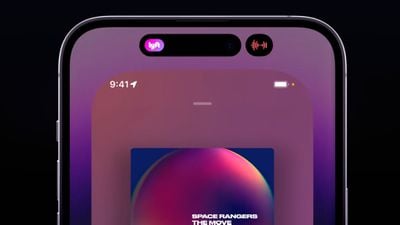
dynamic island split

Dynamic Island Interaction

When tapped, the ‌Dynamic Island‌ expands to become larger so you can interact with the content that it's offering at the current time, and when you're in an app, you can swipe up to send the app's content to the ‌Dynamic Island‌ so you can get back to the Home screen.

Third-Party App Support

Apple is allowing third-party app developers to integrate their apps into the ‌Dynamic Island‌ so you can access third-party app content as well as Apple's own app content. Third-party app Flighty, for example, is able to put your flight information in the ‌Dynamic Island‌ so you can see it with a tap.

flighty iphone 14 digital island

Dynamic Island Reactions

So far, reactions to the ‌Dynamic Island‌ have been largely positive, as can be seen in our roundup of commentary on the feature. It has been called "one of Apple's best designs."

Availability

The ‌Dynamic Island‌ is limited to the ‌iPhone‌ 14 Pro and the ‌iPhone‌ 14 Pro Max. The standard ‌iPhone‌ 14 models continue to offer the same notch as the ‌iPhone‌ 13 models.

Additional Coverage

We'll be picking up an ‌iPhone‌ 14 Pro when preorders go live tomorrow, and when it's delivered on the 16th, we'll do an in-depth look at all of the new features, providing a much more detailed overview of the ‌Dynamic Island‌ and its functionality.

Related Forum: iPhone

Popular Stories

iOS 26

iOS 26.4 and iOS 27 Features Revealed in New Leak

Friday December 12, 2025 10:56 am PST by
Macworld's Filipe Espósito today revealed a handful of features that Apple is allegedly planning for iOS 26.4, iOS 27, and even iOS 28. The report said the features are referenced within the code for a leaked internal build of iOS 26 that is not meant to be seen by the public. However, it appears that Espósito and/or his sources managed to gain access to it, providing us with a sneak peek...
iOS 26

iOS 26.2 Coming Soon With These 8 New Features on Your iPhone

Thursday December 11, 2025 8:49 am PST by
Apple seeded the second iOS 26.2 Release Candidate to developers earlier this week, meaning the update will be released to the general public very soon. Apple confirmed iOS 26.2 would be released in December, but it did not provide a specific date. We expect the update to be released by early next week. iOS 26.2 includes a handful of new features and changes on the iPhone, such as a new...
iOS 26

Apple Releases iOS 26.2 With Alarms for Reminders, Lock Screen Changes, Enhanced Safety Alerts and More

Friday December 12, 2025 10:10 am PST by
Apple today released iOS 26.2, the second major update to the iOS 26 operating system that came out in September, iOS 26.2 comes a little over a month after iOS 26.1 launched. ‌iOS 26‌.2 is compatible with the ‌iPhone‌ 11 series and later, as well as the second-generation ‌iPhone‌ SE. The new software can be downloaded on eligible iPhones over-the-air by going to Settings >...
AirPods Pro Firmware Feature

Apple Releases New Firmware for AirPods Pro 2 and AirPods Pro 3

Thursday December 11, 2025 11:28 am PST by
Apple today released new firmware designed for the AirPods Pro 3 and the prior-generation AirPods Pro 2. The AirPods Pro 3 firmware is 8B30, up from 8B25, while the AirPods Pro 2 firmware is 8B28, up from 8B21. There's no word on what's include in the updated firmware, but the AirPods Pro 2 and AirPods Pro 3 are getting expanded support for Live Translation in the European Union in iOS...
macOS Tahoe 26 Thumb

Apple Releases macOS Tahoe 26.2 With Edge Light

Friday December 12, 2025 10:08 am PST by
Apple today released macOS Tahoe 26.2, the second major update to the macOS Tahoe operating system that came out in September. macOS Tahoe 26.2 comes five weeks after Apple released macOS Tahoe 26.1. Mac users can download the macOS Tahoe update by using the Software Update section of System Settings. macOS Tahoe 26.2 includes Edge Light, a feature that illuminates your face with soft...
AirTag 2 Mock Feature

Apple AirTag 2: Four New Features Found in iOS 26 Code

Thursday December 11, 2025 10:31 am PST by
The AirTag 2 will include a handful of new features that will improve tracking capabilities, according to a new report from Macworld. The site says that it was able to access an internal build of iOS 26, which includes references to multiple unreleased products. Here's what's supposedly coming: An improved pairing process, though no details were provided. AirTag pairing is already...
ipados 26 1 slide over

Apple Releases iPadOS 26.2 With Multitasking Improvements

Friday December 12, 2025 10:09 am PST by
Apple today released iPadOS 26.2, the second major update to the iPadOS 26 operating system released in September. iPadOS 26.2 comes a month after iPadOS 26.1. The new software can be downloaded on eligible iPads over-the-air by going to Settings > General > Software Update. iPadOS 26.2 continues with the multitasking improvements that were added with iPadOS 26.1. You can now drag and...
bug security vulnerability issue fix larry

Update Now: iOS 26.2 Fixes 20+ Security Vulnerabilities

Friday December 12, 2025 11:11 am PST by
Apple today released iOS 26.2, iPadOS 26.2, and macOS 26.2, all of which introduce new features, bug fixes, and security improvements. Apple says that the updates address over 20 vulnerabilities, including two bugs that are known to have been actively exploited. There are a pair of WebKit vulnerabilities that could allow maliciously crafted web content to execute code or cause memory...

Top Rated Comments

alpi123 Avatar
43 months ago
It definitely stole the show yesterday. I'm glad it didn't get leaked.
Score: 41 Votes (Like | Disagree)
iStorm Avatar
43 months ago
It's neat, but I see a couple things that could be improved...

The time is now hidden when a new call comes in. Can't quickly see the time to decide if you want to take the call before your next meeting, or maybe you're expecting another call soon.


The signal bars are now hidden during a call. Can't see if poor reception could be affecting the call at a quick glance.


Attachment Image

Attachment Image
Score: 39 Votes (Like | Disagree)
MrTemple Avatar
43 months ago
Sure the 'dead space' is still there, but the visual weight of the dead space is so nicely taken up by the new interface.

Truly excellent design.
Score: 29 Votes (Like | Disagree)
ProfessionalFan Avatar
43 months ago

The result will be that people will touch their front camera quite often. That is not good for the image quality.
If only there was some kind of invention for wiping off that area easily.
Score: 21 Votes (Like | Disagree)
Villarrealadrian Avatar
43 months ago
My iPhone 12 got mysteriously laggy after iPhone 14 presentation
Score: 16 Votes (Like | Disagree)
AppleFan91 Avatar
43 months ago
Loved it and was a pleasant highlight from yesterday.

Also, while the naming is terrible, someone online called the notch (iPhone X - 13) the “Constant Peninsula” ?
Score: 15 Votes (Like | Disagree)