

Zoom Video Calls Drain Apple M1 MacBook Air Battery by Only 10-13% Per Hour

As more customers get their hands on the first Apple Silicon Macs, we continue to see some interesting performance and battery life tests surface based on real-world usage situations, with the latest including Zoom video calling.
zoom battery
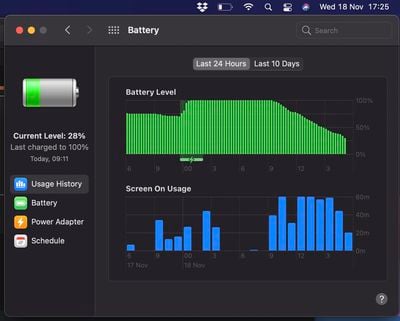
MacRumors forum member "acidfast7_redux," who resides in the UK, spent most of their work day today on Zoom video calls using their new MacBook Air with the M1 chip and 8GB of memory. After a 2.5 hour video call, they say their battery life dropped by 17%, and after a second 36 minute video call, their battery life dropped by 7%, meaning that Zoom ultimately consumed roughly 10-13% of battery life per hour.

finishing the day at the office now:

09.11 to 17.25 (8h14m)
battery went from 100% down to 28%

time breakdown for the office part of the day was:

4h33m Zoom meetings (just closed Zoom for the first time since opening it this morning at 10.00)
3h01m web browsing / MS Office / emails
45m sleep (just closed lid and left the office)

These numbers are impressive given that Zoom has yet to introduce native support for Apple Silicon Macs, so the app is currently running through Apple's translation layer Rosetta 2 on Macs with the M1 chip. Zoom is known to be quite the battery hog on Intel-based Macs, so Apple Silicon's power efficiency gains will be much welcomed.

Over the last week, benchmarks and reviews have proven that the M1 chip lives up to Apple's hype, ranging from the new MacBook Air outperforming the high-end 16-inch MacBook Pro in multi-core Geekbench 5 results to the new Mac mini and 13-inch MacBook Pro compiling WebKit code as fast as a 2019 Mac Pro.

Apple revealed its plans to begin using its own chips in Macs at WWDC 2020 in June, promising industry-leading performance per watt. Apple expects the transition away from Intel processors to take about two years to be completed.


Popular Stories

iOS 26

iOS 26.4 and iOS 27 Features Revealed in New Leak

Friday December 12, 2025 10:56 am PST by
Macworld's Filipe Espósito today revealed a handful of features that Apple is allegedly planning for iOS 26.4, iOS 27, and even iOS 28. The report said the features are referenced within the code for a leaked internal build of iOS 26 that is not meant to be seen by the public. However, it appears that Espósito and/or his sources managed to gain access to it, providing us with a sneak peek...
iOS 26

iOS 26.2 Coming Soon With These 8 New Features on Your iPhone

Thursday December 11, 2025 8:49 am PST by
Apple seeded the second iOS 26.2 Release Candidate to developers earlier this week, meaning the update will be released to the general public very soon. Apple confirmed iOS 26.2 would be released in December, but it did not provide a specific date. We expect the update to be released by early next week. iOS 26.2 includes a handful of new features and changes on the iPhone, such as a new...
iOS 26

Apple Releases iOS 26.2 With Alarms for Reminders, Lock Screen Changes, Enhanced Safety Alerts and More

Friday December 12, 2025 10:10 am PST by
Apple today released iOS 26.2, the second major update to the iOS 26 operating system that came out in September, iOS 26.2 comes a little over a month after iOS 26.1 launched. ‌iOS 26‌.2 is compatible with the ‌iPhone‌ 11 series and later, as well as the second-generation ‌iPhone‌ SE. The new software can be downloaded on eligible iPhones over-the-air by going to Settings >...
AirPods Pro Firmware Feature

Apple Releases New Firmware for AirPods Pro 2 and AirPods Pro 3

Thursday December 11, 2025 11:28 am PST by
Apple today released new firmware designed for the AirPods Pro 3 and the prior-generation AirPods Pro 2. The AirPods Pro 3 firmware is 8B30, up from 8B25, while the AirPods Pro 2 firmware is 8B28, up from 8B21. There's no word on what's include in the updated firmware, but the AirPods Pro 2 and AirPods Pro 3 are getting expanded support for Live Translation in the European Union in iOS...
macOS Tahoe 26 Thumb

Apple Releases macOS Tahoe 26.2 With Edge Light

Friday December 12, 2025 10:08 am PST by
Apple today released macOS Tahoe 26.2, the second major update to the macOS Tahoe operating system that came out in September. macOS Tahoe 26.2 comes five weeks after Apple released macOS Tahoe 26.1. Mac users can download the macOS Tahoe update by using the Software Update section of System Settings. macOS Tahoe 26.2 includes Edge Light, a feature that illuminates your face with soft...
AirTag 2 Mock Feature

Apple AirTag 2: Four New Features Found in iOS 26 Code

Thursday December 11, 2025 10:31 am PST by
The AirTag 2 will include a handful of new features that will improve tracking capabilities, according to a new report from Macworld. The site says that it was able to access an internal build of iOS 26, which includes references to multiple unreleased products. Here's what's supposedly coming: An improved pairing process, though no details were provided. AirTag pairing is already...
ipados 26 1 slide over

Apple Releases iPadOS 26.2 With Multitasking Improvements

Friday December 12, 2025 10:09 am PST by
Apple today released iPadOS 26.2, the second major update to the iPadOS 26 operating system released in September. iPadOS 26.2 comes a month after iPadOS 26.1. The new software can be downloaded on eligible iPads over-the-air by going to Settings > General > Software Update. iPadOS 26.2 continues with the multitasking improvements that were added with iPadOS 26.1. You can now drag and...
bug security vulnerability issue fix larry

Update Now: iOS 26.2 Fixes 20+ Security Vulnerabilities

Friday December 12, 2025 11:11 am PST by
Apple today released iOS 26.2, iPadOS 26.2, and macOS 26.2, all of which introduce new features, bug fixes, and security improvements. Apple says that the updates address over 20 vulnerabilities, including two bugs that are known to have been actively exploited. There are a pair of WebKit vulnerabilities that could allow maliciously crafted web content to execute code or cause memory...

Top Rated Comments

DanielDD Avatar
66 months ago
This is my dream. I can finally have a 9 hour zoom meeting on a single charge.

Oh wait...
Score: 34 Votes (Like | Disagree)
tevion5 Avatar
66 months ago
So now I'll have no excuse to leave long meetings early? 2/10
Score: 32 Votes (Like | Disagree)
aesc80 Avatar
66 months ago


Attachment Image
Score: 16 Votes (Like | Disagree)
Serban55 Avatar
66 months ago

that is literally the biggest issue i'm dealing with right now on my intel macs, 2 mins into zoom call and my macbook sounds like a boeing 747 taking off.
yes, zoom on 16" mbp takes around 33%-34% battery after 45min non stop, no breaks...under M1 around 8-9% in the same 45min
Score: 12 Votes (Like | Disagree)
apparatchik Avatar
66 months ago

The issue must have more to do with Zoom being inefficient, rather than the task of video conferencing being inherently taxing on computer systems, no?
Zoom is the worst, borderline malware. Inefficient, bloated, stealthy... I despise apps that require deep installation of God knows what and lack -by design- a lightweight client that can run from the DMG or a USB when all you're trying to do is quickly connect to a meeting.

I have zoom, microsoft teams, teamviewer, et al only on my iPhone, where I know they're strictly sanboxed and wont take over and install more crap than necessary... in case I need to share screen, I try to stick with the web client when available.
Score: 10 Votes (Like | Disagree)
ilikewhey Avatar
66 months ago
that is literally the biggest issue i'm dealing with right now on my intel macs, 2 mins into zoom call and my macbook sounds like a boeing 747 taking off. i don't mind being apple beta tester if it means i don't have to sit next to outlet during zoom.
Score: 10 Votes (Like | Disagree)
















