Apple Shares Mac Pro Support Docs and Tutorial Videos on Adding RAM and MPX Modules

With the new 2019 Mac Pro now available for purchase, Apple has begun sharing support documents and tutorial videos covering the new high-end machine that's designed for professional users.

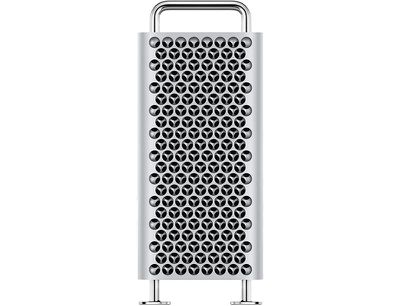
Two new support videos shared this morning walk ‌Mac Pro‌ owners through RAM upgrades and graphics upgrades through adding a new MPX Module. Apple designed the ‌Mac Pro‌ to be upgradeable over time, so all of the components can be swapped out.
macproback
Upgrading the ‌Mac Pro‌'s RAM can be done by lifting off the aluminum housing, opening up the DIMM cover, opening the DIMM ejectors, pulling out old RAM, and then aligning the DIMMs of the new memory into the optimal slots and pushing it in gently.


Installing a new MPX Module requires lifting off the aluminum housing, loosening the screws of the MPX base with a screwdriver and removing the clamp plates, unlocking the MPX base, and then sliding in a new module.


Apple also has a support document highlighting all of the parts that can be replaced and upgraded in the ‌Mac Pro‌, including the memory, PCIe cards, Apple I/O card, power supply, SSD, and wheels.

Many other ‌Mac Pro‌ support documents are available to walk users through component replacement and other features, with a list below:

Apple warns that damage caused by failing to follow the specific instructions provided on replacing components in the ‌Mac Pro‌ is not covered by Apple's warranty.

There are also some support documents specific to the new Pro Display XDR.

Both the ‌Mac Pro‌ and the Pro Display XDR are available for purchase starting today, with pricing on the ‌Mac Pro‌ starting at $5,999 and pricing on the Pro Display XDR starting at $4,999.

Related Roundup: Mac Pro
Buyer's Guide: Mac Pro (Caution)
Related Forum: Mac Pro

Popular Stories

iOS 26

iOS 26.3 and iOS 26.4 Will Add These New Features to Your iPhone

Tuesday February 3, 2026 7:47 am PST by
We are still waiting for the iOS 26.3 Release Candidate to come out, so the first iOS 26.4 beta is likely still at least a week or two away. Following beta testing, iOS 26.4 will likely be released to the general public in March or April. Below, we have recapped known or rumored iOS 26.3 and iOS 26.4 features so far. iOS 26.3 iPhone to Android Transfer Tool iOS 26.3 makes it easier...
Apple Logo Black

Apple's Next Launch is 'Imminent'

Sunday February 1, 2026 12:31 pm PST by
The calendar has turned to February, and a new report indicates that Apple's next product launch is "imminent," in the form of new MacBook Pro models. "All signs point to an imminent launch of next-generation MacBook Pros that retain the current form factor but deliver faster chips," Bloomberg's Mark Gurman said on Sunday. "I'm told the new models — code-named J714 and J716 — are slated...
iOS 26 Home Feature

Apple Gives Final Warning to Home App Users

Tuesday February 3, 2026 8:55 am PST by
In 2022, Apple introduced a new Apple Home architecture that is "more reliable and efficient," and the deadline to upgrade and avoid issues is fast approaching. In an email this week, Apple gave customers a final reminder to upgrade their Home app by February 10, 2026. Apple says users who do not upgrade may experience issues with accessories and automations, or lose access to their smart...
Aston Martin CarPlay Ultra Screen

Apple's CarPlay Ultra to Expand to These Vehicle Brands Later This Year

Sunday February 1, 2026 10:08 am PST by
Last year, Apple launched CarPlay Ultra, the long-awaited next-generation version of its CarPlay software system for vehicles. Nearly nine months later, CarPlay Ultra is still limited to Aston Martin's latest luxury vehicles, but that should change fairly soon. In May 2025, Apple said many other vehicle brands planned to offer CarPlay Ultra, including Hyundai, Kia, and Genesis. In his Powe...
Apple Foldable Thumb

First Foldable iPhone Design Details Revealed

Monday February 2, 2026 7:19 am PST by
Apple's first foldable iPhone will feature relocated volume buttons, an all-black camera plateau, a smaller Dynamic Island, and more, according to design leaks from a known Weibo leaker. The user known as "Instant Digital" today claimed to share several key details about the design of the foldable iPhone: The volume buttons will be located on the top edge of the device, aligned to the...

Top Rated Comments

lkrupp Avatar
80 months ago

I am waiting for the video: How to Buy a House With $65k Instead of a Worthless Depreciating Asset.
What part of this do you not get? Your post is probably the most uninformed I’ve yet seen on this subject.
Score: 19 Votes (Like | Disagree)
gugy Avatar
80 months ago
I love this computer. I want one so bad but I think the MBP 16" will fit the bill better for myself.
If I had the means and the high paying clients, I would definitely get one now, still over time this will be a good deal. My MP 5,1 still a solid machine.
Score: 13 Votes (Like | Disagree)
now i see it Avatar
80 months ago
I missed the support document that explains how are we going to pay for this
Score: 12 Votes (Like | Disagree)
v3rlon Avatar
80 months ago

A 'pro' user doesn't and shouldn't need to call support to install a SSD...
EXACTLY --wrong. This statement is so incorrect it borders on flat-earther mentality.

A "pro" user is someone who uses their computer for professional applications. That does NOT make them tinkerers (though they might be). For that "pro" user, it simply isn't cost-effective for them to work on their own system. If you command money from James Cameron/Steven Spielberg for doing editing on their next "big things" to the tune of $200 an hour, spending a couple of hours doing your own tech support at $25 is a really bad deal.

You're better off doing your work an some other machine while you pay someone else to handle the light work of installing an SSD (or just ordering it that way in the first place). I don't install SSDs in my computer I work. I take it over to IT and say "can you guys upgrade this thing?" Do I know how to install an SSD? Sure. But, that isn't what my boss pays me to do. We've got people for that.

Now, somewhere out there is an over achieving pro user who will, for whatever reason, want to install their own SSD. This person will do the same thing everyone else did/does who wants to take this path. Because they weren't born knowing how to change SSDs, they will educate themselves on the process and just do it. See? Problem solved.
Score: 9 Votes (Like | Disagree)
guerro Avatar
80 months ago
I am waiting for the video: How to Buy a House With $65k Instead of a Worthless Depreciating Asset.
Score: 9 Votes (Like | Disagree)
BigBoy2018 Avatar
80 months ago
Is there not a way to just add a SATA card and then install a garden variety SATA ssd on your own? (without needing and Apple certified technician).

If not, that's a huge fail.
Score: 5 Votes (Like | Disagree)