iPad Apps Are Coming to the Mac With Apple's Project Catalyst

While the Mac and iPad remain distinct products, Apple continues to bridge the gap between its desktop and mobile platforms. In 2014, for example, it introduced Continuity features like Handoff and Universal Clipboard that enable more seamless experiences across the Mac, ‌iPad‌, and other Apple devices.

The next step in this process is Project Catalyst, which makes it much easier for developers to extend iPad apps to the Mac.
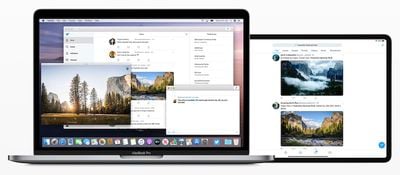
project catalyst
Starting with macOS Catalina and Xcode 11, developers can create a Mac version of an ‌iPad‌ app using UIKit, an Apple framework that until now was intended solely for iOS apps. Adding macOS support to an ‌iPad‌ app is as easy as opening an Xcode project and clicking the Mac checkbox under General > Deployment Info.

While the Mac version of the app should run after the box is checked, this is not always the case, as the Xcode project may contain code that no longer compiles due to frameworks, APIs, or embeddable content that is incompatible with the Mac, according to Apple's developer documentation:

Most iPad apps are great candidates for adaptation, but a few rely on iPad features that don’t exist on a Mac. For example, if your app's essential features require iPad capabilities like gyroscope, accelerometer, or rear camera, iOS frameworks like HealthKit or ARKit, or the app's main function is something like navigation, it might not be suited for the Mac.

Apple has instructions on how to remedy these compatibility issues.

‌iPad‌ apps ported to macOS run natively on the Mac, utilizing the same frameworks, resources, and runtime environment as traditional Mac apps, according to Apple's developer documentation:

The Mac version of your iPad app supports many system features found in macOS without requiring any effort from you…

- A default menu bar for your app.
- Support for trackpad, mouse, and keyboard input.
- Support for window resizing and full-screen display.
- Mac-style scroll bars.
- Copy-and-paste support.
- Drag-and-drop support.
- Support for system Touch Bar controls.

Apple's updated Human Interface Guidelines are a helpful resource for designing and coding the ideal ‌iPad‌ app for Mac.

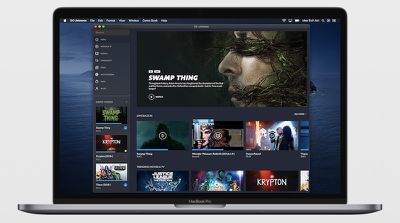
dc universe project catalyst

DC Universe is an example of a Project Catalyst app coming to Mac

If this all sounds familiar, it is because Project Catalyst is Apple's public-facing name for this initiative, which has been referred to by its internal name of Marzipan until now. Apple's plans to allow iOS apps to easily run on Mac were first reported by Bloomberg's Mark Gurman over 18 months ago.

Apple provided us with a first glimpse of Project Catalyst when it brought the ‌iPad‌ versions of its Apple News, Home, Stocks, and Voice Memos apps to the Mac last year in macOS Mojave. Third-party developers are now able to follow suit in macOS Catalina, which will be released to the public in the fall.


Related Forum: macOS Catalina

Popular Stories

iOS 26

iOS 26.4 and iOS 27 Features Revealed in New Leak

Friday December 12, 2025 10:56 am PST by
Macworld's Filipe Espósito today revealed a handful of features that Apple is allegedly planning for iOS 26.4, iOS 27, and even iOS 28. The report said the features are referenced within the code for a leaked internal build of iOS 26 that is not meant to be seen by the public. However, it appears that Espósito and/or his sources managed to gain access to it, providing us with a sneak peek...
apple beta 26 lineup

Apple Leak Confirms Work on Foldable iPhone, AirTag 2, and Dozens More Devices

Monday December 15, 2025 2:05 pm PST by
Last week, details about unreleased Apple devices and future iOS features were shared by Macworld. This week, we learned where the information came from, plus we have more findings from the leak. As it turns out, an Apple prototype device running an early build of iOS 26 was sold, and the person who bought it shared the software. The OS has a version number of 23A5234w, and the first...
Apple Foldable Thumb

Leak Reveals Foldable iPhone Details

Monday December 15, 2025 9:09 am PST by
The first foldable iPhone will feature a series of design and hardware firsts for Apple, according to details shared by the Weibo leaker known as Digital Chat Station. According to a new post, via machine translation, Apple is developing what the leaker describes as a "wide foldable" device, a term used to refer to a horizontally oriented, book-style foldable with a large internal display....
Apple Logo Top Half

Early iOS 26 Software Leak Uncovers Dozens of Upcoming Apple Features

Monday December 15, 2025 3:05 pm PST by
Software from an iPhone prototype running an early build of iOS 26 leaked last week, giving us a glimpse at future Apple devices and iOS features. We recapped device codenames in our prior article, and now we have a list of some of the most notable feature flags that were found in the software code. In some cases, it's obvious what the feature flags are referring to, while some are more...
iOS 26

Apple Releases iOS 26.2 With Alarms for Reminders, Lock Screen Changes, Enhanced Safety Alerts and More

Friday December 12, 2025 10:10 am PST by
Apple today released iOS 26.2, the second major update to the iOS 26 operating system that came out in September, iOS 26.2 comes a little over a month after iOS 26.1 launched. ‌iOS 26‌.2 is compatible with the ‌iPhone‌ 11 series and later, as well as the second-generation ‌iPhone‌ SE. The new software can be downloaded on eligible iPhones over-the-air by going to Settings >...
iOS 26

iOS 26.2 Coming Soon With These 8 New Features on Your iPhone

Thursday December 11, 2025 8:49 am PST by
Apple seeded the second iOS 26.2 Release Candidate to developers earlier this week, meaning the update will be released to the general public very soon. Apple confirmed iOS 26.2 would be released in December, but it did not provide a specific date. We expect the update to be released by early next week. iOS 26.2 includes a handful of new features and changes on the iPhone, such as a new...
macOS Tahoe 26 Thumb

Apple Releases macOS Tahoe 26.2 With Edge Light

Friday December 12, 2025 10:08 am PST by
Apple today released macOS Tahoe 26.2, the second major update to the macOS Tahoe operating system that came out in September. macOS Tahoe 26.2 comes five weeks after Apple released macOS Tahoe 26.1. Mac users can download the macOS Tahoe update by using the Software Update section of System Settings. macOS Tahoe 26.2 includes Edge Light, a feature that illuminates your face with soft...
airpods max 2024 colors

AirPods Max 2 Likely to Offer These 10 New Features

Monday December 15, 2025 7:41 am PST by
Apple released the AirPods Max on December 15, 2020, meaning the over-ear headphones launched five years ago today. While the AirPods Max were updated with a USB-C port and new color options last year, followed by support for lossless audio and ultra-low latency audio this year, the headphones lack some of the features that have been introduced for newer generations of the regular AirPods and the ...

Top Rated Comments

CE3 Avatar
85 months ago
This should be a big revival for the Mac App Store. Lots of popular apps coming soon.
Score: 18 Votes (Like | Disagree)
bladerunner2000 Avatar
85 months ago
So finally being able to post to Instagram from a desktop computer.
Score: 11 Votes (Like | Disagree)
SeattleMoose Avatar
85 months ago
I like this trend. More choice is always good.
Score: 9 Votes (Like | Disagree)
Razeus Avatar
85 months ago
There's nothing you can say that will get me not to believe Apple isn't going to switch to ARM.
Score: 8 Votes (Like | Disagree)
J InTech82 Avatar
85 months ago
This should also bring over a great deal of productivity apps to the Mac. Win win.
Score: 6 Votes (Like | Disagree)
Krevnik Avatar
85 months ago
Slightly confused. This article says ipad app -> macos. Does that include ios -> macos cause ipad has a different os now.
iPadOS, iOS, tvOS are all still "iOS". The difference is what "Idiom" the platform uses: Phone, Pad, or TV. That changes some of the UI behavior. Pad supports split screen, and uses a UISplitView differently than Phone. TV does some things differently as well.

But I can write one app against UIKit and reuse even UI elements between all three platforms, because it is all UIKit.

Catalyst is UIKit for macOS. Nothing more, nothing less. But it looks like macOS is using the Pad idiom.

Will these "Catalyst" built apps require Catalina? Anyone know.
Yes. Catalyst (UIKit) was private in Mojave, and since Catalina is the first major version with UIKit as a public framework, it will require it.

So, is this anything like Universal Apps in Windows? I vaguely remember there being some derision over this.

I'm not a developer, so from the user perspective I think this could be good, especially if they don't force a dumb down of apps for Mac (which based on the Keynote they aren't).

I guess iOS being based on OSX is finally beginning to fulfill its potential after 12 years.
It is like Universal Apps, but there's a key difference between Apple's approach and Microsoft's. Microsoft built UWP on top of WinRT (edit: the framework, not Windows RT, the SKU) that was part of Win8. These are "Modern" or "Metro" apps. The fact that you had to completely port an app to it to get the benefit made it expensive for established apps like Photoshop. And because of how WinRT worked, you may not even get all the benefit of it since there were some weird issues around WinRT in C++ that I don't know if they resolved in the Win 10 timeframe.

Apple played a longer game. iOS/tvOS/iPadOS and macOS already share a lot of frameworks: Foundation, AVFoundation, Core Data, Core Graphics, Core Animation, Map Kit, etc, etc etc. Before Catalyst, I could still write up an app with a single codebase that compiled for all 4 platforms, mostly. The problem is that AppKit and UIKit are different enough that you have to "fork" a piece of your code for AppKit and one for UIKit. This makes managing things a bit trickier and just more effort. By bringing UIKit to the Mac, what Apple is doing is saying to the (more numerous) iOS devs: "You can now bring your app to the Mac without having to deal with AppKit to do it".

The advantage here is that UIKit is something people already use. iOS has the larger developer base. It's now less of a "semi-port" and now a "tweak it for Mac like you do for tvOS or iPad" situation. That's important.

But, in many ways, because the two have shared most of their core frameworks for years, it was also a lot less work to get here. I think Apple was hoping that only having AppKit/UIKit diverged was enough to entice more devs, but I guess not quite.
Score: 5 Votes (Like | Disagree)