

Apple Releases macOS Mojave With Dark Mode, Stacks, Dynamic Desktop and More

Apple today released the newest version of its operating system for Macs, macOS Mojave, to the public. macOS Mojave is a free download that's available today for anyone who has a compatible Mac, and it comes after 11 rounds of betas.

macOS Mojave can be downloaded from the Mac App Store, with a direct link to the download available here.


macOS Mojave is a significant update to macOS, introducing a new systemwide Dark Mode, with Mojave users able to choose between a light theme or the new dark theme, which changes the color of the dock, menu bar, apps, and other elements.

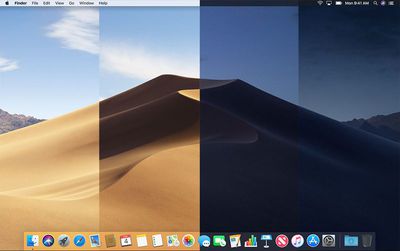
Dark Mode is accompanied by Dynamic Desktops, aka wallpapers that subtly change throughout the day to mimic the progress of the sun across the sky outside.

In the afternoon, for example, the lighting of the Mojave Desert wallpaper is at its peak brightness and the image of the desert is depicted as it would be if you visited it in the daytime with well-lit sand dunes and a bright blue sky.
macosmojavedynamicwallpaper
At night, the sky in the wallpaper shifts to darker blue to reflect that it's now evening. The shift between daytime and nighttime happens gradually over the course of the day, so you'll see subtle changes each time you look at your Mac's display. It's a neat new feature that can be enabled in the Desktop & Screensaver section of preferences.

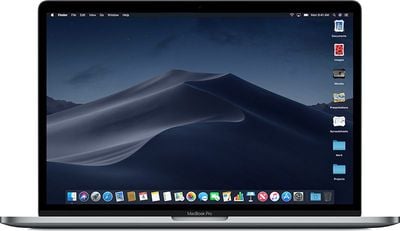
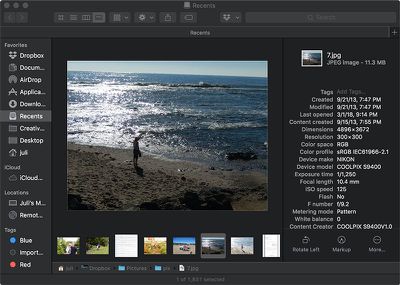
macOS Mojave also includes Stacks, a new desktop organization system that keeps desktop files neat and organized to cut down on clutter. The Finder window has been enhanced with a new Gallery View for previewing larger versions of photos and documents, a Sidebar for easier navigation, a revamped Quick Look option for quick document editing, and Quick Actions, so you can do more in the Finder window than ever before.
macosmojavestacks
Screenshots that you take on the Mac can now be edited using built-in Markup tools and a new management options that also allow for easy screen recording. Continuity camera, a useful new feature, allows you to import photos and document scans directly from an iPhone or iPad to the Mac.
mojavefindergalleryview
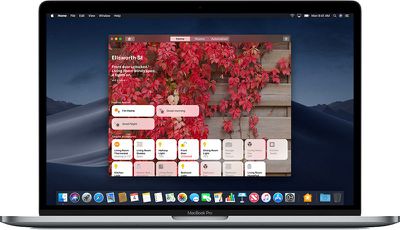
The Apple News, Stocks, Home, and Voice Memos apps have been ported from iOS to macOS as part of a multiyear project Apple is working on to make it easier to bring iOS apps to Macs, and Apple has introduced several new privacy protections to keep your data safer than ever.
macosmojavehomeapp
Apple is also making it harder for websites to track you with a range of new Safari tools, and it's also easier to make and store secure, hard-to-guess passwords for each and every website.

Apple has added an entirely revamped Mac App Store to macOS Mojave that makes it easier to discover apps with a featured section and specific categories for games, creative apps, productivity apps, apps for developers, and more.
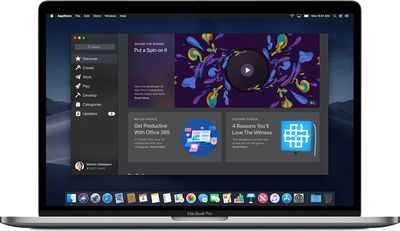
macosmojavemacappstore
macOS Mojave was initially supposed to include a Group FaceTime feature that includes support for chatting with up to 32 people at one time, but it was removed in the macOS Mojave beta and will be introduced in a future Mojave update.
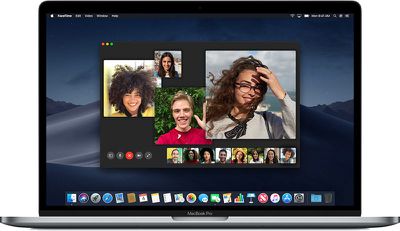
macosmojavegroupfacetime
macOS Mojave drops support for many older Macs compared to macOS High Sierra and it is compatible primarily with machines manufactured in 2012 or later. A full list of Macs that can run Mojave is below:

  • MacBook (Early 2015 or newer)
  • MacBook Air (Mid 2012 or newer)
  • MacBook Pro (Mid 2012 or newer)
  • Mac mini (Late 2012 or newer)
  • iMac (Late 2012 or newer)
  • iMac Pro (2017)
  • Mac Pro (Late 2013, plus mid 2010 and mid 2012 models with recommended Metal-capable GPU)

For more details on all of the features included in macOS Mojave, make sure to check out our macOS Mojave roundup.


Related Forum: macOS Mojave

Popular Stories

Aston Martin CarPlay Ultra Screen

Apple's CarPlay Ultra to Expand to These Vehicle Brands Later This Year

Sunday February 1, 2026 10:08 am PST by
Last year, Apple launched CarPlay Ultra, the long-awaited next-generation version of its CarPlay software system for vehicles. Nearly nine months later, CarPlay Ultra is still limited to Aston Martin's latest luxury vehicles, but that should change fairly soon. In May 2025, Apple said many other vehicle brands planned to offer CarPlay Ultra, including Hyundai, Kia, and Genesis. In his Powe...
iOS 26

iOS 26.3 and iOS 26.4 Will Add These New Features to Your iPhone

Tuesday February 3, 2026 7:47 am PST by
We are still waiting for the iOS 26.3 Release Candidate to come out, so the first iOS 26.4 beta is likely still at least a week or two away. Following beta testing, iOS 26.4 will likely be released to the general public in March or April. Below, we have recapped known or rumored iOS 26.3 and iOS 26.4 features so far. iOS 26.3 iPhone to Android Transfer Tool iOS 26.3 makes it easier...
Apple Logo Black

Apple's Next Launch is 'Imminent'

Sunday February 1, 2026 12:31 pm PST by
The calendar has turned to February, and a new report indicates that Apple's next product launch is "imminent," in the form of new MacBook Pro models. "All signs point to an imminent launch of next-generation MacBook Pros that retain the current form factor but deliver faster chips," Bloomberg's Mark Gurman said on Sunday. "I'm told the new models — code-named J714 and J716 — are slated...
Apple MacBook Pro M4 hero

New MacBook Pros Reportedly Launching Alongside macOS 26.3

Sunday February 1, 2026 5:42 am PST by
Apple is planning to launch new MacBook Pro models with M5 Pro and M5 Max chips alongside macOS 26.3, according to Bloomberg's Mark Gurman. "Apple's faster MacBook Pros are planned for the macOS 26.3 release cycle," wrote Gurman, in his Power On newsletter today. "I'm told the new models — code-named J714 and J716 — are slated for the macOS 26.3 software cycle, which runs from...
iOS 26 Home Feature

Apple Gives Final Warning to Home App Users

Tuesday February 3, 2026 8:55 am PST by
In 2022, Apple introduced a new Apple Home architecture that is "more reliable and efficient," and the deadline to upgrade and avoid issues is fast approaching. In an email this week, Apple gave customers a final reminder to upgrade their Home app by February 10, 2026. Apple says users who do not upgrade may experience issues with accessories and automations, or lose access to their smart...

Top Rated Comments

MacFather Avatar
96 months ago
Deleted.
Score: 50 Votes (Like | Disagree)
AxoNeuron Avatar
96 months ago
Love dark mode. Should have happened years ago!
Score: 19 Votes (Like | Disagree)
M.PaulCezanne Avatar
96 months ago
A very sad and depressing day to all of us who still using an older Mac from 2009, 2010, or 2011...
It sure is. I prefer the form factor of my older MBP and there is nothing slow about it for most common tasks.

Though I completely understand the need to cut off support at some point, it just seems like a waste of perfectly usable hardware.
Score: 18 Votes (Like | Disagree)
MisterAndrew Avatar
96 months ago
It's a new build, 18A391.
Score: 11 Votes (Like | Disagree)
lindenpark Avatar
96 months ago
where is it? Don't see it yet.
https://itunes.apple.com/gb/app/macos-mojave/id1398502828?mt=12
Score: 10 Votes (Like | Disagree)
jollyball Avatar
96 months ago
I can remember going to an Apple Store and waiting in a line to purchase an a copy of 10.5 the day it was released. And it was released at a random time like 5:00 PM. The store closed early and reopened that day to sell the OS. Fun times!
Score: 8 Votes (Like | Disagree)

















