

The developers of the Transit app this week announced the expansion of real-time crowdsourced data for buses, trains, streetcars, ferries, and so forth to 175 cities across the United States, Canada, and Europe.
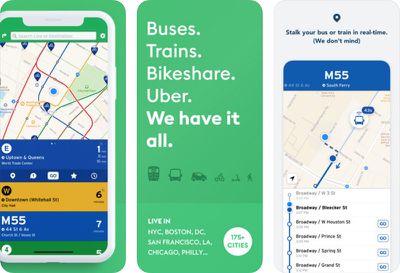
transit app trio
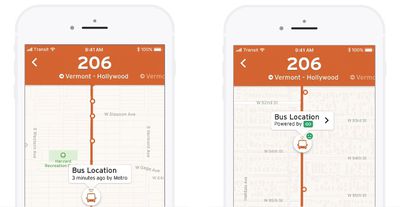
Normally, the locations of public transportation vehicles are pulled from a transit agency's data feed, which can take anywhere from 10 seconds to five minutes to update. This can result in the app showing a bus approaching a certain stop, for example, when in reality it has already passed by—without you on it.

To solve this problem, the Transit app has turned to crowdsourced data from opted-in users of GO, its step-by-step navigation feature.

GO itself isn't new. The feature automatically tracks your transit vehicle, walking speed, and location in real time, notifying you exactly when to leave to catch your ride, and when to disembark. The feature can also reroute you and provide adjusted ETAs when unforeseen changes or delays arise.

Now, when users enable GO, they will also be helping others. Once a rider opts into GO on a bus or train, for example, the Transit app will start broadcasting the vehicle's real-time location, second-by-second, to riders down the line. In general, this greatly improves the location of a vehicle versus agency data.
transit crowdsourced
This means you can watch your vehicle approach—in actual, second-by-second real-time—on the map, whenever someone on that vehicle is using GO.

The team behind Transit has been testing real-time crowdsourced data for nearly two years. Over that time, they've generated data for "millions of trips," starting in the Canadian cities of Montréal and Victoria. Other test regions have included New York City and Los Angeles. The tests are said to have "went well."

For those with privacy concerns, the Transit team ensures that your location is completely anonymous. Data is only shared with its servers while GO is active and you are actually on board the vehicle. As soon as you disembark, GO shuts off, and your vehicle's location stops being sent, according to the app's FAQ.

It's unclear if there's a way to continue using the GO navigation helper without opting in to the real-time crowdsourced data sharing aspect, so if you do not wish to participate, it may be best to keep the feature disabled entirely.

Transit also notes that the location sharing feature relies on extended GPS use, which can use up to five percent of battery life on a 20-minute ride, assuming the rider is actively using the device during the trip. In terms of data, though, Transit says GO uses only about 100 kilobytes on a 20-minute trip.

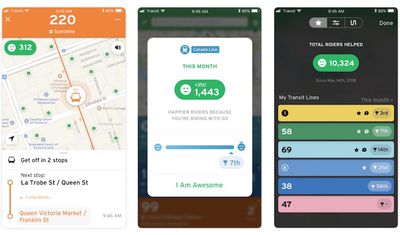
Despite this, the Transit team is hoping that many riders will opt into the feature. They've even added some gamification features to the app as an incentive. GO users will now see a smile face in the top-left corner of the map, for example, indicating how many nearby riders they are helping out.
transit gamification trio
The app also shows GO users how many nearby riders they've helped on a monthly basis, and provides a "helpfulness" rank compared to other GO users. Transit is hoping that a little bit of competition will motivative riders to participate.

Transit bills itself as a real-time urban travel companion. The app is especially popular in Canada, making navigation via public transit easier with real-time data, trip planning and comparisons, step-by-step navigation, service disruption notifications, departure and stop reminders, and much more.

Transit works with not only buses, commuter trains, and subways, but streetcars, ferries, ride-sharing, bike-sharing, scooter-sharing, and more. The app is free to download on the App Store for iPhone and Google Play for Android.


Top Rated Comments

bluespark Avatar
98 months ago
Great, but the main value of the Transit app to me was in its Apple Watch app, which they oddly discontinued. They said then that they planned to release a new one, but that was many months ago. The Apple Watch app needs to be a priority!
Score: 7 Votes (Like | Disagree)
FelixDerKater Avatar
98 months ago
Time to buy it, Apple.
Score: 3 Votes (Like | Disagree)
bluespark Avatar
97 months ago
This functionality has returned. Along with the "Go" feature.
- if you just select the bus you wish to board, it'll alert you based on the walking time it takes to get to the bus with about 1-2mins to spare.
- if you enter your destination, the bus and alternatives are presented and alerted to you on the Watch.

The previous version of this app from 2017 began to drop in accuracy and usefulness significantly enough for me to delete it.

Tried this out last night at 2:40AM to goto the gym, as in Toronto not only are there NO set/scheduled bus times (in a city of 2.6mil its atrocious: unionized workers), I didn't get any GO rider data. However the bus time was accurate under 40 seconds which is refreshing! I prefer the MoveIt app layout since Transits bombardment of nearby buses where I live a pain to view in huge BLOCKS.

Looking forward to using this app more.

PS: the GO feature can be disabled/opt-out yet I want to be certain that an analytical organization can confirm that claim.
I'm not trying to disparage the app's new features, but the "functionality" I was referring to was the Apple Watch app. It would show on a single screen my few favorite train/bus lines with the number of minutes to the next arrival. This was essential functionality for me and it has not returned. Yes, I can still open up the phone app to see that information, but having this quick information on my wrist as I race to catch a bus/train was incredible.

The new stuff is great, no doubt. I just want a basic watch app that displays the relevant information as cleanly and accurately as the prior Transit watch app did. (That it looked great was also a plus.)
[doublepost=1534786970][/doublepost]
I find the interface of Transit a bit fiddly for planning trips.

But here in NYC the subway and bus countdown timers are really awesome. As long as the MTA data is correct (that varies, but on my line it seems accurate to me ~80% of the time), I can time my walk to the subway and minimize time spent hanging out on the platform.

I've also tried it in a couple of other cities like Portland and Montréal. Generally, you just open the app and without missing a beat it tells you what the nearest bus/train/tram/ferry is and how long till the next one.
Same here in Chicago. I almost never use it to plan a trip -- I know where the train lines are already. What I need is quick information about arrival timing.
Score: 2 Votes (Like | Disagree)
DeepIn2U Avatar
98 months ago
Great, but the main value of the Transit app to me was in its Apple Watch app, which they oddly discontinued. They said then that they planned to release a new one, but that was many months ago. The Apple Watch app needs to be a priority!
This functionality has returned. Along with the "Go" feature.
- if you just select the bus you wish to board, it'll alert you based on the walking time it takes to get to the bus with about 1-2mins to spare.
- if you enter your destination, the bus and alternatives are presented and alerted to you on the Watch.

The previous version of this app from 2017 began to drop in accuracy and usefulness significantly enough for me to delete it.

Tried this out last night at 2:40AM to goto the gym, as in Toronto not only are there NO set/scheduled bus times (in a city of 2.6mil its atrocious: unionized workers), I didn't get any GO rider data. However the bus time was accurate under 40 seconds which is refreshing! I prefer the MoveIt app layout since Transits bombardment of nearby buses where I live a pain to view in huge BLOCKS.

Looking forward to using this app more.

PS: the GO feature can be disabled/opt-out yet I want to be certain that an analytical organization can confirm that claim.
Score: 2 Votes (Like | Disagree)
RobNYC Avatar
97 months ago
I find the interface of Transit a bit fiddly for planning trips.

But here in NYC the subway and bus countdown timers are really awesome. As long as the MTA data is correct (that varies, but on my line it seems accurate to me ~80% of the time), I can time my walk to the subway and minimize time spent hanging out on the platform.

I've also tried it in a couple of other cities like Portland and Montréal. Generally, you just open the app and without missing a beat it tells you what the nearest bus/train/tram/ferry is and how long till the next one.
I've also found the real time from the app is mostly accurate. What I have found ever since an iOS update in maybe 2017, the GPS feature in the subway doesn't work much anymore so it can never get an accurate read as to where I am. That never used to be a problem before but now it is.
Score: 1 Votes (Like | Disagree)
RobNYC Avatar
97 months ago
Yeah, that's where it gets fiddly for me too. You have to drag that weird map around manually until it's centered on or near where you are, and the way that's designed is pretty awkward.

I don't tend to use in IN the subway that often since most of the time there's an MTA countdown clock somewhere (if it's working correctly).
I have to do the same thing. I mostly use the widget to check times of whatever subway I'm in. That's pretty reliable about where you are assuming you entered the station from outside and not a transfer.
Score: 1 Votes (Like | Disagree)

Popular Stories

Aston Martin CarPlay Ultra Screen

Apple's CarPlay Ultra to Expand to These Vehicle Brands Later This Year

Sunday February 1, 2026 10:08 am PST by
Last year, Apple launched CarPlay Ultra, the long-awaited next-generation version of its CarPlay software system for vehicles. Nearly nine months later, CarPlay Ultra is still limited to Aston Martin's latest luxury vehicles, but that should change fairly soon. In May 2025, Apple said many other vehicle brands planned to offer CarPlay Ultra, including Hyundai, Kia, and Genesis. In his Powe...
Apple Logo Black

Apple Just Made Its Second-Biggest Acquisition Ever After Beats

Thursday January 29, 2026 10:07 am PST by
Apple today confirmed to Reuters that it has acquired Q.ai, an Israeli startup that is working on artificial intelligence technology for audio. Apple paid close to $2 billion for Q.ai, according to sources cited by the Financial Times. That would make this Apple's second-biggest acquisition ever, after it paid $3 billion for the popular headphone and audio brand Beats in 2014. Q.ai has...
Apple Logo Black

Apple's Next Launch is 'Imminent'

Sunday February 1, 2026 12:31 pm PST by
The calendar has turned to February, and a new report indicates that Apple's next product launch is "imminent," in the form of new MacBook Pro models. "All signs point to an imminent launch of next-generation MacBook Pros that retain the current form factor but deliver faster chips," Bloomberg's Mark Gurman said on Sunday. "I'm told the new models — code-named J714 and J716 — are slated...
14 inch MacBook Pro Keyboard

Apple Changes How You Order a Mac

Saturday January 31, 2026 10:51 am PST by
Apple recently updated its online store with a new ordering process for Macs, including the MacBook Air, MacBook Pro, iMac, Mac mini, Mac Studio, and Mac Pro. There used to be a handful of standard configurations available for each Mac, but now you must configure a Mac entirely from scratch on a feature-by-feature basis. In other words, ordering a new Mac now works much like ordering an...
Apple MacBook Pro M4 hero

New MacBook Pros Reportedly Launching Alongside macOS 26.3

Sunday February 1, 2026 5:42 am PST by
Apple is planning to launch new MacBook Pro models with M5 Pro and M5 Max chips alongside macOS 26.3, according to Bloomberg's Mark Gurman. "Apple's faster MacBook Pros are planned for the macOS 26.3 release cycle," wrote Gurman, in his Power On newsletter today. "I'm told the new models — code-named J714 and J716 — are slated for the macOS 26.3 software cycle, which runs from...
















