Use Edge Light for Better Video Calls in macOS - MacRumorsOpen MenuShow RoundupsShow Forums menuVisit ForumsOpen Sidebar
Skip to Content

Use Edge Light for Better Video Calls in macOS

by

Apple in macOS Tahoe 26.2 introduced Edge Light, a clever new feature that turns your Mac's display into a virtual ring light during video calls. Instead of fumbling with external lighting equipment, your Mac can now illuminate your face automatically when you're sitting in a dark room.
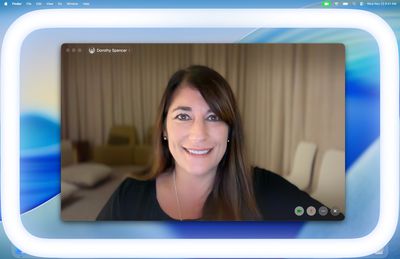
apple edge light macos tahoe 26 2
Basically, Edge Light adds a soft glow around the edges of your display to brighten your face during video conferences. But it's far from just a simple screen border effect. Edge Light uses your Mac's Neural Engine to analyze your face, size, and position in the frame to deliver accurate lighting, while the Image Signal Processor fine-tunes brightness to match your environment.

The feature is even aware enough to know when your cursor approaches the display edge. When it does, Edge Light automatically recedes, allowing you to still access on-screen content without it interfering.

What You'll Need

Edge Light works on any Mac with Apple silicon (M1 or later). It's compatible with all video conferencing apps and even extends to external cameras and the Apple Studio Display when connected to an Apple silicon Mac.

How to Turn On Edge Light

Once you've updated to macOS Tahoe 26.2 or later, enabling Edge Light takes just a couple of clicks:

  1. Open a supporting video call app (FaceTime, Zoom, or WebEx, for example).
  2. Click the green video conferencing menu bar item at the top of your screen.
  3. Select Edge Light from the drop-down menu.
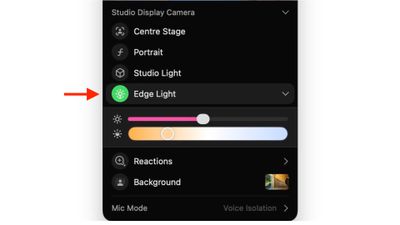
edge light

To adjust the lighting intensity and color temperature, click the down chevron next to Edge Light. You'll see two sliders that let you customize the brightness and warmth of the effect to suit your preferences.

If you own a Mac released in 2024 or later, you can turn on automatic Edge Light activation. Once enabled, your Mac will detect when you're in a dimly lit environment and turn the feature on without any manual input. Simply look for the automatic toggle in the video call dropdown menu, immediately below the expanded Edge Light options.


Top Rated Comments

13 weeks ago
It’s nice to have but it made such little difference to me I ended up turning it off.
Score: 24 Votes (Like | Disagree)
Jseeker Avatar
13 weeks ago
I used it on a Zoom meeting last weekend, and asked the other participants if they could see any difference when I turned it on then off again. They were unable to detect any lighting difference. So it seems useless? That said - and this is important and I will text this next time - I didn't adjust its brightness.
FYI - I'm using a Mac mini and studio display.
Score: 8 Votes (Like | Disagree)
13 weeks ago
Looks useless
Score: 6 Votes (Like | Disagree)
turbineseaplane Avatar
13 weeks ago

Wake me up when Apple Intelligence can make me beautiful on video calls /s
We are about to wake up @ProbablyDylan in the year 2364


Attachment Image

Attachment Image

Attachment Image
Score: 5 Votes (Like | Disagree)
CheesePuff Avatar
13 weeks ago

I used it on a Zoom meeting last weekend, and asked the other participants if they could see any difference when I turned it on then off again. They were unable to detect any lighting difference. So it seems useless? That said - and this is important and I will text this next time - I didn't adjust its brightness.
FYI - I'm using a Mac mini and studio display.
yup made zero difference for me on my M3 iMac
Score: 5 Votes (Like | Disagree)
Kylo83 Avatar
13 weeks ago

Is the light brighter on a miniLED Mac?
No which makes it useless
Score: 5 Votes (Like | Disagree)

Popular Stories

iPhone 18 Pro Deep Red Feature

iPhone 18 Pro Launching Later This Year With These 12 New Features

Wednesday March 18, 2026 7:39 am PDT by
While the iPhone 18 Pro and iPhone 18 Pro Max are not expected to launch for another six months or so, there are already plenty of rumors about the devices. It was initially reported that the iPhone 18 Pro models would have fully under-screen Face ID, with only a front camera visible in the top-left corner of the screen. However, the latest rumors indicate that only one Face ID component...
ios 26 4 yellow

Here Are Apple's Release Notes for iOS 26.4

Wednesday March 18, 2026 11:56 am PDT by
Apple provided developers and public beta testers with the release candidate versions of iOS 26.4 and iPadOS 26.4, which means we're going to see a public launch as soon as next week. The RC versions of the software include Apple's official release notes, giving us final details on what's included in the update. Apple Music - Playlist Playground (beta) generates a playlist from your...
imac video apple feature

Apple Released Yet Another New Product Today

Friday March 20, 2026 2:39 pm PDT by
Apple has unveiled a whopping nine new products so far this March, including an iPhone 17e, iPad Air models with the M4 chip, MacBook Air models with the M5 chip, MacBook Pro models with M5 Pro and M5 Max chips, the all-new MacBook Neo, an updated Studio Display, a higher-end Studio Display XDR, AirPods Max 2, and Nike Powerbeats Pro 2. iPhone 17e features the same overall design as the...
Related Apple News: Ipad | News | Motoring | Local News | Iphone