
ESPN subscribers with AppleTV would gain access to the network’s Internet service on their TV sets. [Sean] Bratches, the network’s executive vice president of affiliate and advertising sales, spoke in an interview today.
The brief report doesn't specify exactly how access to the WatchESPN functionality on the Apple TV would work, but currently customers of a number of cable and Internet companies have varying levels of access to the app's content on iOS and other platforms, which includes nearly all of ESPN's live broadcasts including online-only ESPN3 content.
Currently, cable subscribers through Comcast, Time Warner, Verizon FiOS, and Bright House have full access to WatchESPN content, while subscribers on a host of other Internet services can receive access to the ESPN3 content through the app.
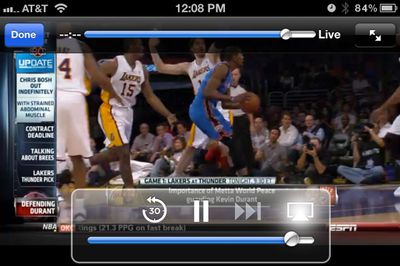
WatchESPN being sent to Apple TV via AirPlay
iOS device users who are eligible to access WatchESPN content can currently send the content to an Apple TV via AirPlay, but including the app directly on the Apple TV would streamline that process.
Update: Bloomberg has expanded its article with additional comments from Bratches:
“We’re a platform-agnostic content company,” Bratches, the network’s executive vice president of affiliate and advertising sales, said today in an interview. “To the extent that in the future there’s an opportunity with Apple to authenticate through the pay-TV food chain as we’re doing with Microsoft, that’s something that we will participate in.”
Update 2: Bloomberg has updated its article once again, citing comments from an ESPN spokesperson backtracking from Bratches' statements by noting that there are no active talks with Apple underway.
No deal is imminent with Apple, said Amy Phillips, a spokeswoman for Bristol, Connecticut-based ESPN.
“We’re not having conversations with Apple about authenticating WatchESPN,” Phillips said.

Friday December 12, 2025 10:56 am PST by Joe Rossignol
Macworld's Filipe Espósito today revealed a handful of features that Apple is allegedly planning for iOS 26.4, iOS 27, and even iOS 28.
The report said the features are referenced within the code for a leaked internal build of iOS 26 that is not meant to be seen by the public. However, it appears that Espósito and/or his sources managed to gain access to it, providing us with a sneak peek...
The first foldable iPhone will feature a series of design and hardware firsts for Apple, according to details shared by the Weibo leaker known as Digital Chat Station.
According to a new post, via machine translation, Apple is developing what the leaker describes as a "wide foldable" device, a term used to refer to a horizontally oriented, book-style foldable with a large internal display....
Monday December 15, 2025 2:05 pm PST by Juli Clover
Last week, details about unreleased Apple devices and future iOS features were shared by Macworld. This week, we learned where the information came from, plus we have more findings from the leak.
As it turns out, an Apple prototype device running an early build of iOS 26 was sold, and the person who bought it shared the software. The OS has a version number of 23A5234w, and the first...
Friday December 12, 2025 10:10 am PST by Juli Clover
Apple today released iOS 26.2, the second major update to the iOS 26 operating system that came out in September, iOS 26.2 comes a little over a month after iOS 26.1 launched. iOS 26.2 is compatible with the iPhone 11 series and later, as well as the second-generation iPhone SE.
The new software can be downloaded on eligible iPhones over-the-air by going to Settings >...
Thursday December 11, 2025 8:49 am PST by Joe Rossignol
Apple seeded the second iOS 26.2 Release Candidate to developers earlier this week, meaning the update will be released to the general public very soon.
Apple confirmed iOS 26.2 would be released in December, but it did not provide a specific date. We expect the update to be released by early next week.
iOS 26.2 includes a handful of new features and changes on the iPhone, such as a new...
Monday December 15, 2025 3:05 pm PST by Juli Clover
Software from an iPhone prototype running an early build of iOS 26 leaked last week, giving us a glimpse at future Apple devices and iOS features. We recapped device codenames in our prior article, and now we have a list of some of the most notable feature flags that were found in the software code.
In some cases, it's obvious what the feature flags are referring to, while some are more...
Friday December 12, 2025 10:08 am PST by Juli Clover
Apple today released macOS Tahoe 26.2, the second major update to the macOS Tahoe operating system that came out in September. macOS Tahoe 26.2 comes five weeks after Apple released macOS Tahoe 26.1.
Mac users can download the macOS Tahoe update by using the Software Update section of System Settings.
macOS Tahoe 26.2 includes Edge Light, a feature that illuminates your face with soft...
Thursday December 11, 2025 11:28 am PST by Juli Clover
Apple today released new firmware designed for the AirPods Pro 3 and the prior-generation AirPods Pro 2. The AirPods Pro 3 firmware is 8B30, up from 8B25, while the AirPods Pro 2 firmware is 8B28, up from 8B21.
There's no word on what's include in the updated firmware, but the AirPods Pro 2 and AirPods Pro 3 are getting expanded support for Live Translation in the European Union in iOS...
I never understand this... why would anyone who has an iPhone use the aluminum remote? The remote app is a great experience, even better on iPad.
Aluminum remote: [list=1]Press desired button.
iPhone as remote: [list=1]Press Sleep/Wake or Home button. * Slide to unlock. * Enter passcode, if required. * Press Home button, if another app is currently running. * Flip to correct home screen, if required, to locate Remote app. * Launch Remote app. * Wait for app to locate AppleTV over Wi-Fi network. * Press desired button or perform required function.
iPhone as remote:
[list=1]Press Sleep/Wake or Home button.
* Slide to unlock.
* Enter passcode, if required.
* Press Home button, if another app is currently running.
* Flip to correct home screen, if required, to locate Remote app.
* Launch Remote app.
* Wait for app to locate AppleTV over Wi-Fi network.
* Press desired button or perform required function.
This is why I almost exclusively use the supplied apple tv remote vs. the remote app. Only time I use the remote app is to browse my local library while something else is playing on the apple tv. Speaking of that, I would LOVE if i could browse on the apple tv while something is playing (music aside which will play in the background).
[U][/U]How many watched the Paul McCartney concert streamed on iTunes and completely missed it??
THAT was the future of television Jobs was speaking about.
(Arificially) scarce availability of content is what the industry (most especially Disney) is after. No you can't buy that movie. It was available for sale for a limited time and you missed it.
Stupid as it seems to consumers, who've already moved light years beyond that nonsense, it's a compromise, like DRM on music. One step at a time, people. We have to get them into the game before they can see the rules have changed, stop fearing it and get on board with it.
On the other hand, inside word is that Hollywood is ALL about streaming at the moment. And don't think they'll let anyone, not even iTunes get between the distributors and their customers. So, there's that to contend with.
Every studio will want its own proprietary streaming format, that they alone totally control. It will be even worse than we have now, because that's they way they like it.
So let's get behind even the dumbest iTunes moves, because the alternative is bedlam. And who needs that when all they want to do is watch a movie?
No, I don't want a Warner Bros app or a Universal app, or a Sony app, or a Paramount app, or a …