

Launched as an Indiegogo project in the middle of last year, the TrackR Bravo is a follow up product to the StickR TrackR, a small coin-sized Bluetooth-enabled device designed to attach to valuable items so they can be located using the TrackR app.

As of today, the TrackR Bravo, which is smaller and lighter than the company's previous-generation products, has begun shipping out to customers. Like the original TrackR products, the TrackR Bravo attaches to items and gives out alerts via an iPhone app when an item is misplaced, preventing keys, cameras, and other small objects from being lost.


Ahead of the product's launch, TrackR sent MacRumors a TrackR Bravo to review, so read on to see how it works and what we thought of it.

Design

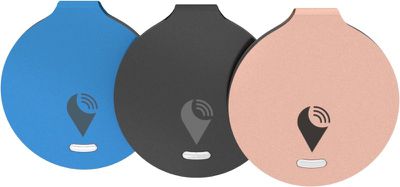
The TrackR Bravo is slightly larger than a quarter, and approximately as large as two quarters stacked on top of each other. It is circular in shape, with a small loop at the top that allows it to be attached to a keyring for fastening to keys, pet collars, and more.
trackrbravo
It has a colorful anodized aluminum housing, and it's small enough to fit comfortably in a purse, wallet, or camera bag.

How it Works

The TrackR Bravo has built-in Bluetooth 4.0, with a 100 foot range. It works in conjunction with the TrackR app, which can be downloaded for free from the App Store.

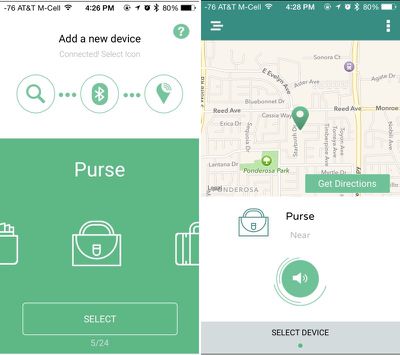
After registering for a TrackR account within the app, the TrackR Bravo can be activated by choosing "Add a New Device" and pressing the Bluetooth activation button on the TrackR. The app supports 10 different TrackR Bravo devices, so multiple items can be tracked at the same time.

To continually track devices, the TrackR app requires the iPhone's Bluetooth to be turned on and the app to be running in the background.

Within the app, there's a map that displays where the TrackR Bravo is located, a distance range that lets you know how far away the item is, and a button that activates a sound to help you find the item. The sound isn't very loud, so you will need to be fairly close to the TrackR to hear it. You may not hear it a few rooms away, for example, but it will be audible when in the same room.
trackrbravoapp1
If you tap the button on the TrackR Bravo itself, it will play a noise within the app, which can also help locate a lost phone. When using this feature, it often took several presses to get the sound to activate, but it did work reliably.

The TrackR Bravo is supposed to have a 100 foot range, but we found that the available range was much less than that. It does show the last known location of an item though, and when the iPhone gets close enough to the TrackR, it will pick up the Bluetooth signal again.

For example, with the iPhone in a bedroom and the TrackR Bravo in a living room approximately 40 feet away, signal between the two devices was lost so a sound was unable to be played. We had to approach the living room again for the iPhone to connect again, so when looking for a lost TrackR item within a large house, you will still need to do quite a bit of roaming.

At times, it also took awhile for the two devices to pair back up when a connection was broken, making it take longer to find lost items. There were also instances when it refused to re-pair all together until we exited the app and reopened it with the TrackR nearby.

The company advertises a Crowd GPS network that's designed to help you find items that are out of Bluetooth range by using the iPhones of other people who also have the TrackR app installed, but we were not able to test this feature as no one with the TrackR app walked near our "lost" TrackR Bravo.

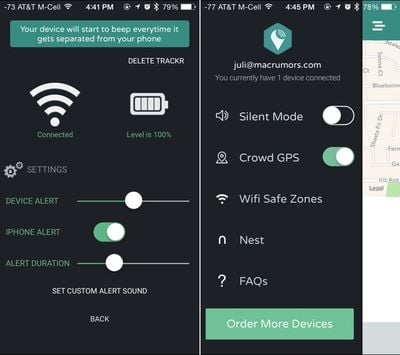
There are settings within the app to turn on alerts for when the TrackR Bravo and the iPhone become separated. This will cause the TrackR's sound to go off when you walk away and it can also set off a notification sound on the phone. This is perhaps one of the most useful features of the TrackR, because it can be used to make sure you don't leave the house without an important item or forget an item at a restaurant.
trackrbravo2
WiFi Safe Zones can be set up so you don't receive alerts when your phone is connected to home WiFi, and the TrackR Bravo is also able to integrate with the Nest thermostat to control device alerts when at home.

The TrackR Bravo has a one year battery life with a replaceable CR1616 battery. It is water resistant, but there's an option to purchase an accessory pack for a waterproof enclosure.

Who's It For?

If you often misplace small items like keys and wallets within your home, the TrackR Bravo may be a useful tool. It's also potentially useful to prevent you from leaving valuable items behind when leaving a restaurant or other location, due to the alarms that go off when a Bluetooth connection is lost.

The range on the TrackR Bravo is short, so it can't be used like some GPS-enabled trackers that help you keep an eye on things like luggage over long distances, but it is suitable for use within a home.

Pros:

  • Fits anywhere
  • App is easy to use

Cons:

  • Short range
  • Sound isn't loud enough
  • Bluetooth connection unreliable at times

Compatibility

The TrackR Bravo works with the iPhone 4s and later and the third-generation iPad and later.

How to Buy

The TrackR Bravo can be purchased from the TrackR website for $29.99.

Tag: Review

Top Rated Comments

Old Muley Avatar
140 months ago
I could see surreptitiously attaching these to my children.
Score: 3 Votes (Like | Disagree)
ArtOfWarfare Avatar
140 months ago
When using this feature, it often took several presses to get the sound to activate, but it did work reliably.
Your definition of "reliably" differs from mine... having to press the button more than once for it to activate means that it works "sometimes", or "occasionally", not "reliably", in my book.

I'm considering this... if I could buy a pack of 3 or something for $30, I'd do it, but 1 for $30 just seems too expensive.

Edit: Hm, they do offer discounts for bulk buying:

1 for $29
3 for $58 ($19.33 each)
5 for $87 ($17.40 each)
8 for $116 ($14.50 each)

Could split the 8 with someone... each person gets 4 for $58...
Score: 3 Votes (Like | Disagree)
Traverse Avatar
140 months ago
I need something like this for my stupid wallet! I lose it around my house all the time! :mad:

I even bought a cheap box to keep my keys, watch, and wallet in...didn't work. ;)
Score: 3 Votes (Like | Disagree)
friedmud Avatar
140 months ago
It says in the article one year.

My question is more of how this would compare to say a Tile? They do feature some upgrades to this such as the device itself making a sound. They're also cheaper, but don't have the user replaceable battery (meaning cheaper up front but more expensive long run).

It's hard to tell which one you're talking about: but both the Tile and Trackr Bravo can play sound out of the device.
Score: 2 Votes (Like | Disagree)
HowEver Avatar
140 months ago
Apple provides "Find My Device" for iPhones and laptops but yes, it would be brilliant if an iDevice/Tracker could be snapped on everything else.

This sort of thing needs to be bought by Apple. The problem of not enough users or the crowd feature to work would be solved instantly if it were part of iOS.
Score: 1 Votes (Like | Disagree)
hagar Avatar
140 months ago
I have the previous generation Trackr, and it's completely useless. It almost never reconnects after the Bluetooth connection has been lost. I have now requested a replacement unit, and the same problems continue to exist. For me this was good idea but a bad execution.
Score: 1 Votes (Like | Disagree)

Popular Stories

iOS 26

iOS 26.4 and iOS 27 Features Revealed in New Leak

Friday December 12, 2025 10:56 am PST by
Macworld's Filipe Espósito today revealed a handful of features that Apple is allegedly planning for iOS 26.4, iOS 27, and even iOS 28. The report said the features are referenced within the code for a leaked internal build of iOS 26 that is not meant to be seen by the public. However, it appears that Espósito and/or his sources managed to gain access to it, providing us with a sneak peek...
apple beta 26 lineup

Apple Leak Confirms Work on Foldable iPhone, AirTag 2, and Dozens More Devices

Monday December 15, 2025 2:05 pm PST by
Last week, details about unreleased Apple devices and future iOS features were shared by Macworld. This week, we learned where the information came from, plus we have more findings from the leak. As it turns out, an Apple prototype device running an early build of iOS 26 was sold, and the person who bought it shared the software. The OS has a version number of 23A5234w, and the first...
Apple Foldable Thumb

Leak Reveals Foldable iPhone Details

Monday December 15, 2025 9:09 am PST by
The first foldable iPhone will feature a series of design and hardware firsts for Apple, according to details shared by the Weibo leaker known as Digital Chat Station. According to a new post, via machine translation, Apple is developing what the leaker describes as a "wide foldable" device, a term used to refer to a horizontally oriented, book-style foldable with a large internal display....
iOS 26

Apple Releases iOS 26.2 With Alarms for Reminders, Lock Screen Changes, Enhanced Safety Alerts and More

Friday December 12, 2025 10:10 am PST by
Apple today released iOS 26.2, the second major update to the iOS 26 operating system that came out in September, iOS 26.2 comes a little over a month after iOS 26.1 launched. ‌iOS 26‌.2 is compatible with the ‌iPhone‌ 11 series and later, as well as the second-generation ‌iPhone‌ SE. The new software can be downloaded on eligible iPhones over-the-air by going to Settings >...
Apple Logo Top Half

Early iOS 26 Software Leak Uncovers Dozens of Upcoming Apple Features

Monday December 15, 2025 3:05 pm PST by
Software from an iPhone prototype running an early build of iOS 26 leaked last week, giving us a glimpse at future Apple devices and iOS features. We recapped device codenames in our prior article, and now we have a list of some of the most notable feature flags that were found in the software code. In some cases, it's obvious what the feature flags are referring to, while some are more...
iOS 26

iOS 26.2 Coming Soon With These 8 New Features on Your iPhone

Thursday December 11, 2025 8:49 am PST by
Apple seeded the second iOS 26.2 Release Candidate to developers earlier this week, meaning the update will be released to the general public very soon. Apple confirmed iOS 26.2 would be released in December, but it did not provide a specific date. We expect the update to be released by early next week. iOS 26.2 includes a handful of new features and changes on the iPhone, such as a new...
macOS Tahoe 26 Thumb

Apple Releases macOS Tahoe 26.2 With Edge Light

Friday December 12, 2025 10:08 am PST by
Apple today released macOS Tahoe 26.2, the second major update to the macOS Tahoe operating system that came out in September. macOS Tahoe 26.2 comes five weeks after Apple released macOS Tahoe 26.1. Mac users can download the macOS Tahoe update by using the Software Update section of System Settings. macOS Tahoe 26.2 includes Edge Light, a feature that illuminates your face with soft...
AirPods Pro Firmware Feature

Apple Releases New Firmware for AirPods Pro 2 and AirPods Pro 3

Thursday December 11, 2025 11:28 am PST by
Apple today released new firmware designed for the AirPods Pro 3 and the prior-generation AirPods Pro 2. The AirPods Pro 3 firmware is 8B30, up from 8B25, while the AirPods Pro 2 firmware is 8B28, up from 8B21. There's no word on what's include in the updated firmware, but the AirPods Pro 2 and AirPods Pro 3 are getting expanded support for Live Translation in the European Union in iOS...

















