

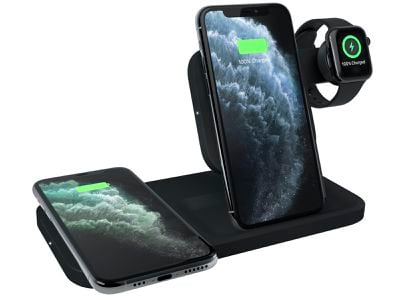
Logitech in March introduced a new series of POWERED wireless charging options, one of which is a new 3-in-1 dock meant to charge the iPhone, Apple Watch, AirPods, and other devices that support Qi-based wireless charging.
logitech3in1
After Apple canceled the AirPower charging dock in March of 2019, multi-device charging options soared in popularity. It seems like every company is coming out with a 3-in-1 wireless charging dock, and Logitech is no exception.

Logitech has been making wireless chargers for Apple devices for a couple of years now, and the first iteration of the POWERED stand, which charged a single iPhone, continues to be one of my favorite chargers to this day. The new $130 POWERED 3-in-1 dock is similar to that original POWERED stand, but it adds expanded charging capabilities that make it a useful all-in-one charging solution.
logitechpowered1
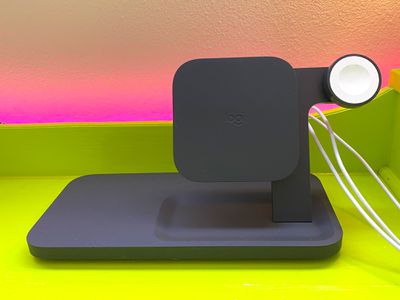
Logitech is offering the POWERED 3-in-1 dock in two colors, charcoal and white, and my review version is the charcoal model. The black is sleek and unassuming, and it looks attractive despite its plastic construction. It's made from a thick, heavy plastic with a rubber coating that keeps devices in place, and it feels sturdy and stable.

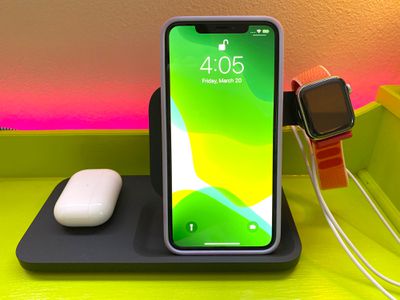
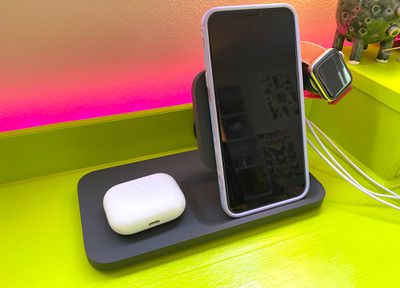
The dock features a flat wireless charging space on the left that can charge AirPods, an iPhone, or another smartphone, along with an upright charger in the middle able to charge an iPhone or other smartphone. On the right side, there's a built-in Apple Watch charging puck, and the whole thing is charged with a single power adapter.
logitechpowered3
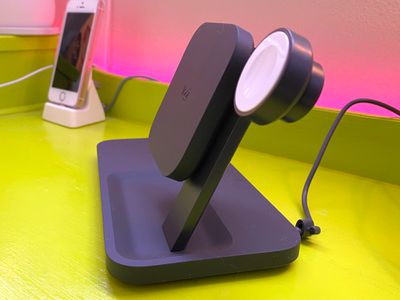
The dock overall is compact and doesn't take up a whole lot of space on my desk, which I like, and design wise, it's one of my favorite charging multi-device wireless charging docks that I've tried because of the convenience of the upright charger. The square-shaped upright charger guides the iPhone into the right spot, and it works with iPhones of all sizes.

I'm not entirely sure why the Apple Watch charging puck is located over to the right side of the dock rather than the left over the flat charging surface, which would have saved more space, but maybe it was intended to make it easier to get each device in its proper charging spot.

The way the Apple Watch arm sticks out looks a little funny, but it is a functional design and I've had no issues dropping my Apple Watch, iPhone, and AirPods Pro in their respective spots and getting charging started right away. With some chargers, there's a bit of adjustment needed to make sure things are properly situated, which can lead to charging mishaps.
logitechpowered4
For the most part, I had no problem with that thanks to the upright charger, though when using the secondary charger with an iPhone, you might want to take a few seconds to make sure the iPhone is properly positioned. I was able to drop and go most of the time, but it's still possible to put the iPhone down a little off center, which prevents charging.

There's a light at the top of the charger that lets you know when your iPhone is in the right spot, and it's not super bright when the lights are out.

The two charging spots are able to charge Apple devices at up to 7.5W, which is the maximum charging speed for an iPhone at this time. In my testing, my iPhones charged to around 20 to 23 percent in about a half hour depending on battery capacity.

Both spots charge at 7.5W simultaneously, so you can charge two devices at max speed, and if you have an Android smartphone, it'll charge at a maximum of 10W in either spot.
logitechpowered2
Wireless charging is not meant to be speedy and it's not a great solution if you need power fast, but it's certainly convenient for trickle charging during the day or while you sleep. My AirPods also charged at the expected speed, as did my Apple Watch. For reference, the Apple Watch charger included is 5W.

The 3-in-1 dock works with most cases that are 3mm or thinner, and I had no problems with an Apple Smart Battery Case, a standard Apple silicone case, a Speck case of average thickness, and a thicker Lifeproof case.

I don't often pay as much attention as I should to built-in safety features in chargers, but Logitech says that the POWERED Dock has internal heat sensors for temperature management, overcharge protection that shuts it off when a device battery is full, and foreign object detection to shut it off if a foreign object is detected in the charging zone.

logitechpowered6
Overall, I have no complaints with Logitech's Dock. It's well designed, the upright charger is convenient and can be used for watching videos or FaceTiming when you charge, and the extra open spot that fits either an iPhone or AirPods is versatile and useful.

Bottom Line

I see a lot of complaints about the prices of these kinds of docks, and the POWERED 3-in-1 Dock from Logitech is not what I'd call affordable. It's $130, which is about in line with other name-brand 3-in-1 docks on the market.

You can get cheaper options from Amazon, and it's also a whole lot cheaper to just use the cords and cables that come with your devices, so these 3-in-1 charging solutions certainly aren't for everyone.

What the POWERED dock lacks in affordability, it makes up for in convenience and reliability. An all-in-one wireless charging spot makes it simple to drop your iPhone and Apple Watch on the dock and go, and the dock charges with a single cord so there's less overall cord clutter.

If you're looking for a multi-device charging solution and aren't sure what 3-in-1 dock to go with, the Logitech POWERED is definitely worth considering.

How to Buy

The Logitech POWERED 3-in-1 Dock can be purchased from the Logitech website for $130.

Top Rated Comments

jclo Avatar
75 months ago

The three white cables you see on the pictures are three individual charging cables that happen to run from behind the cupboard to the front, looking like they would run into the dock. Look at the last picture. The charging dock has one black cable running to it on the back, visible on pic #4.

The author/photographer did not pay enough attention to detail like these (or didn’t care).
Yes, sorry, these cables are not in any way part of the charger. They're on my desk in such a way that makes them difficult to relocate (lots of cable ties underneath) and I didn't realize they would be mistaken for a part of the charger.
Score: 4 Votes (Like | Disagree)
Neodym Avatar
75 months ago

That cable management looks really bad, especially for $130.
The three white cables you see on the pictures are three individual charging cables that happen to run from behind the cupboard to the front, looking like they would run into the dock. Look at the last picture. The charging dock has one black cable running to it on the back, visible on pic #4.

The author/photographer did not pay enough attention to detail like these (or didn’t care).
Score: 3 Votes (Like | Disagree)
locovaca Avatar
75 months ago
That cable management looks really bad, especially for $130.
Score: 2 Votes (Like | Disagree)
darkslide29 Avatar
75 months ago
I purchased a different 3-in-1 Charger that was previously featured on MacRumors, and I’ve been very happy with it the two months owning it. In my opinion, it is much sleeker looking than this on my nightstand, so I usually try to share my experience when these come up. One of my favorite details is that the watch charger can stay flat, or can be raised up, depending on preference and the watch band on your phone. Keep in mind while pricey, you don’t need to supply your own watch charger or other charging cords like some of the cheaper options do.

https://satechi.net/products/trio-wireless-charging-pad
Score: 2 Votes (Like | Disagree)
DeanL Avatar
75 months ago

That cable management looks really bad, especially for $130.
I was just thinking about how ugly it looks.
Score: 2 Votes (Like | Disagree)
ericg301 Avatar
75 months ago
my instagram feed is full of $25-50 charging stands. what's so special about this one?
Score: 1 Votes (Like | Disagree)

Popular Stories

iOS 26

iOS 26.4 and iOS 27 Features Revealed in New Leak

Friday December 12, 2025 10:56 am PST by
Macworld's Filipe Espósito today revealed a handful of features that Apple is allegedly planning for iOS 26.4, iOS 27, and even iOS 28. The report said the features are referenced within the code for a leaked internal build of iOS 26 that is not meant to be seen by the public. However, it appears that Espósito and/or his sources managed to gain access to it, providing us with a sneak peek...
Apple Foldable Thumb

Leak Reveals Foldable iPhone Details

Monday December 15, 2025 9:09 am PST by
The first foldable iPhone will feature a series of design and hardware firsts for Apple, according to details shared by the Weibo leaker known as Digital Chat Station. According to a new post, via machine translation, Apple is developing what the leaker describes as a "wide foldable" device, a term used to refer to a horizontally oriented, book-style foldable with a large internal display....
iOS 26

Apple Releases iOS 26.2 With Alarms for Reminders, Lock Screen Changes, Enhanced Safety Alerts and More

Friday December 12, 2025 10:10 am PST by
Apple today released iOS 26.2, the second major update to the iOS 26 operating system that came out in September, iOS 26.2 comes a little over a month after iOS 26.1 launched. ‌iOS 26‌.2 is compatible with the ‌iPhone‌ 11 series and later, as well as the second-generation ‌iPhone‌ SE. The new software can be downloaded on eligible iPhones over-the-air by going to Settings >...
iOS 26

iOS 26.2 Coming Soon With These 8 New Features on Your iPhone

Thursday December 11, 2025 8:49 am PST by
Apple seeded the second iOS 26.2 Release Candidate to developers earlier this week, meaning the update will be released to the general public very soon. Apple confirmed iOS 26.2 would be released in December, but it did not provide a specific date. We expect the update to be released by early next week. iOS 26.2 includes a handful of new features and changes on the iPhone, such as a new...
macOS Tahoe 26 Thumb

Apple Releases macOS Tahoe 26.2 With Edge Light

Friday December 12, 2025 10:08 am PST by
Apple today released macOS Tahoe 26.2, the second major update to the macOS Tahoe operating system that came out in September. macOS Tahoe 26.2 comes five weeks after Apple released macOS Tahoe 26.1. Mac users can download the macOS Tahoe update by using the Software Update section of System Settings. macOS Tahoe 26.2 includes Edge Light, a feature that illuminates your face with soft...
AirPods Pro Firmware Feature

Apple Releases New Firmware for AirPods Pro 2 and AirPods Pro 3

Thursday December 11, 2025 11:28 am PST by
Apple today released new firmware designed for the AirPods Pro 3 and the prior-generation AirPods Pro 2. The AirPods Pro 3 firmware is 8B30, up from 8B25, while the AirPods Pro 2 firmware is 8B28, up from 8B21. There's no word on what's include in the updated firmware, but the AirPods Pro 2 and AirPods Pro 3 are getting expanded support for Live Translation in the European Union in iOS...
airpods max 2024 colors

AirPods Max 2 Likely to Offer These 10 New Features

Monday December 15, 2025 7:41 am PST by
Apple released the AirPods Max on December 15, 2020, meaning the over-ear headphones launched five years ago today. While the AirPods Max were updated with a USB-C port and new color options last year, followed by support for lossless audio and ultra-low latency audio this year, the headphones lack some of the features that have been introduced for newer generations of the regular AirPods and the ...
apple beta 26 lineup

Apple Leak Confirms Work on Foldable iPhone, AirTag 2, and Dozens More Devices

Monday December 15, 2025 2:05 pm PST by
Last week, details about unreleased Apple devices and future iOS features were shared by Macworld. This week, we learned where the information came from, plus we have more findings from the leak. As it turns out, an Apple prototype device running an early build of iOS 26 was sold, and the person who bought it shared the software. The OS has a version number of 23A5234w, and the first...
















