

Fiat Chrysler Automobiles (FCA) is home to a number of vehicle brands, including Dodge, Jeep, Ram, and of course Chrysler and Fiat. All of these brands include FCA's Uconnect infotainment system, the most recent version of which, version 4, began making its way into vehicles for the 2017 and 2018 model years. Vehicles with Uconnect 4 support both CarPlay and Android Auto, and I recently had an opportunity to test out a 2018 Chrysler Pacifica Hybrid Limited equipped with a Uconnect 4C NAV system that includes built-in navigation.
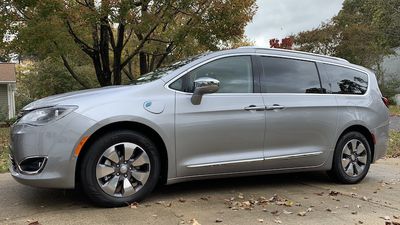
The Pacifica Hybrid is a plug-in hybrid, and really the only such vehicle available in the minivan segment in the United States, so it has a lot going for it in that regard. With a charge that takes just a couple of hours with a 240V level 2 charger or more like 14 hours with a 120V level 1 charger, you get roughly 33 miles of battery-only operation.
Otherwise, the Pacifica acts as a traditional hybrid, supplementing the gas engine and recapturing some energy through regenerative braking to recharge itself. Overall, the Pacifica Hybrid is rated at 84 MPGe (32 MPG in gas-only mode) and offers up to 570 miles of range.
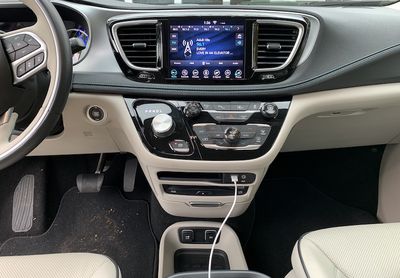
Unsurprisingly, my test vehicle was outfitted with lots of bells and whistles, including a 20-speaker Harman Kardon audio system that sounded great and a host of safety features including standard ParkSense sensors to alert of you of obstacles at front and rear, optional parallel and perpendicular parking assist that controls the steering wheel for you, and adaptive cruise control with stop and go support.
You'll also find a lane departure warning with assist feature to help keep you in your lane, blind spot monitoring, rear cross-traffic warnings, collision warning with automatic braking, bird's eye surround view, rain-sensing wipers, and more. KeySense technology recognizes which key is being used to operate the vehicle and lets you customize settings for each driver.
Uconnect
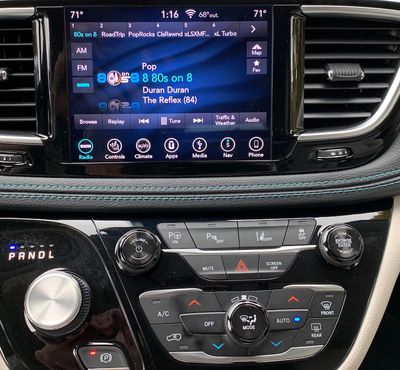
The 2018 Pacifica comes with an 8.4-inch flush-mounted display in the center stack, and it's a bit more square than some other infotainment system displays. As a result, FCA is able to include persistent status and menu bars at the top and bottom of the screen, with the currently active function taking up the majority of the display. The top status bar displays information like temperature settings for driver and passenger, the current radio station, clock, exterior temperature, and Wi-Fi signal if you have the available hotspot functionality activated.
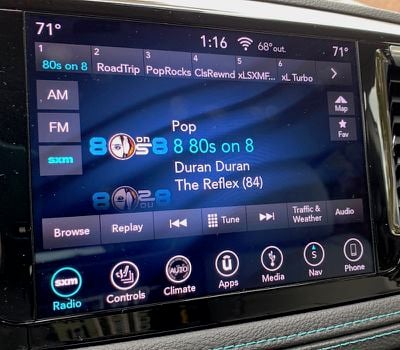
The bottom menu bar is customizable and provides easy access to a variety of functions, and the buttons can update in real-time to show information relative to the specific functionality. For example, the Radio icon will also display the current station, while the Nav icon will show your current compass heading and the Phone icon will show the signal strength of a connected device.
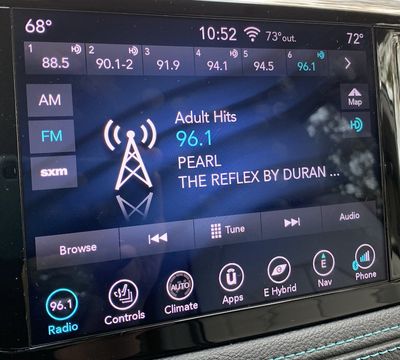
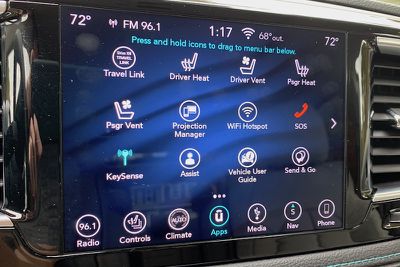
Other buttons control systems such as heated/ventilated seats, heating and air conditioning, connected media devices, and paired phones. An Apps icon gives you access to up to two dozen such sections, and you can press and hold any of them and drag them to the menu bar.
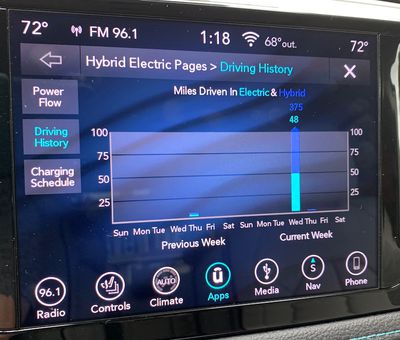
The Pacifica Hybrid even has a Hybrid Electric app that will give you a live view of your power flow as well as your driving history that shows you how far you've driven on electric and gas power over the past two weeks. You can also set your charging schedule in case you want to take advantage of lower electricity rates at night, for example.
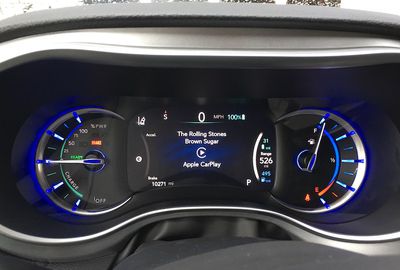
Overall, the 8.4-inch display is bright and clear, although its glossy finish does tend to attract fingerprints. A supplemental 7-inch driver information display can be configured to show information like audio track, turn-by-turn directions, and more.
Built-in Navigation
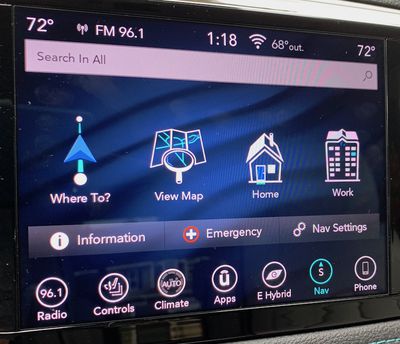
I came away impressed with Uconnect's navigation capabilities. It all starts with the initial menu screen you see when you launch the navigation app, which offers immediate access to address/POI search, a direct map view, and quick-access directions to home or work, once those are configured. There's also easy access to directions to emergency services like hospitals, which can be an important lifesaver in an unfamiliar area.
From there, it's one more tap into a menu that offers a number of other options for finding your destination, including search, exact address, lists of recent and favorite destinations, POIs, and more. Of course, voice is the easiest way to input a destination, and I found the built-in voice assistant very good at recognizing my spoken destinations and interpreting them correctly.
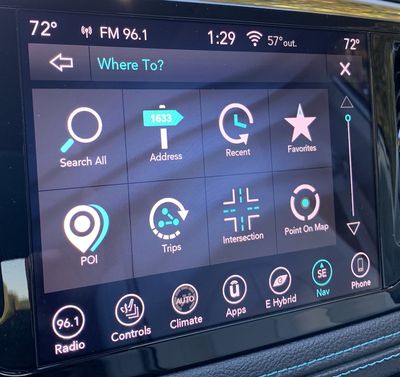
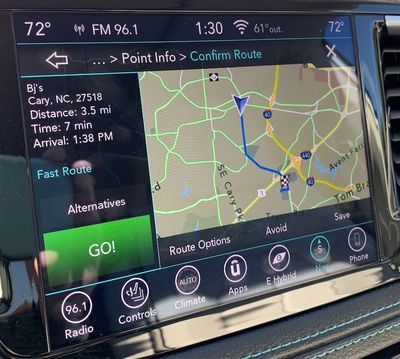
Once a destination is found and a route plotted, Uconnect's navigation system offers an overview of the route and the ability to change certain options if you want to optimize things, and then you're off and running.
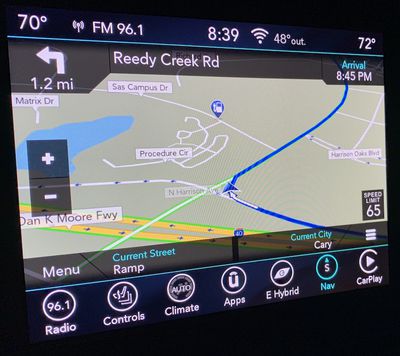
During navigation, the Uconnect system offers an information-rich display that includes all of the usual metrics such as a map with large zoom buttons, current speed limit, upcoming maneuvers, and arrival time, as well as your current street and city. Voice guidance is accurate, timely, and natural-sounding.
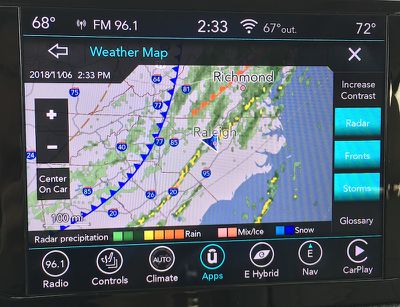
Complementing the built-in navigation is support for SiriusXM Travel Link, a subscription service that offers data such as weather, nearby fuel prices and movie listings, sports scores, and stock prices. A five-year subscription to Travel Link is included with the Pacifica.
Climate Control
In an age of increasingly complex and multi-purpose infotainment systems, there's been considerable controversy over whether basic functions like climate controls should be incorporated into them. While infotainment systems are powerful and convenient, their touchscreen nature is more difficult to navigate by feel than hardware knobs and buttons, and many have advocated for keeping climate controls, which generally have a limited number of options and are frequently adjusted, as physical controls rather than on-screen ones.
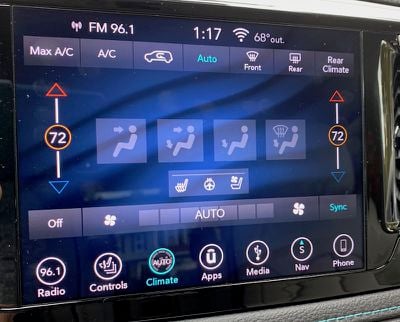
Chrysler has tried to split the difference in the Pacifica, offering both hardware and on-screen controls. The physical knob and buttons make it easy to adjust the mode, temperature set points, fan speed, and defrosters nearly by feel. Those are going to be your most frequently adjusted options on a climate control system, so it makes sense to make them easy to adjust.
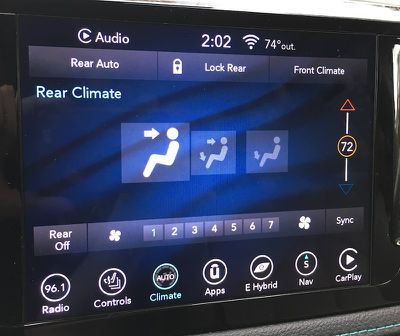
All of these functions are, however, also available through the Uconnect system, which even offers a few more options. For example, if you want to sync the driver and passenger temperature settings or control the rear climate system, you'll need to dive into the Uconnect system. But even when you do, the most commonly used functions come with large icons that are easy to tap.
CarPlay
When you plug your iPhone into the specified USB port on the dashboard, you'll go through the usual process of granting access for CarPlay, at which point the standard CarPlay home screen will pop up on the Uconnect display. You'll quickly notice that in addition to CarPlay, the Uconnect status and menu bars remain visible at the top and bottom of the display.
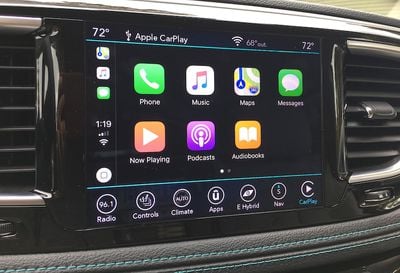
This is a fantastic way to integrate CarPlay into the native infotainment system, as it makes it incredibly easy to hop in and out of CarPlay as needed. The Phone icon in the menu bar even automatically changes to a CarPlay button when you plug in your phone.
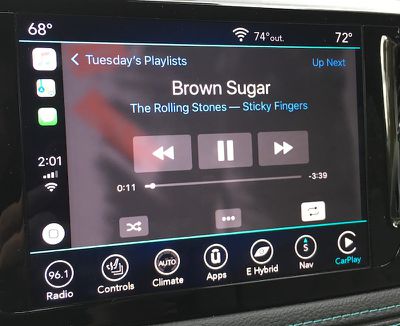
On some all-touchscreen infotainment systems, CarPlay takes over the entire display, which can make it a bit difficult to get back to the vehicle's own system unless you use voice commands or there's a dedicated hardware button to take you back to the native home screen. CarPlay's built-in solution is to have an "app" on its home screen for the car manufacturer, and selecting that icon will take you back to the native system. Other infotainment systems use a widescreen display that's able to show some information from the native system alongside CarPlay.
But with Uconnect, you never really leave the Uconnect system, even when CarPlay is running. You can always access the various Uconnect functions using the menu bar at the bottom, and just as easily get back to CarPlay. There isn't even a Chrysler icon on the CarPlay home screen, because you simply don't need it.
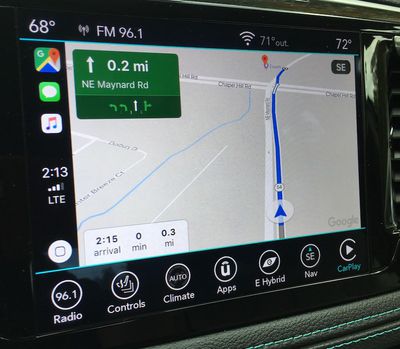
If you prefer to operate CarPlay on the Pacifica without using the touchscreen, you can use the hardware Browse/Enter knob below the display to scroll through the interface and select items, but it's much clunkier than direct touch manipulation and the knob is on the far side of the center stack from the driver.
CarPlay can also be controlled via Siri, and as with most other car manufacturers, Chrysler has opted for a dual-duty voice button on the steering wheel. A short press activates the built-in Uconnect voice assistant, while a long press brings up Siri.
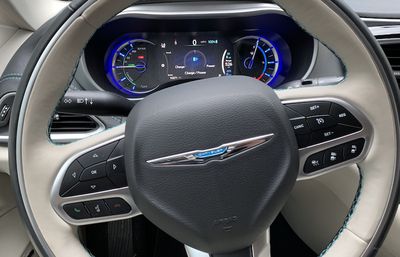
Overall, the Pacifica has quite a few steering wheel controls, which can be helpful once you learn the locations of all of them. Buttons on the front of the wheel are dedicated to cruise control, phone/voice assistant controls, and configuration controls for the driver display. Additional rocker-type switches are located on the back of the steering wheel, with the left switch used for changing radio stations and audio tracks and the right switch used for volume control and changing audio modes.
Uconnect Theater
My test Pacifica came with Uconnect Theater, which includes dual 10.1-inch HD touchscreens on the front seatbacks, as well as a connected Blu-ray player up front and HDMI input, headphones, and remotes for each of the rear screens.
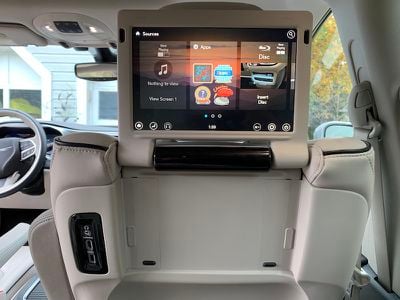
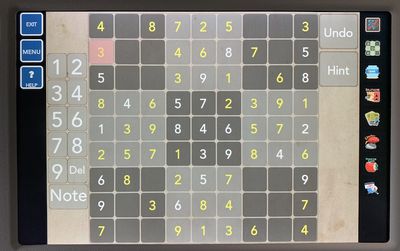
With various options for accessing videos, music, and even built-in games on Uconnect Theater, the kids can stay entertained on those long road trips. Miracast wireless streaming is also available from compatible devices, although that doesn't include iOS devices.
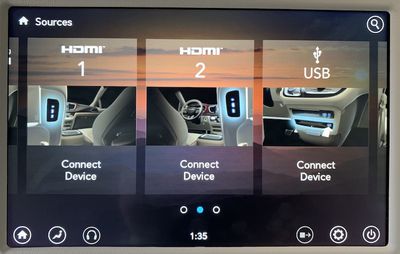
The two screens can operate independently or together, and inputs for one screen can be displayed on the other screen. Several of the included games like checkers and tic-tac-toe also support two-player gaming.
Ports
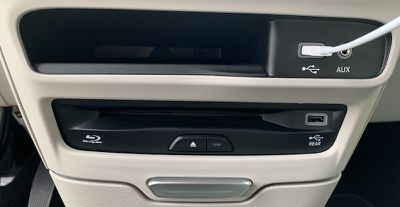
The Pacifica Hybrid is loaded with charging ports, as you might expect with a premium trim minivan. The center stack contains two USB ports, one next to an Aux port for connecting to the main Uconnect audio system and CarPlay, and a second one just below next to the Blu-ray player that can deliver content to the Uconnect Theater system.
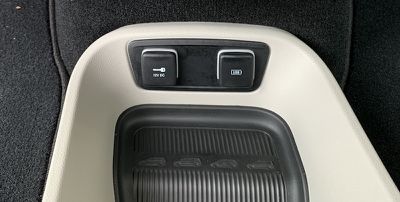
A third front USB port is located near the floor up front next to a 12V port.
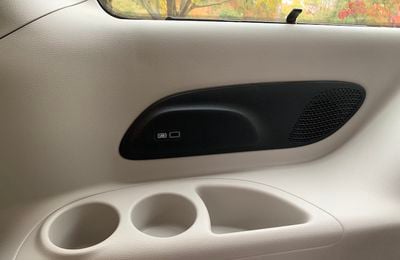
There's an additional USB port (and an HDMI port) located on each front seatback as part of the Uconnect Theater system, offering convenient charging for second-row passengers. And for those relegated to the third row, this model was equipped with one more USB port along the right side. For other power needs, there's another 12V port in the far rear of the minivan for tailgating and other situations, as well as a traditional 115V outlet tucked away on the right wall behind the second-row seats and the sliding door.
Wrap-up
I came away from the Pacifica Hybrid with a quite positive impression of the Uconnect infotainment system. It ticks most of the boxes when it comes to functionality and ease of use. The built-in navigation system worked well, and Uconnect offers a host of controls. The sheer number of control options in Uconnect can feel a bit overwhelming at times, but the ability to customize the bottom menu bar with your most frequently needed functions helps to streamline things.
Integration with CarPlay is excellent, and while I've typically appreciated widescreen displays that can share native infotainment content alongside CarPlay, FCA has shown me an excellent alternative in Uconnect with the persistent menu and status bars. The setup really does make it feel like Uconnect and CarPlay are working together rather than two completely different modes.
CarPlay is available on all Chrysler Pacifica trims, both regular and hybrid. Lower-tier non-hybrid models (L, LX, Touring Plus, and Touring L) all come with a 7-inch touchscreen Uconnect 4 system, while the larger 8.4-inch display comes standard on the Touring L Plus and Limited trims and is available as a package option on the Touring L. All three hybrid trims (Touring Plus, Touring L, and Limited) have at least the larger 8.4-inch system standard, with the navigation version standard on Limited.
Uconnect Theater, which is great for long road trips for the kids, is standard on the Touring L Plus and Hybrid Limited trims, and it's an option on the regular Limited trim.
The 2018 Pacifica Hybrid starts at $39,995 for the base Touring Plus trim, and CarPlay support comes standard. Higher-end Touring L and Limited trims are also available with upgraded options, and the Pacifica Hybrid currently qualifies for a $7,500 federal tax credit to help bring down the cost of eco-friendly vehicles. Non-hybrid Pacifica models start at $26,995. New 2019 models at similar prices and trim levels are also now starting to hit dealerships.

















Top Rated Comments
The slow uptake on CarPlay is precisely what happened, Apple had too many rules. I'm sure that's exactly what happened, Apple realized they had to relax their requirements, and the result is a beautiful integration in the uConnect system, and hopefully others will follow.