

A few months ago, I took a look at the 2021 Buick Envision, which now supports wireless CarPlay as part of the Buick Infotainment System offered by GM. I've been a fan of GM's infotainment systems for a while now, as I find they have an intuitive, modern interface that keeps things simple and comes closer to replicating a smartphone feel than systems from many other manufacturers.
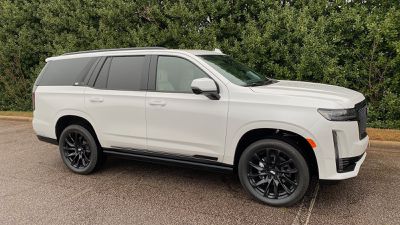
I've subsequently had a chance to try out another GM vehicle with wireless CarPlay, and that's the 2021 Cadillac Escalade with its high-end OLED Infotainment System, an all-new system that bears essentially no resemblance to other current GM infotainment systems.
Hardware and Native Infotainment
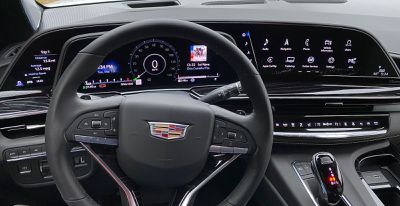
Cadillac markets the Escalade as having an industry-first 38 inches of curved OLED display in front of the driver, although this is actually made up of three separate displays: a 16.9-inch infotainment screen, a 14.2-inch instrument cluster screen, and a 7.2-inch "control panel" screen to the left of the instrument cluster. The setup is standard across all trims of the Escalade.
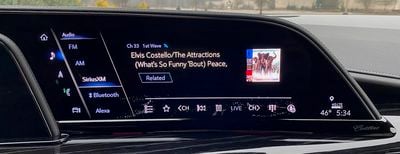 Native Audio app with SiriusXM
All three screens are curved OLED displays, which makes for vivid colors and outstanding contrast with deep blacks. Cadillac says the screens offer twice the pixel density of a typical 4K television, and they certainly do deliver sharp text and graphics.
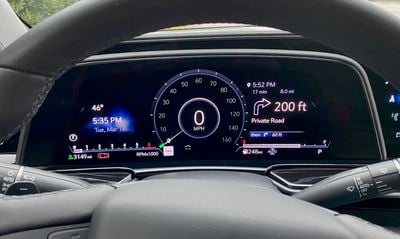 All-digital instrument cluster
The design of the triple-display layout is such that the screens taper off a bit at the left and right edges, which means the infotainment system is designed around non-rectangular interfaces that complement the shape of the physical screens. It's a very cool look, but as we'll see in a bit, it introduces some issues.
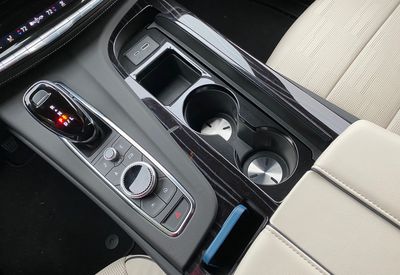 Center console with rotary infotainment system controller, volume knob, and buttons
The Escalade is a big vehicle with big screens on a big dashboard, so in addition to the touchscreen for the main infotainment display, Cadillac also includes some controls on the center console. That includes a rotary controller to navigate the interface in both the native system and CarPlay, a volume knob, and some buttons to quickly jump to popular functions.
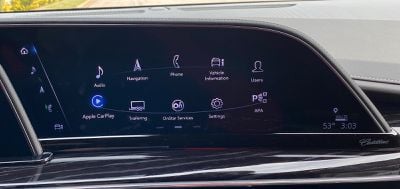 Home screen carousel layout when using rotary controller
One neat trick with the native system is that in some spots the interface optimizes itself based on whether you're using the touchscreen or the rotary controller. For example, the home screen of the native system switches to a carousel view that feels natural to navigate with the dial, but once you reach for the screen with your hand, it switches to a more traditional grid view.
CarPlay
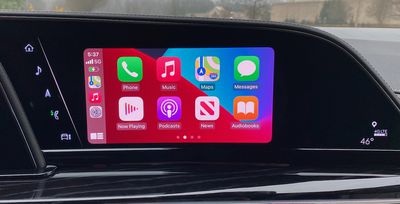 CarPlay home screen
CarPlay functions in either wired or wireless mode, and wireless setup was very easy as expected. But once CarPlay pops up on the infotainment screen, a problem immediately becomes apparent: It's not optimized for the shape of the display. CarPlay remains a traditional rectangular screen shoehorned into this oddly-shaped display, leaving significant areas of the display unused. Granted, those areas are a nice deep black thanks to the OLED technology, but it still looks funny.
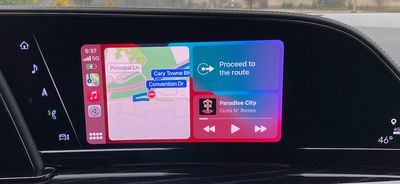 CarPlay dashboard screen
With the shape constraints, you end up with a fairly typical-sized CarPlay screen of around 8.5 inches on the diagonal even on a massive 16.9-inch display. It's not a widescreen interface, so you don't get the expansive view on navigation apps like you do with systems that support wider aspect ratios for CarPlay.
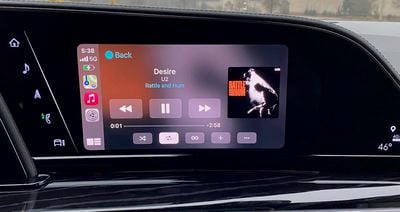 CarPlay "Now Playing screen
That said, the CarPlay interface does look great on the OLED display, with deep blacks and vivid colors that really pop. I just wish it could fill up more of that huge display. The Escalade does not support second-screen Apple Maps navigation prompts in either the instrument cluster or head-up display, but that's not totally surprising given that only a few automakers have started supporting it so far.
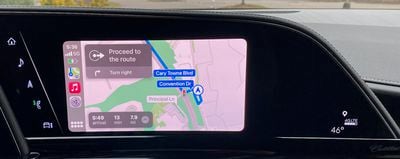 Apple Maps in CarPlay
GM does make it easy to hop back and forth between CarPlay and the native infotainment system, thanks partly to some hardware controls on the center console. If you're in CarPlay, a quick press of the home button takes you to the native system, while a longer press-and-hold gets you back into CarPlay.
Wireless Phone Charger
In addition to wireless CarPlay, the Escalade includes a wireless phone charger as standard equipment, which is a welcome inclusion and certainly expected given the sticker price of the vehicle and all of the other technology in it. Cadillac has used a space-saving vertical design for its charger, and I found it worked quite well. Inside the charging cavity is a pair of flexible domes that give way to allow the phone to slide in but then hold the phone firmly in place against the vertical surface.
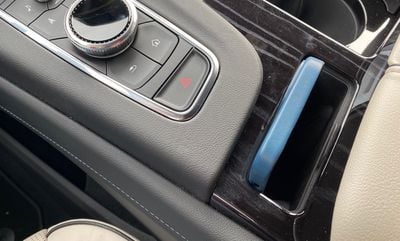 Vertical wireless phone charger in center console
This is a fantastic setup that keeps things secure and ensures that you get perfect alignment every time, unlike some of the pads I've used in other vehicles where getting the phone situated just right for charging can be a little finicky.
I will say that my iPhone 12 Pro Max with an Apple leather case on it just barely fit in the charging slot, so keep that in mind if you're using a Pro Max phone with a more substantial case or an Android phablet that's even larger than Apple's largest offering.
Cadillac says the wireless charger supports up to 15W of charging power, which is fantastic for a vehicle charger, although iPhones are undoubtedly limited to 7.5W since this isn't using Apple's MagSafe standard. Still, it's great to see improvements on the charging front after experiencing some of the early days of vehicle wireless chargers that could barely charge at a trickle.
Ports, Connectivity, and Seatback Entertainment
If you want to go the wired route, the Escalade comes absolutely loaded with USB ports. There is a set of USB-C/USB-A ports for charging and data located prominently on the center console, and another set also for data and charging inside the center console compartment.
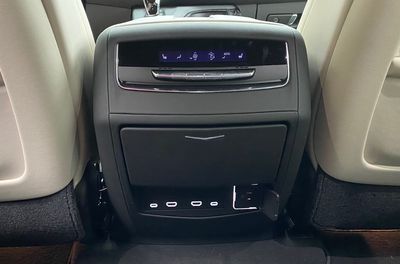 Second row charging, AC power, and connectivity ports
For second-row passengers in the captain's chairs, each side has access to a USB-C port and an HDMI port that provide connectivity for the seatback entertainment systems. There's also a 120V outlet for powering various electronic devices. Third-row passengers aren't left out either, with a USB-C charging port located on either side.
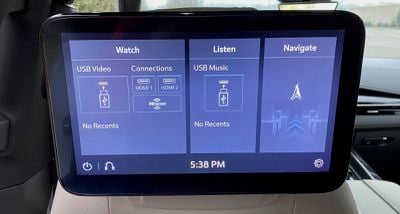 Second-row entertainment system main screen
The seatback entertainment system for second-row passengers supports a variety of inputs such as HDMI, USB video, and Miracast for non-Apple devices, and it also provides access to the navigation system to let passengers get involved in the journey such as by looking up destinations and passing them to the main screen for the driver to accept and plot a route for. The system doesn't include any built-in games, however, which is something my kids were disappointed to learn after experiencing Chrysler's seatback system in the Pacifica.
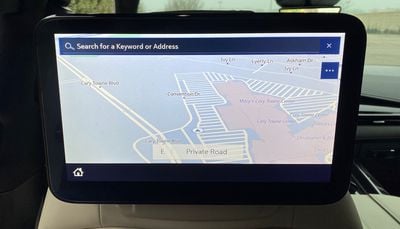 Second-row entertainment system map app
Instrument Cluster
Getting back to the native infotainment system and the rest of the technology available to the driver, there's an impressive array of options available in the instrument cluster, including a full map view that includes an augmented-reality navigation view that will overlay upcoming turns and POI labels on a live video feed to help guide you along your route.
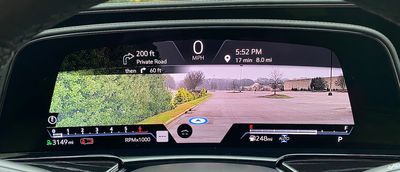 AR navigation in instrument cluster
My test vehicle was also equipped with a $2,000 thermal night vision mode that displays what's in front in a black and white thermal view, potentially helping you identify wildlife or pedestrians on dark roads before they become visible to the naked eye.
If that's not enough information overload, there's also a head-up display to provide glanceable information without having to take your eyes off the road. It's a pretty standard system as head-up displays go, offering a look at your speed, turn-by-turn directions from the native navigation system, driver safety alerts, and a few other tidbits.
The small third screen to the left of the driver offers a few types of functionality, including at-a-glance views of trip metrics, controls for setting the view (gauges, map, AR, night vision) on the main instrument cluster screen, and settings for the head-up display.
Climate Controls
The climate control system on the Escalade is thankfully largely hardware-based, with a row of physical buttons underneath a thin digital display. I wish there was a bit more differentiation among the buttons or some rotary knobs for the temperature and/or fan speed to make it easier to adjust settings by feel, but at least I didn't have to go digging into the main infotainment system for basic climate controls.
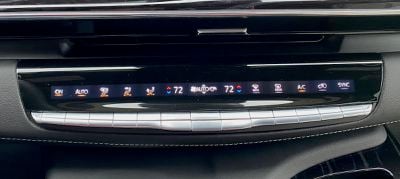 Climate controls
Wrap-up
The 2021 Cadillac Escalade is by no means a cheap vehicle, as is obvious from the moment you step into it, if not from the outside. Pricing starts at a little under $80,000, and it's available in five trims: Luxury, Premium Luxury, Sport, Premium Luxury Platinum, and Sport Platinum, with optional four-wheel drive. My test vehicle was a 4WD Sport trim with a number of other options that pushed the sticker price all the way up to nearly $107,000. If you go all-in with the extended-length ESV version and all of the available options, you could even push it beyond $120,000.
Consequently, a premium infotainment experience is to be expected, and Cadillac definitely delivers here with the massive OLED display system included on all trims. The native system works well and looks gorgeous, with multiple options for controlling the system and lots of bells and whistles like the AR navigation view and optional night vision feature.
That said, the CarPlay experience on this system is a bit of a disappointment, with the oddly shaped main infotainment screen significantly impacting the usability of CarPlay by limiting it to a fairly standard-sized window in a traditional aspect ratio. CarPlay looks great on the OLED display and it works well with both wireless connectivity and a handy wireless charger to keep your phone topped up, but it's a shame it can't take advantage of the palette it's presented on.





















Top Rated Comments