
How to Zip a File on Mac - MacRumorsOpen MenuShow RoundupsShow Forums menuVisit ForumsOpen Sidebar
Skip to Content

How to Zip a File on Mac

by

macos finder iconPeople compress or "zip" electronic files for different reasons – to make them easier to transport electronically, to organize their backups, or to save device storage space, for example.

Whatever your use case, the good news is that there's no need to download additional software to compress files in macOS. That's because Apple includes a built-in ability to zip files on your Mac, allowing you to quickly compress single files, groups of files, or entire folders. Keep reading to learn how.

How to Zip a File or Folder on Mac

  1. Click the Finder icon in your Mac's Dock to make sure it's the active application.
  2. Right-click (or Control-click) on the file or folder you want to compress. Alternately, drag a selection box over several files and/or folders with your cursor by holding down the left mouse button or pressing down on the trackpad.
  3. Select Compress [name of file] or Compress X Items from the contextual dropdown menu.
    finder

  4. Locate the newly created zip file in the same directory as the original files and/or folders.
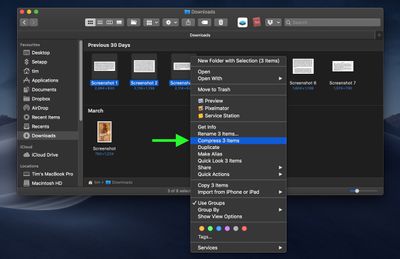
If you compressed a single file, the zip archive takes the same name and adds a zip extension. If you compressed more than one file or folder, the zip archive will be named "Archive.zip" by default.

How to Decompress a Zip Archive on Mac
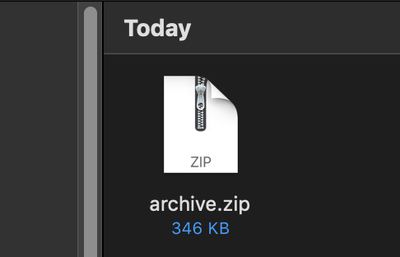
zip archive icon
Unzipping a compressed archive is as easy as double-clicking on the zip file. The files and/or folders will be extracted to the same location as the archive.


Popular Stories

iOS 27 on iPhone 17 1

iOS 27 Will Add These New Features to Your iPhone

Saturday May 2, 2026 8:43 am PDT by
Apple is expected to unveil iOS 27 during its WWDC 2026 keynote on June 8, and there are already many rumored features and changes for iPhones. The first developer beta of iOS 27 will likely be available immediately following the keynote, and a public beta typically follows in July. Following beta testing, the software update should be released to all users with a compatible iPhone in...
Apple Event Logo

Apple Just Released a New Accessory

Monday May 4, 2026 8:13 am PDT by
Apple today released a new Pride Edition Sport Loop for the Apple Watch. The band features a rainbow design with 11 colors of woven nylon yarns. The new Pride Edition Sport Loop is available to order now on Apple.com and in the Apple Store app in 40mm, 42mm, and 46mm sizes, and it will be available at Apple Store locations starting later this week. In the U.S., the band costs $49. There...
Apple Announces 2026 Pride Band Watch Face and iPhone Wallpaper Article 2

iOS 26.5 Coming Soon With These New Features

Monday May 4, 2026 8:40 am PDT by
iOS 26.5 is expected to be released next week, following more than a month of beta testing. The update is relatively minor, but there are a couple of new features and changes across the operating system that we have recapped below. iOS 26.5 lays the groundwork for end-to-end encryption for RCS in the Messages app and ads in the Apple Maps app, and it will include a new Pride wallpaper and a...
Related Apple News: Apple Maps Visited Places Disable | Foldable Iphone | Technology | Macbook Air M3 Buyers Guide | Culture