How to Use the YouTube App's New Voice Search Feature When Casting to a Smart TV - MacRumorsOpen MenuShow RoundupsShow Forums menuVisit ForumsOpen Sidebar
Skip to Content

How to Use the YouTube App's New Voice Search Feature When Casting to a Smart TV

by

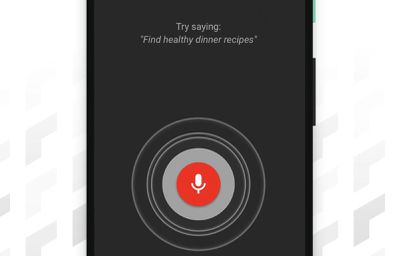
The official YouTube app for iOS has gained a new voice search feature that aims to make searching for content easier when you're casting YouTube video to a smart TV.
youtube app voice search
Once you've connected your iPhone or iPad to a smart TV, you can search with your voice via the mobile app, as well as use it to pause, play, and adjust the volume on your TV. Here's how it works.

  1. Download and launch the YouTube app on your iPhone or ‌iPad‌.
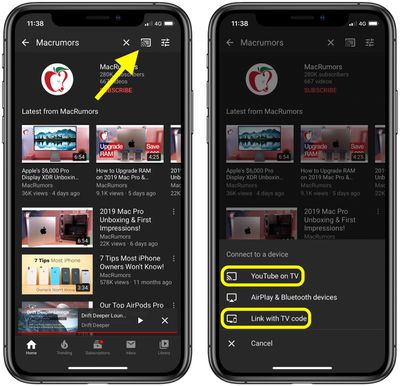
  2. Tap the Cast button at the top of the Home tab.
  3. Launch the YouTube app on your smart TV.
  4. If you haven't connected your iOS device to your smart TV before, select Link with TV code and then tap LEARN NOW under "Learn how to get a TV code." Otherwise, tap YouTube on TV to connect.
    youtube

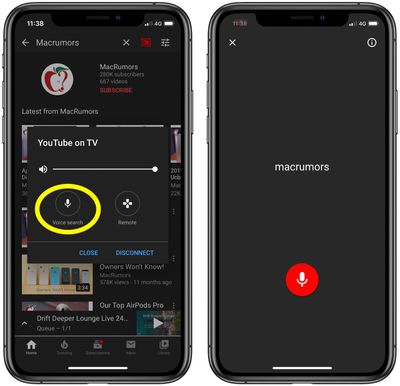
  5. When your iOS device is connected to your TV, you'll see an overlay on your device's screen with a volume slider, a Remote button, and the new Voice search button – tap it.
  6. Tap the red microphone icon, and when you hear the audible prompt, say the word or phrase that you want to search on YouTube.
    youtube

You should see the results of your voice search appear on your TV. And don't forget, you can use the Remote option in the YouTube app's mobile interface to navigate and select the content that shows up on your TV.

According to German site SmartDroid, YouTube is currently working on improving the remote interface for controlling YouTube casting. The updated controls are said to include quicker access to captions and playback quality settings, but there's no word on when we can expect them to roll out for the iOS YouTube app.

Tags: TV, YouTube

Top Rated Comments

John.B Avatar
82 months ago
Giving the YouTube app unfettered access to my iPhone microphone, what could go wrong? 🤣
Score: 5 Votes (Like | Disagree)
justperry Avatar
82 months ago

Giving the YouTube app unfettered access to my iPhone microphone, what could go wrong? 🤣
Exactly my thoughts.
So little to gain, so much to lose.

Be aware setting up your Spanky brand new TV, deny all instead of opting in into the so called "do you want your TV experience to be improved", it's just a different way of them saying " we are tracking all your time on your TV set, what you're watching, how many times, how long and what more...".
Score: 2 Votes (Like | Disagree)
canadianreader Avatar
82 months ago

Giving the YouTube app unfettered access to my iPhone microphone, what could go wrong? 🤣
Macrumors should add a privacy note when they give these kind of advice.
Score: 1 Votes (Like | Disagree)

Popular Stories

iPhone 18 Pro Deep Red Feature

iPhone 18 Pro Launching Later This Year With These 12 New Features

Wednesday March 18, 2026 7:39 am PDT by
While the iPhone 18 Pro and iPhone 18 Pro Max are not expected to launch for another six months or so, there are already plenty of rumors about the devices. It was initially reported that the iPhone 18 Pro models would have fully under-screen Face ID, with only a front camera visible in the top-left corner of the screen. However, the latest rumors indicate that only one Face ID component...
imac video apple feature

Apple Released Yet Another New Product Today

Friday March 20, 2026 2:39 pm PDT by
Apple has unveiled a whopping nine new products so far this March, including an iPhone 17e, iPad Air models with the M4 chip, MacBook Air models with the M5 chip, MacBook Pro models with M5 Pro and M5 Max chips, the all-new MacBook Neo, an updated Studio Display, a higher-end Studio Display XDR, AirPods Max 2, and now the Nike Powerbeats Pro 2. iPhone 17e features the same overall design as...
ios 26 4 yellow

Here Are Apple's Release Notes for iOS 26.4

Wednesday March 18, 2026 11:56 am PDT by
Apple provided developers and public beta testers with the release candidate versions of iOS 26.4 and iPadOS 26.4, which means we're going to see a public launch as soon as next week. The RC versions of the software include Apple's official release notes, giving us final details on what's included in the update. Apple Music - Playlist Playground (beta) generates a playlist from your...
Related Apple News: Sport | Buyers Guide | World News | Reviews | Health