 With iOS 13, Apple introduced several additional features to its Maps app, one of which is called Look Around. This gives you a street-level view of what's around your current location or the location you search for on the map.
If you've ever used Google Street View, you already have a good idea of how Look Around works, but Apple's equivalent feature includes a couple of functions that differentiate it from Google Maps.
Launch the Apple Maps app on your iPhone or iPad, and then check to see if there's a binoculars icon on the map in your exact location. (Tap the location arrow in the floating menu of options if another area of the map is showing that's different to where you're at).
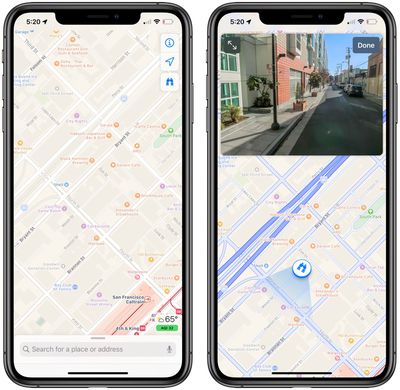
If you see a pair of binoculars on the map, simply tap them to open a street-level view in a card overlay at the top of the screen. You can also tap the two arrows pointing away from each other in the top left corner of the card to take the street-level view fullscreen.
Note that you should also see the binoculars icon available to tap in the floating menu when checking the standard overhead map in a supported location.
If Look Around isn't yet supported in your current location, you can still search for specific locations supported by Look Around. For example, try searching for San Francisco and you'll see a Look Around icon in the results overlay.
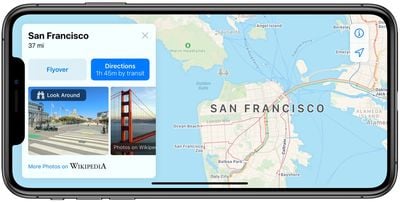
Once you're in Look Around mode, tap the view to move through the area. You can also tap a spot further in the distance and the view will smoothly zoom towards the location.
To help orient you in Look Around mode, points of interest such as bars, restaurants, parks and the like are identified by floating icons at street level. Note however that you can only zoom into areas that can be accessed by vehicles, because the Look Around data is captured by cars fitted with 360-degree cameras.
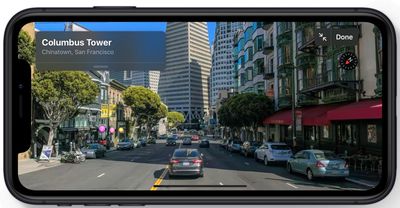
Currently, Look Around in Maps is limited to areas in California, Nevada, and Hawaii, but Apple plans to expand availability in 2019 and beyond.