As part of Apple's accessibility push in watchOS 9, Assistive Touch now includes Quick Actions that let you respond to Apple Watch alerts with hand gestures. This article explains how to use them.
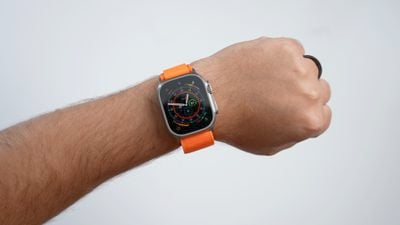
In watchOS 8, Apple introduced a new accessibility feature called Assistive Touch that allows users to control their Apple Watch using gestures and arm movements. With watchOS 9, Apple has built on the technology behind Assistive Touch with Quick Actions.
With new Quick Actions, users with upper body limb differences can now do even more with a double-pinch gesture to respond to alerts on their Apple Watch, including answer or end a phone call, take a photo when the viewfinder and shutter button are showing in the Camera app, play or pause media in the Now Playing app, and start, pause, or resume a workout. You can also use quick actions to snooze an alarm or stop a timer.
In fact, Quick Actions can be useful to just about anybody. For example, if you're holding something in your other hand and can't touch the screen of your Apple Watch to answer or end a phone call, you can perform a double-pinch gesture with your watch hand to do exactly that.
In watchOS 9, you can choose Quick Actions to be available at all times, available only when AssistiveTouch is enabled, or off. You can also choose Full appearance (a banner appears and the action button is highlighted) or Minimal appearance (the action button is highlighted with no banner).
How to Enable Quick Actions
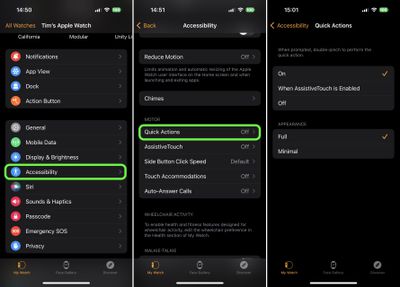
To turn quick actions on or off, follow these steps.
- Open the Watch app on your iPhone.
- Tap Accessibility.
- Under "Motor," tap Quick Actions.
- Choose from one of the following options: On, When AssistiveTouch is Enabled, and Off. You can also choose their appearance to be Full or Minimal.
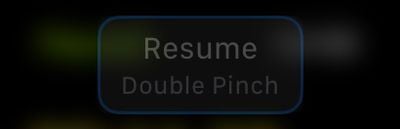
With Quick Actions on, when you see an alert on your Apple Watch, you'll be prompted to perform a Quick Action. For example, when you've paused a workout, a prompt lets you know that you can double-pinch to resume it (tap index finger to thumb twice quickly).
If you'd like a little practice performing Quick Action gestures, open Settings on your Apple Watch, then go to Accessibility -> Quick Actions, and tap Try it out....