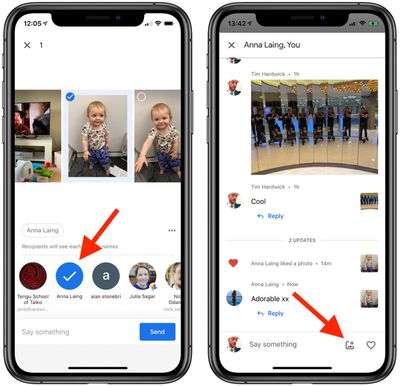
google photosGoogle Photos for iOS offers users several picture and video sharing options like live albums, shared libraries, and shared albums, and now Google has built a messaging service into its ‌Photos‌ app that makes it possible to share individual snaps and video clips as part of an ongoing conversation.

Why Add a Messaging Service to a Photos App?

Previously, sharing individual photos through the app was done by creating an album for the photo and sharing a link to it, but user feedback suggested to Google that this sharing option could be a simpler experience, so it's adding an option to share individual photos as part of an ongoing, private conversation. You can like photos or comment in the conversation, and you can save photos or videos to your own gallery.

Google says the new messaging feature isn't designed to replace the chat apps you already use, but it hopes that by including an option, users will find sharing moments with friends and family easier than before. Here's how it works.

How to Share Media in a Google Photos Chat Thread

  1. Launch the Google Photos app on your iPhone or iPad.
  2. Tap a picture in your library that you want to share.
  3. Tap the Share icon (the square with an arrow pointing out).
    2how to use the messaging feature in Google Photos

  4. Type in the name or email address of the person with whom you want to share the photo, or select a contact from the Share Sheet options. You can also start a group chat by adding as many people as you like.
  5. Type a message to accompany the photo, then tap Send.
  6. You can keep up with the chat thread that you just created via the Sharing tab. You can easily share more photos in the conversation using the picture symbol next to the message input field at the bottom of the chat thread.
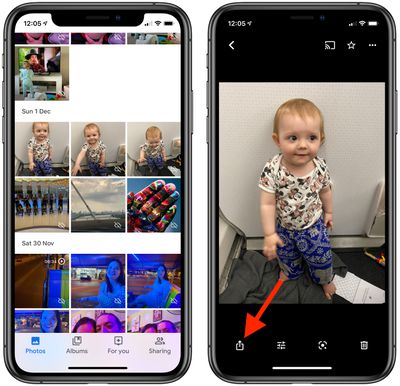
    how to use messaging in google photos

The person you shared the photo with will receive an email notifying them, and if they've got the Google ‌Photos‌ app installed on their device, they'll receive an alert inviting them to join the chat.

Top Rated Comments

@meinertzhagen Avatar
81 months ago
After so many years, Google's messaging strategy is still mind-boggling.
Score: 7 Votes (Like | Disagree)
Ion-X Avatar
81 months ago

Why?

If I was Google, I'd just add a "Browse my Google Photos" button to the messaging app that they already have, "Hangouts"
Hate to break it to you... but Google is discontinuing Hangouts for consumers.
Score: 2 Votes (Like | Disagree)
MisterSavage Avatar
81 months ago

After so many years, Google's messaging strategy is still mind-boggling.
This. So much this. Google Allo, killing Hangouts, etc.
Score: 2 Votes (Like | Disagree)
Sasparilla Avatar
81 months ago
Bizarre. Photo's now had a full on messaging app built inside of it that they control and monitor, wonder if they'll spread this to their other apps? Can't imagine why Google would do that. \s
Score: 1 Votes (Like | Disagree)
mrgraff Avatar
81 months ago
Why?

If I was Google, I'd just add a "Browse my Google Photos" button to the messaging app that they already have, "Hangouts"
Score: 1 Votes (Like | Disagree)
JosephAW Avatar
81 months ago
Another way is to long press on the app and press the X when it appears. ;)
Score: 1 Votes (Like | Disagree)

Popular Stories

iOS 26

iOS 26.3 and iOS 26.4 Will Add These New Features to Your iPhone

Tuesday February 3, 2026 7:47 am PST by
We are still waiting for the iOS 26.3 Release Candidate to come out, so the first iOS 26.4 beta is likely still at least a week or two away. Following beta testing, iOS 26.4 will likely be released to the general public in March or April. Below, we have recapped known or rumored iOS 26.3 and iOS 26.4 features so far. iOS 26.3 iPhone to Android Transfer Tool iOS 26.3 makes it easier...
Apple Logo Black

Apple's Next Launch is 'Imminent'

Sunday February 1, 2026 12:31 pm PST by
The calendar has turned to February, and a new report indicates that Apple's next product launch is "imminent," in the form of new MacBook Pro models. "All signs point to an imminent launch of next-generation MacBook Pros that retain the current form factor but deliver faster chips," Bloomberg's Mark Gurman said on Sunday. "I'm told the new models — code-named J714 and J716 — are slated...
iOS 26 Home Feature

Apple Gives Final Warning to Home App Users

Tuesday February 3, 2026 8:55 am PST by
In 2022, Apple introduced a new Apple Home architecture that is "more reliable and efficient," and the deadline to upgrade and avoid issues is fast approaching. In an email this week, Apple gave customers a final reminder to upgrade their Home app by February 10, 2026. Apple says users who do not upgrade may experience issues with accessories and automations, or lose access to their smart...
Aston Martin CarPlay Ultra Screen

Apple's CarPlay Ultra to Expand to These Vehicle Brands Later This Year

Sunday February 1, 2026 10:08 am PST by
Last year, Apple launched CarPlay Ultra, the long-awaited next-generation version of its CarPlay software system for vehicles. Nearly nine months later, CarPlay Ultra is still limited to Aston Martin's latest luxury vehicles, but that should change fairly soon. In May 2025, Apple said many other vehicle brands planned to offer CarPlay Ultra, including Hyundai, Kia, and Genesis. In his Powe...
Apple Foldable Thumb

First Foldable iPhone Design Details Revealed

Monday February 2, 2026 7:19 am PST by
Apple's first foldable iPhone will feature relocated volume buttons, an all-black camera plateau, a smaller Dynamic Island, and more, according to design leaks from a known Weibo leaker. The user known as "Instant Digital" today claimed to share several key details about the design of the foldable iPhone: The volume buttons will be located on the top edge of the device, aligned to the...