

 When using Apple's FaceTime app, you can apply camera effects while on a video call, including built-in filters, stickers, labels, and shapes.
FaceTime camera effects can be used on these devices: iPhone 7, iPhone 7 Plus, iPhone 8, iPhone 8 Plus, iPhone X, iPhone XS, iPhone XS Max, iPhone XR, iPhone 11, iPhone 11 Pro, iPhone 11 Pro Max, and later models.
If you have a supported device, simply follow the steps below to get started using camera effects in FaceTime.
How to Apply a Filter in a FaceTime Video Call
- Open the FaceTime app on your iPhone make a video call.
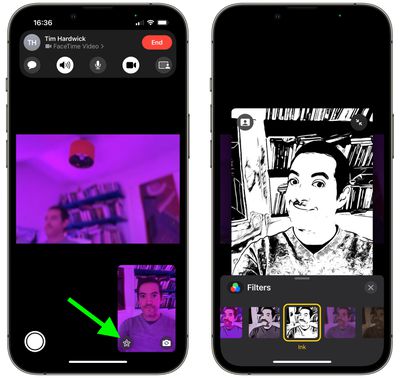
- When the call has connected, tap the star-shaped Effects icon in the image of yourself (if you don't see it, tap the screen).
- Tap the Filter button (the second icon from the left) in the effects strip above the main FaceTime controls.

- Change your appearance by tapping a filter at the bottom – swipe left or right to preview them.
How to Add a Text Label in a FaceTime Video Call
- Open the FaceTime app on your iPhone make a video call.
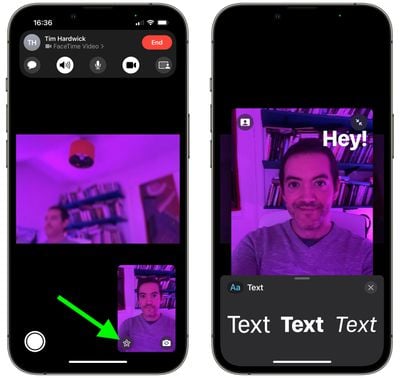
- When the call has connected, tap the star-shaped Effects icon in the image of yourself (if you don't see it, tap the screen).
- Tap the Label button (the third icon from the left) in the effects strip above the main FaceTime controls.
- While the label is selected, type the text you want to appear in the label, then tap away from it.
- Drag the label to where you want to place it on the camera display.
- To delete the label, tap it, then tap the X icon.
How to Add Stickers in a FaceTime Video Call
- Open the FaceTime app on your iPhone make a video call.
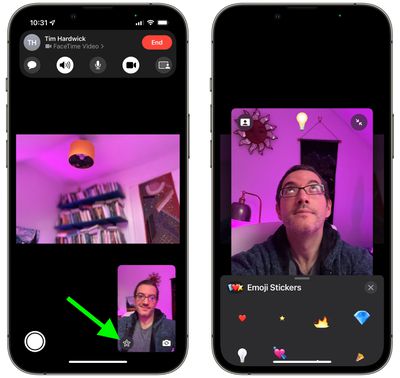
- When the call has connected, tap the star-shaped Effects icon in the image of yourself (if you don't see it, tap the screen).
- Tap one of the stickers buttons – they're the three rightmost icons in the effects strip above the main FaceTime controls.
- Tap a sticker to add it to the call.
- Drag the label to where you want to place it on the camera display.
- To delete the sticker, tap it, then tap the X icon.
How to Add Shapes to a FaceTime Video Call
- Open the FaceTime app on your iPhone make a video call.
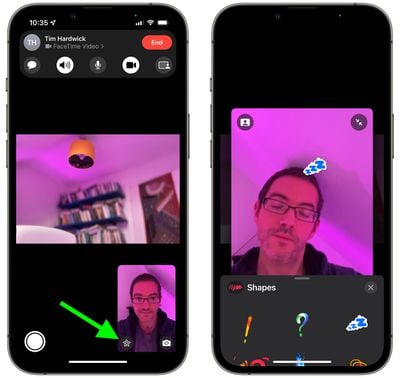
- When the call has connected, tap the star-shaped Effects icon in the image of yourself (if you don't see it, tap the screen).
- Tap the Shapes button (the middle icon represented by a squiggle) in the effects strip above the main FaceTime controls.
- Tap a shape to add it to the call.
- Drag the shape to where you want to place it on the camera display.
- To delete the sticker, tap it, then tap the X icon.
To learn how to use Animoji and Memoji characters in FaceTime, click here.
Tag: FaceTime Guide





















