

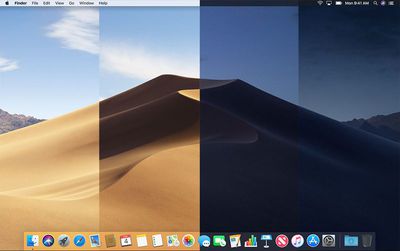
Apple in macOS Mojave introduced Dynamic Desktops, which are wallpapers that shift with the time of day, changing the lighting and look of the wallpaper with the progress of the sun across the sky.

For example, in the afternoon, the lighting in the wallpaper is at its peak brightness and the image of the Mojave desert is depicted as it would be if you visited it in the daytime with well-lit sand dunes and a bright blue sky.


At night, the sky in the wallpaper shifts to darker blue to reflect that it's now evening. The shift between daytime and nighttime happens gradually over the course of the day, so you'll see subtle changes each time you look at your Mac's display.
macosmojavedynamicwallpaper
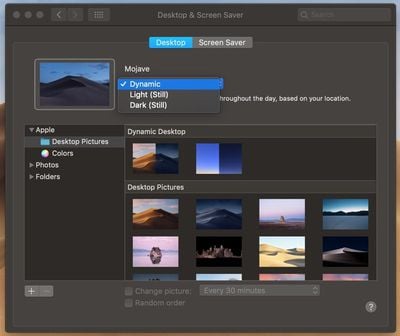
Dynamic Desktop is simple to enable. Here's how:
macosmojavedynamicdesktop

  1. Open up System Preferences.
  2. Choose Desktop & Screensaver.
  3. Select one of the options from the "Dynamic Desktop" section under "Desktop."
  4. Using the dropdown menu underneath the wallpaper's name, make sure "Dynamic" is enabled.

There are two Dynamic Desktop options in macOS Mojave, which work with both Light and Dark Mode.

You can choose between the wallpaper that depicts the Mojave desert and a Solar Gradients wallpaper that shifts from a lighter sky blue in the daytime to a darker twilight blue. Apple is likely to add additional Dynamic Desktop options in the future.

Apple's Dynamic Desktop feature relies on your location to be able to match the lighting of the wallpaper with the lighting outside, so to use it, you will need to have Location Services enabled.


Related Forum: macOS Mojave

Top Rated Comments

macduke Avatar
98 months ago
Hopefully since this is the Mac someone will hack something together to make us able to add our own dynamic wallpapers. I do professional photography and would totally spend all day making a good photo for this.

This would be a neat feature to add to iOS as well. I've always been disappointed that Apple hasn't done more with motion wallpapers beyond the floating dots. The 3D Touch wallpapers have never seemed very useful to me because I never press on them—it would be better if they would just activate an animation when you lift your phone up. I don't need a bunch of cheesy effects but feel like some subtle ones like rain hitting on a window with drops slowly rolling down would be cool.
Score: 14 Votes (Like | Disagree)
Xenc Avatar
98 months ago
About as useful as all the emojis :rolleyes:
You just used an emoji
Score: 11 Votes (Like | Disagree)
B2k1977 Avatar
98 months ago
About as useful as all the emojis :rolleyes:
Score: 6 Votes (Like | Disagree)
Blackstick Avatar
98 months ago
Damn, now I gotta photograph my daughter in the exact same pose in the morning, at high noon and asleep for this to work properly!
Score: 6 Votes (Like | Disagree)
chucker23n1 Avatar
98 months ago
Oh please. Lately their QC has been trash, instead of fixing what needs fixing this is what they come up with? Oh boy can't wait to crack my piggy bank open. I used to be a mac user but in my opinion the last few years the value add for what you spend on a Mac just isn't there anymore. The machines and software are not what they used to be. No one seems to want to admit that, instead everyone ooohs and ahhs over features like this that pose no real benefit to the user. Seems the new Apple mantra is form over function. Rather than try to be witty and insult me, change my mind... I dare you.
No matter how true this is, how is it remotely relevant? Are you going to complain in every single macOS-related post about how Apple could have set their priorities differently? Do you believe the team who developed dynamic desktop pictures would be a good team to instead improve QC?
Score: 5 Votes (Like | Disagree)
MobiusStrip Avatar
98 months ago
Great to see Apple wasting resources on this junk instead of fixing age-old defects. Gee, I sure hope there’s some kind of “touch bar” support for this. That’ll be as useful as rubbing two turds together.

Where’s the big ground-up rewrite of Finder we were promised years ago?
Score: 5 Votes (Like | Disagree)

Popular Stories

Aston Martin CarPlay Ultra Screen

Apple's CarPlay Ultra to Expand to These Vehicle Brands Later This Year

Sunday February 1, 2026 10:08 am PST by
Last year, Apple launched CarPlay Ultra, the long-awaited next-generation version of its CarPlay software system for vehicles. Nearly nine months later, CarPlay Ultra is still limited to Aston Martin's latest luxury vehicles, but that should change fairly soon. In May 2025, Apple said many other vehicle brands planned to offer CarPlay Ultra, including Hyundai, Kia, and Genesis. In his Powe...
iOS 26

iOS 26.3 and iOS 26.4 Will Add These New Features to Your iPhone

Tuesday February 3, 2026 7:47 am PST by
We are still waiting for the iOS 26.3 Release Candidate to come out, so the first iOS 26.4 beta is likely still at least a week or two away. Following beta testing, iOS 26.4 will likely be released to the general public in March or April. Below, we have recapped known or rumored iOS 26.3 and iOS 26.4 features so far. iOS 26.3 iPhone to Android Transfer Tool iOS 26.3 makes it easier...
Apple Logo Black

Apple's Next Launch is 'Imminent'

Sunday February 1, 2026 12:31 pm PST by
The calendar has turned to February, and a new report indicates that Apple's next product launch is "imminent," in the form of new MacBook Pro models. "All signs point to an imminent launch of next-generation MacBook Pros that retain the current form factor but deliver faster chips," Bloomberg's Mark Gurman said on Sunday. "I'm told the new models — code-named J714 and J716 — are slated...
Apple MacBook Pro M4 hero

New MacBook Pros Reportedly Launching Alongside macOS 26.3

Sunday February 1, 2026 5:42 am PST by
Apple is planning to launch new MacBook Pro models with M5 Pro and M5 Max chips alongside macOS 26.3, according to Bloomberg's Mark Gurman. "Apple's faster MacBook Pros are planned for the macOS 26.3 release cycle," wrote Gurman, in his Power On newsletter today. "I'm told the new models — code-named J714 and J716 — are slated for the macOS 26.3 software cycle, which runs from...
iOS 26 Home Feature

Apple Gives Final Warning to Home App Users

Tuesday February 3, 2026 8:55 am PST by
In 2022, Apple introduced a new Apple Home architecture that is "more reliable and efficient," and the deadline to upgrade and avoid issues is fast approaching. In an email this week, Apple gave customers a final reminder to upgrade their Home app by February 10, 2026. Apple says users who do not upgrade may experience issues with accessories and automations, or lose access to their smart...
















