Since 2014, Apple has included a little-known feature in iOS called Live Listen that allows an iPhone or iPad to serve as a remote microphone for an MFI-compatible hearing aid.

In iOS 12 and later, Live Listen supports Powerbeats Pro, Apple's sporty Beats-branded earphones, making it possible to use your iOS device as a directional mic and have the audio relayed to your ears.
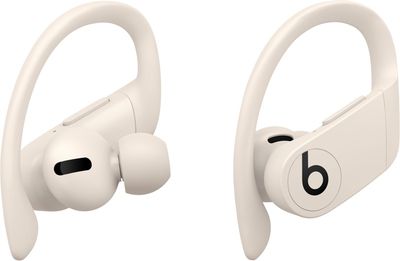
powerbeatsproivory
As an accessibility feature, the idea behind Live Listen is for it to be used by people who are hard of hearing or need extra help separating voices in a loud environment, but it can be useful in other ways, too.

If you're on a family vacation, for instance, you could use your ‌iPhone‌ or ‌iPad‌ as a makeshift baby monitor for when the baby's napping and you're in another room with the TV on. All you'd need to do is put the iOS device near the baby's crib and wear a single ‌Powerbeats Pro‌ earbud, which should have a strong enough Bluetooth range to allow you to listen in from afar.

Live Listen will work even when other audio is being played on your ‌iPhone‌ or ‌iPad‌ – so you could listen to a podcast, say, and still be keeping tabs on the baby. Just note that whatever it is that you're listening to will switch to mono output to match the Live Listen stream.

Live Listen is easy to set up and use once you know how. The following steps show you how it's done on an ‌iPhone‌ or ‌iPad‌ running iOS 12.

How to Set Up Live Listen on iPhone and iPad

  1. Launch the Settings app on your ‌iPhone‌ or ‌iPad‌.
  2. Tap Control Center.
    how to set up live listen with airpods

  3. Tap Customize Controls.
  4. Scroll down and tap the green plus (+) button next to Hearing.
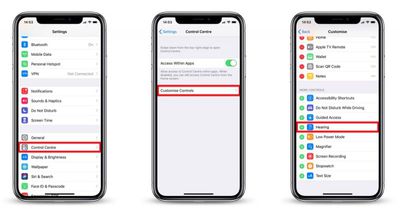
How to Use Live Listen on iPhone and iPad

  1. Put your ‌Powerbeats Pro‌ earbuds in and connect them to your ‌iPhone‌ or ‌iPad‌ in the usual way.
  2. Launch Control Center on your iOS device: On an ‌iPad‌ with a Home button, double-tap the Home button; on ‌iPhone‌ 8 or earlier, swipe up from the bottom of the screen; and on a 2018 iPad Pro or ‌iPhone‌ XR/X/XS/XS Max, swipe down from the upper right of the screen.
    how to use live listen with airpods

  3. Tap the Hearing icon.
  4. Tap Live Listen.
  5. Place your ‌iPhone‌ or ‌iPad‌ close to the person you want to hear, preferably in front of them.
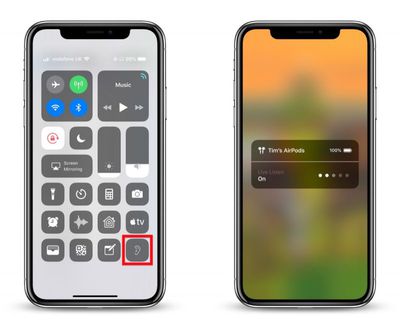
If the output to your ‌Powerbeats Pro‌ earbuds is too quiet or too loud, use the volume buttons on your ‌iPhone‌ or ‌iPad‌ to adjust the volume level.

If you see the message "Unavailable for current route" when you try to turn on Live Listen, restarting your iOS device and then forgetting and re-connecting your ‌Powerbeats Pro‌ earbuds in the Settings app's Bluetooth menu should fix the issue.

Popular Stories

Aston Martin CarPlay Ultra Screen

Apple's CarPlay Ultra to Expand to These Vehicle Brands Later This Year

Sunday February 1, 2026 10:08 am PST by
Last year, Apple launched CarPlay Ultra, the long-awaited next-generation version of its CarPlay software system for vehicles. Nearly nine months later, CarPlay Ultra is still limited to Aston Martin's latest luxury vehicles, but that should change fairly soon. In May 2025, Apple said many other vehicle brands planned to offer CarPlay Ultra, including Hyundai, Kia, and Genesis. In his Powe...
Apple Logo Black

Apple's Next Launch is 'Imminent'

Sunday February 1, 2026 12:31 pm PST by
The calendar has turned to February, and a new report indicates that Apple's next product launch is "imminent," in the form of new MacBook Pro models. "All signs point to an imminent launch of next-generation MacBook Pros that retain the current form factor but deliver faster chips," Bloomberg's Mark Gurman said on Sunday. "I'm told the new models — code-named J714 and J716 — are slated...
Apple MacBook Pro M4 hero

New MacBook Pros Reportedly Launching Alongside macOS 26.3

Sunday February 1, 2026 5:42 am PST by
Apple is planning to launch new MacBook Pro models with M5 Pro and M5 Max chips alongside macOS 26.3, according to Bloomberg's Mark Gurman. "Apple's faster MacBook Pros are planned for the macOS 26.3 release cycle," wrote Gurman, in his Power On newsletter today. "I'm told the new models — code-named J714 and J716 — are slated for the macOS 26.3 software cycle, which runs from...
iOS 26

iOS 26.3 and iOS 26.4 Will Add These New Features to Your iPhone

Tuesday February 3, 2026 7:47 am PST by
We are still waiting for the iOS 26.3 Release Candidate to come out, so the first iOS 26.4 beta is likely still at least a week or two away. Following beta testing, iOS 26.4 will likely be released to the general public in March or April. Below, we have recapped known or rumored iOS 26.3 and iOS 26.4 features so far. iOS 26.3 iPhone to Android Transfer Tool iOS 26.3 makes it easier...
14 inch MacBook Pro Keyboard

Apple Changes How You Order a Mac

Saturday January 31, 2026 10:51 am PST by
Apple recently updated its online store with a new ordering process for Macs, including the MacBook Air, MacBook Pro, iMac, Mac mini, Mac Studio, and Mac Pro. There used to be a handful of standard configurations available for each Mac, but now you must configure a Mac entirely from scratch on a feature-by-feature basis. In other words, ordering a new Mac now works much like ordering an...