watchOS is the operating system that runs on the Apple Watch, powering its fitness tracking capabilities, apps, communication features, time-keeping abilities, and more. Apple plans to push regular updates to fix watchOS bugs, refine performance, and introduce new features, and the release of watchOS 2 alongside iOS 9 later today is a major uprade for the platform. (Update: Apple has delayed the public release of watchOS 2.)
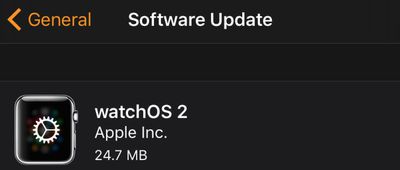
watchos_2_install
watchOS updates are installed in a unique way that differs from how we install iPhone and Mac updates, so we've crafted a quick tutorial to remind users how to get the latest version of watchOS on their Apple Watches so they're ready for watchOS 2.

Before You Start

Before you try to download and install the new version of watchOS, make sure of the following:

  1. Your iPhone has been updated to iOS 9.
  2. Your iPhone and Apple Watch are within range of each other.
  3. Your Apple Watch has at least a 50 percent charge.
  4. Your Apple Watch is connected to its charger.
How to install software on apple watch 2
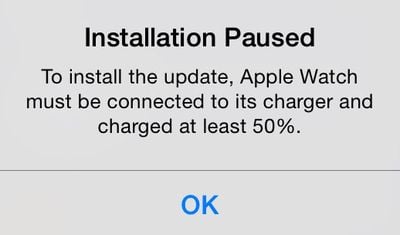
The last two requirements are important. You will be able to download the new version of watchOS without a 50 percent charge or Apple Watch resting on its charger, but you won't be able to install it. During the installation step, you will instead see a message that the installation is paused and won't continue until Apple Watch is connected to the charger with at least a 50 percent charge.

Downloading and Installing the Update

  1. Open the Apple Watch app on your iPhone and select the My Watch tab if necessary.
  2. Tap General, then tap Software Update.
  3. Tap Download and Install to begin the process.
  4. Enter your four-digit passcode on Apple Watch when prompted.
  5. The Apple logo and progress bar will appear when the software is installing. When finished, Apple Watch will restart.

If Something Goes Wrong
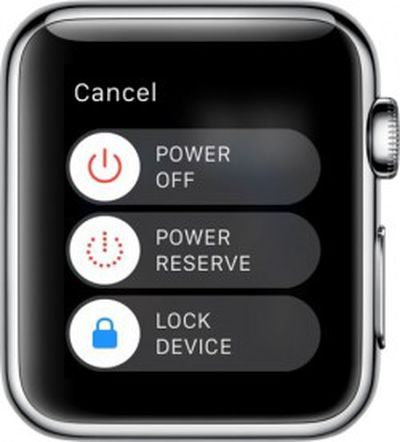
Apple Watch Power OffIf, for some reason, the download freezes up or you can't get the software to install on Apple Watch, you can try restarting the device.

Restarting

  1. Hold down the Side button until the Power Off slider appears.
  2. Slide the bar to shut off Apple Watch.
  3. Hold down the Side button until the Apple logo appears.
  4. Wait for Apple Watch to restart.
  5. Enter your passcode when prompted.

Hard Reset
If powering down Apple Watch does not work, you can also try a hard reset. This forces the device to shut off. It usually takes a bit longer to restart Apple Watch when you perform a hard reset.

  1. Hold both the Side button and Digital Crown down at the same time.
  2. The screen will go blank, and then the Apple logo will appear.
  3. Wait for Apple Watch to restart.
  4. Enter your passcode when prompted.

Apple is rapidly iterating on watchOS, so don't be surprised if we continue to see frequent updates. watchOS arrives just five months after the Apple Watch's debut and brings a host of new features including native third-party apps, so most Apple Watch owners will want to upgrade as soon as possible and begin exploring what's new.

Related Roundup: Apple Watch 11
Buyer's Guide: Apple Watch (Buy Now)

Top Rated Comments

WarHeadz Avatar
132 months ago
Thanks for this great article. Will start charging my AW now to be ready . I've ordered pizza and Coca Cola!
You're celebrating a software update with pizza and coke? Hope you don't use Windows 10 or you'd be obese by now.

Edit: Ouch, bet you wish you didn't order that pizza so soon. No software update for the Watch today. :(
Score: 5 Votes (Like | Disagree)
drumcat Avatar
132 months ago
Thanks for this great article. Will start charging my AW now to be ready . I've ordered pizza and Coca Cola!
How's that pizza tasting with the delay? :)
Score: 1 Votes (Like | Disagree)
Michaelgtrusa Avatar
132 months ago
These are some nice tips.
Score: 1 Votes (Like | Disagree)

Popular Stories

ios 26 1 slide to stop

iOS 26.1 Brings Back 2007 Feature in New Way

Friday October 31, 2025 1:40 pm PDT by
The upcoming iOS 26.1 update includes a small but helpful change for iPhones, and it could prevent you from running late to something important. Specifically, when an alarm goes off in the Clock app, there is a new "slide to stop" control on the screen for turning off the alarm. On previous iOS 26 versions, there is simply a large "stop" button, which could be accidentally tapped. The new ...
M5 MacBook Pro

Waiting for New Macs? Apple Just Shared Bad News

Friday October 31, 2025 7:32 am PDT by
Apple has just given a strong indication that it will not be releasing any additional new Macs for the remainder of the year. Apple's CFO Kevan Parekh dropped the hint during the company's earnings call on Thursday:On Mac, keep in mind, we expect to face a very difficult compare against the M4 MacBook Pro, Mac mini, and iMac launches in the year-ago quarter.Parekh essentially gave a heads up ...
iPhone 17 Pro Cosmic Orange

8 Reasons to Wait for Next Year's iPhone 18 Pro

Thursday October 30, 2025 4:42 am PDT by
Apple's iPhone development roadmap runs several years into the future and the company is continually working with suppliers on several successive iPhone models at the same time, which is why we often get rumored features months ahead of launch. The iPhone 18 series is no different, and we already have a good idea of what to expect for the iPhone 18 Pro and iPhone 18 Pro Max. One thing worth...
iOS 26

6 New Things Your iPhone Can Do in iOS 26.1

Wednesday October 29, 2025 4:22 am PDT by
Apple is about to drop iOS 26.1, the first major point release since iOS 26 was rolled out in September, and there are at least six notable changes and improvements to look forward to. We've rounded them up below. Apple has already provided developers and public beta testers with the release candidate version of iOS 26.1, which means Apple will likely roll out the update to all compatible...
Coffee Burgundy and Purple iPhone 18 Pro Mock 1

Leaker Outlines Potential New Colors for iPhone 18 Pro

Friday October 31, 2025 8:28 am PDT by
Apple's iPhone 18 Pro models could be available in new rich and warm color option, according to a known leaker. The Weibo user known as "Instant Digital" today suggested that next-year's iPhone 18 Pro models will be available in at least one of the following color options: Coffee, purple, and burgundy. The iPhone XR, iPhone 11, iPhone 12, iPhone 14, and iPhone 14 Pro were all available in ...
Apple Foldable Thumb

iPhone Fold: Launch, Pricing, and What to Expect From Apple's Foldable

Friday October 31, 2025 8:52 am PDT by
Apple is expected to launch a new foldable iPhone next year, based on multiple rumors and credible sources. The long-awaited device has been rumored for years now, but signs increasingly suggest that 2026 could indeed be the year that Apple releases its first foldable device. Below, we've collated an updated set of key details that have been leaked about Apple's foldable iPhone so far. Ove...
apple tv hd

Apple Launched Its Big New Vision for TV 10 Years Ago Today

Thursday October 30, 2025 8:58 am PDT by
Apple launched the Apple TV HD, the Siri Remote, tvOS, and their accompanying App Store a decade ago today, marking a major overhaul of the device. The new vision for the Apple TV was unveiled on September 9, 2015 during Apple's "Hey Siri" event in San Francisco, where CEO Tim Cook introduced the device with the statement, "The future of TV is apps." The announcement represented a major...
iOS 26

Apple This November: iOS 26.2 Beta, Rumored New Products, and More

Thursday October 30, 2025 12:42 pm PDT by
Tomorrow is Halloween, and then November is upon us. Below, we outline what to expect from Apple next month, as the slower holiday season approaches. Apple is expected to kick off November by releasing iOS 26.1, iPadOS 26.1, macOS 26.1, watchOS 26.1, tvOS 26.1, and visionOS 26.1. With beta testing now wrapped up, the updates will likely be released this Monday, November 3 or Tuesday,...
iOS 26

iOS 26.1 Coming Soon: New Features for Your iPhone and Release Date

Monday October 27, 2025 7:55 am PDT by
The upcoming iOS 26.1 update includes a handful of new features and changes for iPhones, including a toggle for changing the appearance of the Liquid Glass design, "slide to stop" for alarms in the Clock app, and more. Below, we outline key details about iOS 26.1. Release Date Given that Apple has yet to seed an iOS 26.1 Release Candidate, which is typically the final beta version, the...
iOS 18 Siri Personal Context

Apple CEO Tim Cook Says Revamped Siri on Track to Launch Next Year

Thursday October 30, 2025 1:50 pm PDT by
Apple CEO Tim Cook today said that a more personalized version of Siri remains on track to launch at some point next year, with the new set of features expected to debut on the iPhone as part of iOS 26.4 in March or April. "We're also excited for a more personalized Siri," said Cook, on Apple's earnings call for the third quarter of the 2025 calendar year. "We're making good progress on it,...