How to Unpair AirPods Max From iPhone, iPad, Apple TV, Apple Watch, or Mac - MacRumorsOpen MenuShow RoundupsShow Forums menuVisit ForumsOpen Sidebar
Skip to Content

How to Unpair AirPods Max From iPhone, iPad, Apple TV, Apple Watch, or Mac

by

This article explains how to unpair AirPods Max from a number of different Apple devices. If you're sending AirPods Max back to Apple for return or passing them on to someone else, then you'll want to unpair the headphones with your Apple hardware before you part ways with them.
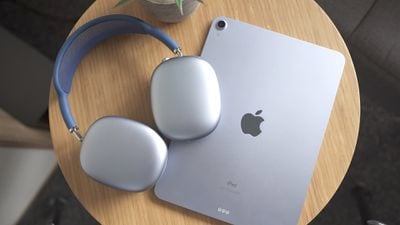
airpods max reaons 3
Bear in mind that when you unpair ‌AirPods‌ from an iPhone, Mac, or Apple TV (fourth-generation or later), this also automatically unpairs the wireless earphones from all other devices linked to the same iCloud account, so you won't have to repeat the process on your other devices once you've done so.

How to Unpair AirPods Max From iPhone or iPad

  1. Launch the Settings app.
  2. Tap Bluetooth.
  3. Tap the "i" icon next to the AirPods Max in the Devices list.
    settings

  4. Tap Forget this Device.
  5. Tap Forget Device in the pop-up message to confirm.
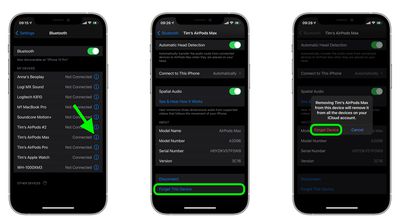
Note that unpairing ‌AirPods‌ Max from your ‌iPhone‌ also unpairs them from your Apple Watch, however you can also individually unpair ‌AirPods‌ Max from Apple Watch without unpairing them from your ‌iPhone‌.

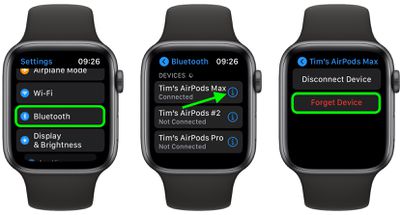
How to Unpair AirPods Max From Apple Watch

  1. On your Apple Watch, launch the Settings app.
  2. Tap Bluetooth.
    Apple Watch

  3. Tap the "i" icon next to your ‌AirPods‌ Max in the list.
  4. Tap Forget Device.

How to Unpair AirPods From Mac

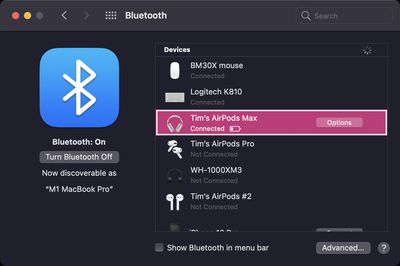
  1. On your Mac, click the Apple icon in the menu bar and select System Preferences....
  2. Click the Bluetooth icon in the preference pane.
    Mac bluetooth

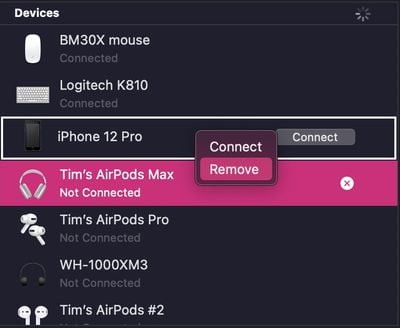
  3. Right-click (or Ctrl-click) your ‌AirPods‌ Max in the Devices list.
  4. Click Remove in the contextual menu that appears.
    Mac bluetooth

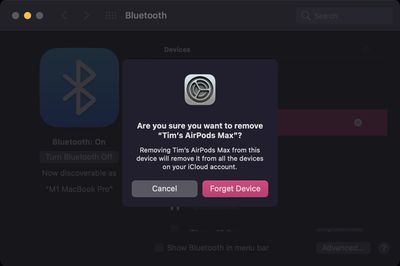
  5. Click Remove again to confirm.
    Mac bluetooth

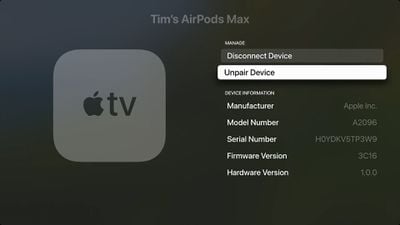
How to Unpair AirPods From Apple TV

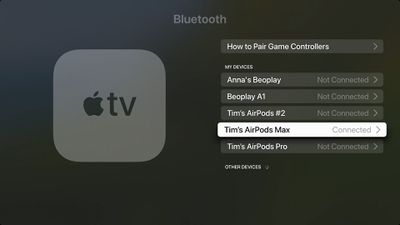
  1. On your ‌‌Apple TV‌‌, launch the Settings app.
  2. Select Remotes and Devices -> Bluetooth (or General -> Bluetooth on third-generation ‌‌Apple TV‌‌ or earlier models).
  3. Select your ‌AirPods‌ Max in the Devices list.
    apple tv bluetooth

  4. Select Unpair Device.
    Apple TV

  5. Select Unpair Device again to confirm.
Related Roundup: AirPods Max 2
Buyer's Guide: AirPods Max (Buy Now)
Related Forum: AirPods

Popular Stories

AirPods Max 2 Design

Apple Releases New Firmware for AirPods Max 2

Tuesday May 5, 2026 11:16 am PDT by
Apple today released new firmware for the AirPods Max 2. The firmware is version 8E258, up from the prior 8E251 firmware that was released just ahead of when the AirPods Max 2 launched. It's not clear what's included in the firmware update, but Apple provides limited details in its AirPods firmware support document. Most updates focus on bug fixes and improvements. The AirPods Max 2 have...
iOS 27 on iPhone 17 1

iOS 27 Will Add These New Features to Your iPhone

Saturday May 2, 2026 8:43 am PDT by
Apple is expected to unveil iOS 27 during its WWDC 2026 keynote on June 8, and there are already many rumored features and changes for iPhones. The first developer beta of iOS 27 will likely be available immediately following the keynote, and a public beta typically follows in July. Following beta testing, the software update should be released to all users with a compatible iPhone in...
Apple Event Logo

Apple Just Released a New Accessory

Monday May 4, 2026 8:13 am PDT by
Apple today released a new Pride Edition Sport Loop for the Apple Watch. The band features a rainbow design with 11 colors of woven nylon yarns. The new Pride Edition Sport Loop is available to order now on Apple.com and in the Apple Store app in 40mm, 42mm, and 46mm sizes, and it will be available at Apple Store locations starting later this week. In the U.S., the band costs $49. There...
Related Apple News: Iphone | News | Ipad | Iphone | Opinion