Turn a Video into a GIF on iPhone and iPad - MacRumorsOpen MenuShow RoundupsShow Forums menuVisit ForumsOpen Sidebar
Skip to Content

Turn a Video into a GIF on iPhone and iPad

by

Animated GIFs have become a staple of the internet. Invented in 1987, the looping, soundless video clips can be found everywhere online, from social media networks to messaging platforms. They're often used to express emotions, communicate ideas, or just make people laugh.

gif image
Because they are so short, GIF files are quick to load and they play automatically, so they communicate what you want instantaneously and without effort on the viewer's part. What's more, thanks to Apple's Shortcuts app, you can turn video clips into GIFs quickly and easily on your iPhone and iPad without even having to download anything.

The following steps show you how it's done.

  1. Open the Shortcuts app.
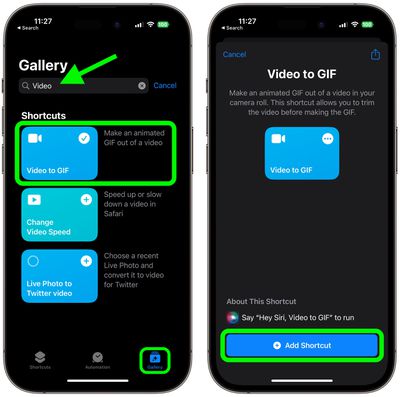
  2. Using the Gallery tab, search for "Video to GIF," tap the shortcut in the results, then tap Add Shortcut.
  3. Run the shortcut by tapping its card in the My Shortcuts tab.
    shortcuts

  4. You'll be presented with a list of videos from your photo library that you can turn into GIFs. Choose the clip that you want to convert.
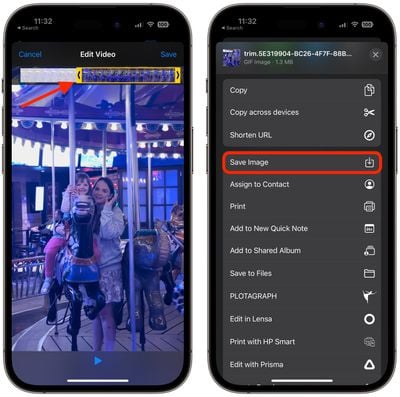
  5. If the video is too long, you'll be prompted to trim it down by dragging the chevrons on either end of the clip. After that, tap Save.
  6. Tap the Share button below the preview to Save Image or choose a sharing method. Once you're finished, tap Done.
    gif

If you want more control when making your own GIFs, consider using a dedicated GIF creation tool such as GIPHY. The app is free to download and includes additional options including stickers and effects to apply to your creations.


Popular Stories

iPhone 18 Pro Deep Red Feature

iPhone 18 Pro Launching Later This Year With These 12 New Features

Wednesday March 18, 2026 7:39 am PDT by
While the iPhone 18 Pro and iPhone 18 Pro Max are not expected to launch for another six months or so, there are already plenty of rumors about the devices. It was initially reported that the iPhone 18 Pro models would have fully under-screen Face ID, with only a front camera visible in the top-left corner of the screen. However, the latest rumors indicate that only one Face ID component...
ios 26 4 yellow

Here Are Apple's Release Notes for iOS 26.4

Wednesday March 18, 2026 11:56 am PDT by
Apple provided developers and public beta testers with the release candidate versions of iOS 26.4 and iPadOS 26.4, which means we're going to see a public launch as soon as next week. The RC versions of the software include Apple's official release notes, giving us final details on what's included in the update. Apple Music - Playlist Playground (beta) generates a playlist from your...
Apple Logo Sketch Feature

Apple Has Now Unveiled Eight New Products This Month

Tuesday March 17, 2026 9:25 am PDT by
Apple has unveiled a whopping eight new products so far this March, including an iPhone 17e, iPad Air models with the M4 chip, MacBook Air models with the M5 chip, MacBook Pro models with M5 Pro and M5 Max chips, the all-new MacBook Neo, an updated Studio Display, a higher-end Studio Display XDR, and now the AirPods Max 2 this week. iPhone 17e features the same overall design as the iPhone...
Related Apple News: Reviews | Ipad | Motoring | Ipad | Travel