

In macOS Sonoma, Apple introduced Messages-like reactions for FaceTime. Rather than being triggered by words though, they can be triggered by gestures.

When you're on a FaceTime video call on a Mac running macOS Sonoma or later, you can trigger on-screen effects like hearts, balloons, confetti, fireworks, and more, with the effects flooding the display over the FaceTime window.
You can trigger these layer screen effects via the green FaceTime menu bar item, which includes a mini webcam view and buttons to trigger Reactions, or you can go hands-free and trigger the same reactions simply using physical gestures.
For example, one thumb up triggers a Like, and two thumbs up are attended by Fireworks. Similarly, one thumb down counts as a dislike, and two thumbs down initiates a rain shower.
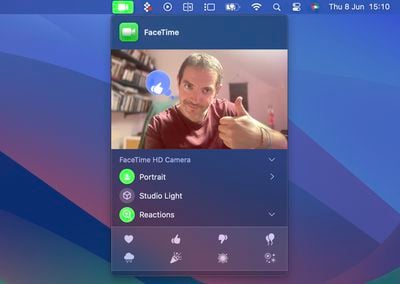
New FaceTime Reactions
There are eight reactions you can perform on a FaceTime video call. They include:
- Love
- Like
- Dislike
- Balloons
- Stormy rain
- Confetti
- Laser beams
- Fireworks
Gestures to Trigger Reactions
And here are the physical gestures that you can perform to trigger the effects:
- Heart - Heart emoji
- Thumbs up - Thumbs up emoji
- Two thumbs up - Fireworks
- Single thumbs down - Thumbs down emoji
- Two thumbs down - Cloud
- Peace sign with one hand - Balloons
- Peace sign with two hands - Confetti
- "Rock on" sign with two hands - Laser
These reactions work by default in FaceTime, and third-party videoconferencing apps can adopt the effects as well if they use the correct developer APIs.




















